4. Hydrological modelling - HYDROTEL
WARNING
xHydro provides tools to execute HYDROTEL, but will not prepare the model itself. This should be done beforehand.
INFO
The HYDROTEL executable can be acquired from this GitHub repository.
xHydro provides a collection of functions designed to facilitate hydrological modelling, focusing on two key models: HYDROTEL and a suite of models emulated by the Raven Hydrological Framework. It is important to note that Raven already possesses an extensive Python library, RavenPy, which enables users to build, calibrate, and execute models.
xHydro wraps some of these functions to support multi-model assessments with HYDROTEL, though users seeking advanced functionalities may prefer to use RavenPy directly.
The primary contribution of xHydro to hydrological modelling is thus its support for HYDROTEL, a model that previously lacked a dedicated Python library. However, building a HYDROTEL project is best done using PHYSITEL and the HYDROTEL GUI, both of which are proprietary software. Therefore, for the time being, xHydro is designed to facilitate the execution and modification of an already established HYDROTEL project, rather than assist in building one from scratch.
A similar Notebook to this one, but that covers RavenPy models, is available here.
4.1. Basic information
[1]:
from IPython.display import clear_output
import xhydro as xh
import xhydro.modelling as xhm
clear_output(wait=False)
The xHydro modelling framework is based on a model_config dictionary, which is meant to contain all necessary information to execute a given hydrological model. For example, depending on the model, it can store meteorological datasets directly, paths to datasets (netCDF files or other), csv configuration files, parameters, and basically anything that is required to configure and execute an hydrological model.
The list of required inputs for the dictionary can be obtained one of two ways. The first is to look at the hydrological model’s class, such as xhydro.modelling.Hydrotel. The second is to use the xh.modelling.get_hydrological_model_inputs function to get a list of the required keys for a given model, as well as the documentation.
[3]:
Help on function get_hydrological_model_inputs in module xhydro.modelling.hydrological_modelling:

get_hydrological_model_inputs(model_name: str, required_only: bool = False) -> tuple[dict, str]
    Get the required inputs for a given hydrological model.

    Parameters
    ----------
    model_name : str
        The name of the hydrological model to use.
        Currently supported models are ["HYDROTEL", "Blended", "GR4JCN", "HBVEC", "HMETS", "HYPR", "Mohyse", "SACSMA"].
    required_only : bool
        If True, only the required inputs will be returned.

    Returns
    -------
    dict
        A dictionary containing the required configuration for the hydrological model.
    str
        The documentation for the hydrological model.
[4]:
# This function can be called to get a list of the keys for a given model, as well as its documentation.
inputs, docs = xhm.get_hydrological_model_inputs("Hydrotel", required_only=False)
inputs
[4]:
{'model_name': 'HYDROTEL',
 'project_dir': str | os.PathLike,
 'project_file': str,
 'executable': str | os.PathLike,
 'project_config': dict | None,
 'simulation_config': dict | None,
 'output_config': dict | None}
[5]:
print(docs)
Class to handle HYDROTEL simulations.

Parameters
----------
project_dir : str or Path
    Path to the project folder.
project_file : str
    Name of the project file (e.g. 'projet.csv').
executable : str or Path
    Command to execute HYDROTEL.
    On Windows, this should be the path to hydrotel.exe.
project_config : dict, optional
    Dictionary of configuration options to overwrite in the project file.
simulation_config : dict, optional
    Dictionary of configuration options to overwrite in the simulation file. See the Notes section for more details.
output_config : dict, optional
    Dictionary of configuration options to overwrite in the output file (output.csv).

Notes
-----
The name of the simulation file must match the name of the 'SIMULATION COURANTE' option in the project file.

This class is designed to handle the execution of HYDROTEL simulations, with the ability to overwrite configuration options,
but it does not handle the creation of the project folder itself. The project folder must be created beforehand.

For more information on how to configure the project, refer to the documentation of HYDROTEL:
https://github.com/INRS-Modelisation-hydrologique/hydrotel
HYDROTEL and Raven vary in terms of required inputs and available functions, but an effort will be made to standardize the outputs as much as possible. Currently, all models include the following three functions:
.run(): Executes the model, reformats the outputs to be compatible with analysis tools inxHydro, and returns the simulated streamflow as axarray.Dataset.The streamflow variable will be named
qand will have units ofm3 s-1.For 1D data (such as hydrometric stations), the corresponding dimension in the dataset will be identified by the
cf_role: timeseries_idattribute.
.get_inputs(): Retrieves the meteorological inputs used by the model..get_outputs(): Retrieves the simulated outputs from the model.Use
.get_outputs("q")to obtain the simulated streamflow as axarray.Dataset.
.standardize_outputs(): Standardizes the outputs to ensure consistency across different models, facilitating comparison and analysis. This function is used by default in the.run()method, but can also be called separately if needed.
4.2. Initializing and running a calibrated model
A typical HYDROTEL project consists of multiple subfolders and files that describe meteorological inputs, watershed characteristics, and more. An example is given in the cell below. The model primarily relies on three key files:
A project file located in the main directory, which may have any given name (e.g.,
SLNO.csv). It contains basic information about the project, including the name of the current simulation (SIMULATION COURANTE).A
simulation/[simulation_name]/[simulation_name].csvfile that manages all the parameters for the run, including simulation dates, the path to meteorological data, and the physical processes to be used.A
simulation/[simulation_name]/output.csvfile that specifies which results to produce, such as which variables and river reaches to output results for.
Default files are not provided with xHydro, but you can find an example of a HYDROTEL project in the DemoProject folder of the (HYDROTEL repository)[https://github.com/INRS-Modelisation-hydrologique/hydrotel]. Configuration options for project_config, simulation_config, or output_config can nonetheless be specified when initializing the HYDROTEL model, or through the .update_config() function later. This will update the corresponding CSV files accordingly.
[6]:
# For this example, we will use the DemoProject prepared for the HYDROTEL model.
import os
from dotenv import load_dotenv
from pathlib import Path
import tempfile
notebook_folder = Path(tempfile.TemporaryDirectory().name)

load_dotenv(dotenv_path=Path.cwd().parents[1] / "tests" / ".env")
hydrotel_demo = os.getenv("HYDROTEL_DEMO", None)
hydrotel_executable = os.getenv("HYDROTEL_EXECUTABLE", None)

# Copy the demo project to a temporary folder, so that we can run the model without modifying the original files.
import shutil
shutil.copytree(hydrotel_demo, notebook_folder / "hydrotel_demo")
# Remove the input and output files
for f in (notebook_folder / "hydrotel_demo" / "meteo").glob("*"):
    f.unlink()
for f in (notebook_folder / "hydrotel_demo" / "simulation" / "simulation" / "resultat").glob("*"):
    f.unlink()
[7]:
from pathlib import Path

def print_file_structure(directory, indent=0):
    path = Path(directory)
    for item in path.iterdir():
        print(" " * indent + item.name)
        # If the item is a directory, recurse into it
        if item.is_dir():
            print_file_structure(item, indent + 2)


# Example usage
print_file_structure(notebook_folder / "hydrotel_demo")
DELISLE.csv
meteo
physitel
  proprietehydrolique.sol
  uhrh.prj
  rivieres.dbf
  noeuds.nds
  point.rdx
  uhrh.csv
  lacs.shx
  rivieres.shp
  pente.tif
  type_sol.cla
  troncon.trl
  occupation_sol.tif
  uhrh.shx
  lacs.prj
  uhrh.dbf
  occupation_sol.cla
  rivieres.prj
  uhrh.shp
  uhrh.tif
  rivieres.shx
  orientation.tif
  lacs.shp
  occupation_sol.csv
  lacs.dbf
  altitude.tif
  type_sol.tif
simulation
  simulation
    thorsen.csv
    bv3c.csv
    degre_jour_modifie.csv
    thornthwaite.csv
    degre-jour-glacier.csv
    milieux_humides_isoles.csv
    rankinen.csv
    cequeau.csv
    etp-mc-guiness.csv
    stats.txt
    hydro_quebec.csv
    degre-jour-bande.csv
    penman.csv
    rayonnement_net.csv
    corrections.csv
    grillemeteo.csv
    penman_monteith.csv
    linacre.csv
    simulation.gsb
    simulation.csv
    moyenne_3_stations.csv
    output.csv
    troncons_stations.csv
    submodels-versions.txt
    milieux_humides_riverains.csv
    thiessen.csv
    grilleprevision.csv
    onde_cinematique.csv
    onde_cinematique_modifiee.csv
    priestlay_taylor.csv
    resultat
  simulation-global
    corrections.csv
    simulation-global.gsb
    troncons_stations.csv
    parametres_sous_modeles.csv
    milieux_humides_riverains.csv
    stats.txt
    submodels-versions.txt
    output.csv
    simulation-global.csv
    milieux_humides_isoles.csv
neige
  station.stn
  NEIGE01.nei
  NEIGE02.nei
  NEIGE03.nei
  station.p3s
etats
  ruisselement_surface_surf_2020010100.csv
  bilan_vertical_2020070100.csv
  acheminement_riviere_MH_2020010100.csv
  ruisselement_surface_2020010100.csv
  fonte_neige_2020070100.csv
  ruisselement_surface_hypo_2020070100.csv
  ruisselement_surface_base_2020010100.csv
  acheminement_riviere_2020010100.csv
  ruisselement_surface_2020070100.csv
  fonte_neige_2020010100.csv
  ruisselement_surface_hypo_2020010100.csv
  acheminement_riviere_2020070100.csv
  ruisselement_surface_base_2020070100.csv
  bilan_vertical_2020010100.csv
  ruisselement_surface_surf_2020070100.csv
  acheminement_riviere_MH_2020070100.csv
hydro
  02MC036.hyd
  station.sth
hgm
  hydrogramme.hgm
physio
  shreve.csv
  troncon_width_depth.csv
  wet_pixel_info.csv
  pro_rac.def
  ind_fol.def
  strahler.csv
[8]:
model_config = {
    "model_name": "Hydrotel",
    "project_dir": notebook_folder / "hydrotel_demo",
    "project_file": "DELISLE.csv",
    "simulation_config": {
        "DATE DEBUT": "1981-01-01",
        "DATE FIN": "1981-12-31",
        "FICHIER STATIONS METEO": "meteo/ERA5.nc",
        "PAS DE TEMPS": 24,
    },
    "output_config": {"TRONCONS": "tous", "DEBITS_AVAL": 1, "OUTPUT_NETCDF": 1},
    "executable": hydrotel_executable,
}
With model_config on hand, an instance of the hydrological model can be initialized using xhydro.modelling.hydrological_model or the xhydro.modelling.Hydrotel class directly.
[9]:
hm = xhm.hydrological_model(model_config)

print(f"Simulation directory, taken from the project file: '{hm.simulation_dir}'\n")
print(f"Project configuration: '{hm.project_config}'\n")
print(f"Simulation configuration: '{hm.simulation_config}'\n")
print(f"Output configuration: '{hm.output_config}'")
Simulation directory, taken from the project file: '/tmp/tmpww7qb255/hydrotel_demo/simulation/simulation'

Project configuration: '{'PROJET HYDROTEL VERSION': '4.3.1.0000', 'FICHIER ALTITUDE': 'physitel/altitude.tif', 'FICHIER PENTE': 'physitel/pente.tif', 'FICHIER ORIENTATION': 'physitel/orientation.tif', 'FICHIER ZONE': 'physitel/uhrh.tif', 'FICHIER NOEUD': 'physitel/noeuds.nds', 'FICHIER TRONCON': 'physitel/troncon.trl', 'FICHIER PIXELS': 'physitel/point.rdx', 'FICHIER MILIEUX HUMIDES PROFONDEUR TRONCONS': 'physio/troncon_width_depth.csv', 'SIMULATION COURANTE': 'simulation'}'

Simulation configuration: '{'SIMULATION HYDROTEL VERSION': '4.3.1.0000', 'FICHIER OCCUPATION SOL': 'physitel/occupation_sol.cla', 'FICHIER PROPRIETE HYDROLIQUE': 'physitel/proprietehydrolique.sol', 'FICHIER TYPE SOL COUCHE1': 'physitel/type_sol.cla', 'FICHIER TYPE SOL COUCHE2': 'physitel/type_sol.cla', 'FICHIER TYPE SOL COUCHE3': 'physitel/type_sol.cla', 'COEFFICIENT ADDITIF PROPRIETE HYDROLIQUE': '0', 'FICHIER INDICE FOLIERE': 'physio/ind_fol.def', 'FICHIER PROFONDEUR RACINAIRE': 'physio/pro_rac.def', 'FICHIER GRILLE METEO': '', 'FICHIER STATIONS METEO': 'meteo/ERA5.nc', 'FICHIER STATIONS HYDRO': 'hydro/station.sth', 'PREVISION METEO': '0', 'FICHIER GRILLE PREVISION': '', 'DATE DEBUT PREVISION': '1973-06-01 00:00', 'DATE DEBUT': '1981-01-01 00:00', 'DATE FIN': '1981-12-31 00:00', 'PAS DE TEMPS': 24, 'TRONCON EXUTOIRE': '1', 'TRONCONS DECONNECTER': 'off', 'NOM FICHIER CORRECTIONS': '1', 'LECTURE ETAT FONTE NEIGE': 'etats/fonte_neige_2020010100.csv', 'LECTURE ETAT TEMPERATURE DU SOL': '', 'LECTURE ETAT BILAN VERTICAL': 'etats/bilan_vertical_2020010100.csv', 'LECTURE ETAT RUISSELEMENT SURFACE': 'etats/ruisselement_surface_2020010100.csv', 'LECTURE ETAT ACHEMINEMENT RIVIERE': 'etats/acheminement_riviere_2020010100.csv', 'ECRITURE ETAT FONTE NEIGE': '2020-07-01 00:00', 'ECRITURE ETAT TEMPERATURE DU SOL': '', 'ECRITURE ETAT BILAN VERTICAL': '2020-07-01 00:00', 'ECRITURE ETAT RUISSELEMENT SURFACE': '2020-07-01 00:00', 'ECRITURE ETAT ACHEMINEMENT RIVIERE': '2020-07-01 00:00', 'REPERTOIRE ECRITURE ETAT FONTE NEIGE': 'etats', 'REPERTOIRE ECRITURE ETAT TEMPERATURE DU SOL': '', 'REPERTOIRE ECRITURE ETAT BILAN VERTICAL': 'etats', 'REPERTOIRE ECRITURE ETAT RUISSELEMENT SURFACE': 'etats', 'REPERTOIRE ECRITURE ETAT ACHEMINEMENT RIVIERE': 'etats', 'INTERPOLATION DONNEES': 'THIESSEN', 'FONTE DE NEIGE': 'DEGRE JOUR MODIFIE', 'FONTE GLACIER': '', 'TEMPERATURE DU SOL': '', 'EVAPOTRANSPIRATION': 'HYDRO-QUEBEC', 'BILAN VERTICAL': 'BV3C', 'RUISSELEMENT': 'ONDE CINEMATIQUE', 'ACHEMINEMENT RIVIERE': 'ONDE CINEMATIQUE MODIFIEE', 'MILIEUX HUMIDES ISOLES': '1', 'MILIEUX HUMIDES RIVERAINS': '1', 'FICHIER DE PARAMETRE GLOBAL': '0', 'LECTURE INTERPOLATION DONNEES': 'lecture_interpolation.csv', 'THIESSEN': 'thiessen.csv', 'MOYENNE 3 STATIONS': 'moyenne_3_stations.csv', 'LECTURE FONTE NEIGE': 'lecture_fonte_neige.csv', 'DEGRE JOUR MODIFIE': 'degre_jour_modifie.csv', 'LECTURE TEMPERATURE DU SOL': 'lecture_tempsol.csv', 'RANKINEN': 'rankinen.csv', 'THORSEN': 'thorsen.csv', 'LECTURE EVAPOTRANSPIRATION': 'lecture_etp.csv', 'HYDRO-QUEBEC': 'hydro_quebec.csv', 'THORNTHWAITE': 'thornthwaite.csv', 'LINACRE': 'linacre.csv', 'PENMAN': 'penman.csv', 'PRIESTLAY-TAYLOR': 'priestlay_taylor.csv', 'PENMAN-MONTEITH': 'penman_monteith.csv', 'LECTURE BILAN VERTICAL': 'lecture_bilan_vertical.csv', 'BV3C': 'bv3c.csv', 'CEQUEAU': 'cequeau.csv', 'LECTURE RUISSELEMENT SURFACE': 'lecture_ruisselement.csv', 'ONDE CINEMATIQUE': 'onde_cinematique.csv', 'LECTURE ACHEMINEMENT RIVIERE': 'lecture_acheminement.csv', 'ONDE CINEMATIQUE MODIFIEE': 'onde_cinematique_modifiee.csv', 'FICHIER MILIEUX HUMIDES ISOLES': 'milieux_humides_isoles.csv', 'FICHIER MILIEUX HUMIDES RIVERAINS': 'milieux_humides_riverains.csv'}'

Output configuration: '{'TRONCONS': 'tous', 'TRONCONS_MOYENNES_PONDEREES': '1', 'TMIN': '1', 'TMAX': '1', 'TMIN_JOUR': '1', 'TMAX_JOUR': '1', 'PLUIE': '1', 'NEIGE': '1', 'APPORT': '1', 'COUVERT_NIVAL': '1', 'HAUTEUR_NEIGE': '1', 'ALBEDO_NEIGE': '1', 'APPORT_GLACIER': '1', 'EAU_GLACIER': '1', 'PROFONDEUR_GEL': '1', 'ETP': '1', 'ETR1': '1', 'ETR2': '1', 'ETR3': '1', 'ETR_TOTAL': '1', 'PRODUCTION_BASE': '1', 'PRODUCTION_HYPO': '1', 'PRODUCTION_SURF': '1', 'Q12': '1', 'Q23': '1', 'Q23_SOMME_ANNUELLE': '1', 'QRECHARGE': '1', 'THETA1': '1', 'THETA2': '1', 'THETA3': '1', 'APPORT_LATERAL': '1', 'APPORT_LATERAL_UHRH': '1', 'ECOULEMENT_SURF': '1', 'ECOULEMENT_HYPO': '1', 'ECOULEMENT_BASE': '1', 'DEBITS_AMONT': '1', 'DEBITS_AVAL': 1, 'DEBITS_AVAL_MOY7J_MIN': '1', 'HAUTEUR_AVAL': '1', 'OUTPUT_NETCDF': 1}'
As we can see, the DemoProject outputs every available variable for all river reaches. This is because the output_config key only overwrites the specified keys, but leaves the rest of the configuration unchanged. Therefore, if we want to only keep the few variables that are relevant for our analysis, we can use the update_config method once the model has been initialized.
[10]:
output = hm.output_config.copy()
output = {k: "0" if str(output[k]) == "1" else output[k] for k in output.keys()}
output["DEBITS_AVAL"] = "1"
output["OUTPUT_NETCDF"] = "1"
hm.update_config(output_config=output)
print(f"Updated output configuration: '{hm.output_config}'")
Updated output configuration: '{'TRONCONS': 'tous', 'TRONCONS_MOYENNES_PONDEREES': '0', 'TMIN': '0', 'TMAX': '0', 'TMIN_JOUR': '0', 'TMAX_JOUR': '0', 'PLUIE': '0', 'NEIGE': '0', 'APPORT': '0', 'COUVERT_NIVAL': '0', 'HAUTEUR_NEIGE': '0', 'ALBEDO_NEIGE': '0', 'APPORT_GLACIER': '0', 'EAU_GLACIER': '0', 'PROFONDEUR_GEL': '0', 'ETP': '0', 'ETR1': '0', 'ETR2': '0', 'ETR3': '0', 'ETR_TOTAL': '0', 'PRODUCTION_BASE': '0', 'PRODUCTION_HYPO': '0', 'PRODUCTION_SURF': '0', 'Q12': '0', 'Q23': '0', 'Q23_SOMME_ANNUELLE': '0', 'QRECHARGE': '0', 'THETA1': '0', 'THETA2': '0', 'THETA3': '0', 'APPORT_LATERAL': '0', 'APPORT_LATERAL_UHRH': '0', 'ECOULEMENT_SURF': '0', 'ECOULEMENT_HYPO': '0', 'ECOULEMENT_BASE': '0', 'DEBITS_AMONT': '0', 'DEBITS_AVAL': '1', 'DEBITS_AVAL_MOY7J_MIN': '0', 'HAUTEUR_AVAL': '0', 'OUTPUT_NETCDF': '1'}'
4.2.1. Formatting meteorological data
The acquisition of raw meteorological data is covered in the GIS notebook and Use Case Example notebooks. Therefore, this notebook will use a test dataset.
[11]:
import xarray as xr

from xhydro.testing.helpers import (  # In-house function to get data from the xhydro-testdata repo
    deveraux,
)

D = deveraux()

meteo_file = D.fetch("hydro_modelling/ERA5_testdata.nc")
ds = xr.open_dataset(meteo_file)
ds
[11]:
<xarray.Dataset> Size: 69kB
Dimensions:      (time: 366, lat: 3, lon: 5)
Coordinates:
  * time         (time) datetime64[ns] 3kB 1981-01-01 1981-01-02 ... 1982-01-01
  * lat          (lat) float64 24B 48.5 48.75 49.0
  * lon          (lon) float64 40B -65.5 -65.25 -65.0 -64.75 -64.5
    z            (lat, lon) float32 60B ...
    spatial_agg  <U7 28B ...
    timestep     <U1 4B ...
    HYBAS_ID     int64 8B ...
    source       <U29 116B ...
Data variables:
    tasmax       (time, lat, lon) float32 22kB ...
    tasmin       (time, lat, lon) float32 22kB ...
    pr           (time, lat, lon) float32 22kB ...
Attributes: (12/30)
    GRIB_NV:                                  0
    GRIB_Nx:                                  1440
    GRIB_Ny:                                  721
    GRIB_cfName:                              unknown
    GRIB_cfVarName:                           t2m
    GRIB_dataType:                            an
    ...                                       ...
    GRIB_totalNumber:                         0
    GRIB_typeOfLevel:                         surface
    GRIB_units:                               K
    long_name:                                2 metre temperature
    standard_name:                            unknown
units: KEvery hydrological model has different requirements when it comes to their input data. In this example, the data variables have units (temperatures in °K and precipitation in m) and time units that would not be compatible with the requirements for the HYDROTEL model. Additionally, while HYDROTEL can manage 2D grids, it is almost always preferable to instead provide a 1D spatial dimension to shorten some initialization manipulations done by the model.
The function xh.modelling.format_input can be used to reformat CF-compliant datasets for use in hydrological models.
[12]:
Help on function format_input in module xhydro.modelling.hydrological_modelling:

format_input(
    ds: xr.Dataset,
    model: str,
    convert_calendar_missing: float | str | dict | bool = nan,
    save_as: str | PathLike | None = None,
    **kwargs
) -> tuple[xr.Dataset, dict]
    Reformat CF-compliant meteorological data for use in hydrological models. See the "Notes" section for important details.

    Parameters
    ----------
    ds : xr.Dataset
        A dataset containing the meteorological data. See the "Notes" section for more information on the expected format.
    model : str
        The name of the hydrological model to use.
        Currently supported models are:
        - "HYDROTEL", "Raven" (which is an alias for all RavenPy models), "Blended", "GR4JCN", "HBVEC", "HMETS", "HYPR", "Mohyse", "SACSMA".
    convert_calendar_missing : float | str | dict | bool, optional
        The value to use for missing values when converting the calendar to "standard".
        If the value is a float, it will be used as the fill value for all variables.
        If the value is a string "interpolate", the new dates will be linearly interpolated over time.
        A dictionary can be used to specify a different fill value for each variable.
        Keys should be the names of the variables as they appear in the first entry in the "variable_name" lists of the "Notes" section.
        If True, temperatures will be interpolated and precipitation will be filled with 0.
        If False, the calendar will not be converted. Only possible for "Raven" models.
    save_as : str, optional
        Where to save the reformatted data. If None, the data will not be saved.
        This can be useful when multiple files are needed for a single model run (e.g. HYDROTEL needs a configuration file).
    \*\*kwargs : dict
        Additional keyword arguments to pass to the save function.

    Returns
    -------
    xr.Dataset
        The reformatted dataset.
    dict
        For HYDROTEL, a dictionary containing the configuration for the meteorological data.
        If `save_as` is provided, the configuration will have been saved to a file with the same name as `save_as`, but with a ".nc.config" extension.
        For Raven, a dictionary containing the 'data_type' and 'alt_names_meteo' keys required for the 'model_config' argument.

    Notes
    -----
    The input dataset should ideally be CF-compliant and follow CMIP6's Controlled Vocabulary, but this function will attempt to detect the
    variables based on the standard_name attribute, the cell_methods attribute, or the variable name.
    More information on those attributes can be found here: https://wcrp-cmip.org/cmip-model-and-experiment-documentation/, and specifically
    the 'CMIP6 MIP table' link provided in the 'Search for variables' section.

    Specifically:

    - If using 1D time series, the station dimension should have an attribute `cf_role` set to "timeseries_id".
    - Units don't need to be canonical, but they should be convertible to the expected units and be understood by `xclim`.
    - Elevation represents the altitude of the meteorological data / model grid cell, not the altitude of the ground.
    - Snowfall units should be in water equivalent of precipitation (e.g. mm/day or kg/m²/s), NOT height (e.g. cm of fresh snow on the ground).
    - The function will try to detect the variables based on the attributes and the variable name. The following attempts will be made:
        - Longitude:
            - standard_name: "longitude"
            - variable name: "longitude", "lon"
        - Latitude:
            - standard_name: "latitude"
            - variable name: "latitude", "lat"
        - Elevation:
            - standard_name: "surface_altitude"
            - variable name: "elevation", "orog", "z", "altitude", "height"
        - Precipitation:
            - standard_name: "*precipitation*" (e.g. "lwe_thickness_of_precipitation_amount")
            - variable name: "pr", "precip", "precipitation"
        - Rainfall:
            - standard_name: "*rainfall*" (e.g. "rainfall_flux", "rainfall_amount")
            - variable name: "prra", "prlp", "rainfall", "rain", "precipitation_rain"
        - Snowfall:
            - standard_name: "*snowfall*" (e.g. "snowfall_flux", "snowfall_amount")
            - variable name: "prsn", "snowfall", "precipitation_snow"
        - Maximum temperature:
            - standard_name: "air_temperature"
            - cell_methods: "time: maximum"
            - variable name: "tasmax", "tmax", "t2m_max", "temperature_max"
        - Minimum temperature:
            - standard_name: "air_temperature"
            - cell_methods: "time: minimum"
            - variable name: "tasmin", "tmin", "t2m_min", "temperature_min"
        - Mean temperature:
            - standard_name: "air_temperature"
            - cell_methods: "time: mean"
            - variable name: "tas", "tmean", "t2m", "temperature_mean"

    HYDROTEL requires the following variables: ["longitude", "latitude", "elevation", "time", "tasmax", "tasmin", "pr"].
    Raven requires the following variables: ["longitude", "latitude", "elevation", "time", "tasmax/tasmin" or "tas", "pr" or "prlp/prsn"].
[13]:
# You can also use the 'save_as' argument to save the new file(s) in your project folder.
ds_reformatted, config = xh.modelling.format_input(
    ds,
    "Hydrotel",
    save_as=notebook_folder / "hydrotel_demo" / "meteo" / "ERA5.nc",
)
/exec/rondeau/.conda/envs/xhydro-20260609/lib/python3.14/site-packages/clisops/utils/dataset_utils.py:1772: UserWarning: For coordinate variable 'longitude' no bounds can be identified.
HYDROTEL requires a configuration file to accompany the meteorological file. This configuration file must have the same name as the corresponding NetCDF file, but with a .nc.config extension. If the save_as option is used, this configuration file will also be saved along with the meteorological data.
Note that a third file, with a .pth extension, may also be provided. This file is used to specify the weight to apply to each station in the meteorological data in relation to each computational unit (RHHU, or “Relatively Homogeneous Hydrological Unit”). This file is optional, and if it is not provided, the model will compute it automatically during initialization. xHydro does not currently provide a function to create this file, but this might be added in the future.
[14]:
ds_reformatted
[14]:
<xarray.Dataset> Size: 38kB
Dimensions:      (time: 366, station_id: 8)
Coordinates:
  * time         (time) int64 3kB 5785920 5787360 5788800 ... 6310080 6311520
  * station_id   (station_id) int64 64B 0 1 2 3 4 5 6 7
    elevation    (station_id) float32 32B 100.0 100.0 100.0 ... 100.0 100.0
    latitude     (station_id) float64 64B 48.5 48.5 48.75 ... 48.75 48.75 49.0
    longitude    (station_id) float64 64B -65.25 -65.0 -65.5 ... -64.5 -65.5
    spatial_agg  <U7 28B 'polygon'
    timestep     <U1 4B 'D'
    HYBAS_ID     int64 8B 7120035110
    source       <U29 116B 'era5_reanalysis_single_levels'
Data variables:
    tasmax       (time, station_id) float32 12kB -9.085 -8.085 ... -2.062 -4.993
    tasmin       (time, station_id) float32 12kB -15.94 -14.57 ... -13.86 -18.4
    pr           (time, station_id) float32 12kB 0.1025 0.1063 ... 0.5474 0.9813
Attributes: (12/30)
    GRIB_NV:                                  0
    GRIB_Nx:                                  1440
    GRIB_Ny:                                  721
    GRIB_cfName:                              unknown
    GRIB_cfVarName:                           t2m
    GRIB_dataType:                            an
    ...                                       ...
    GRIB_totalNumber:                         0
    GRIB_typeOfLevel:                         surface
    GRIB_units:                               K
    long_name:                                2 metre temperature
    standard_name:                            unknown
units: K[15]:
config
[15]:
{'TYPE (STATION/GRID/GRID_EXTENT)': 'STATION',
 'STATION_DIM_NAME': 'station_id',
 'LATITUDE_NAME': 'latitude',
 'LONGITUDE_NAME': 'longitude',
 'ELEVATION_NAME': 'elevation',
 'TIME_NAME': 'time',
 'TMIN_NAME': 'tasmin',
 'TMAX_NAME': 'tasmax',
 'PRECIP_NAME': 'pr'}
4.2.2. Validating the Meteorological Data
Users may want to conduct more advanced health checks on the meteorological inputs before executing hydrological models (e.g., identifying unrealistic values). This can be done using xhydro.utils.health_checks. For the full list of available checks, refer to the ‘xscen’ documentation.
We can use .get_inputs() to automatically retrieve the meteorological data. In this example, we’ll ensure there are no abnormal meteorological values or sequences of values.
[16]:
health_checks = {
    "raise_on": [],  # If an entry is not here, it will warn the user instead of raising an exception.
    "flags": {
        "pr": {  # You can have specific flags per variable.
            "negative_accumulation_values": {},
            "very_large_precipitation_events": {},
            "outside_n_standard_deviations_of_climatology": {"n": 5},
            "values_repeating_for_n_or_more_days": {"n": 5},
        },
        "tasmax": {
            "tasmax_below_tasmin": {},
            "temperature_extremely_low": {},
            "temperature_extremely_high": {},
            "outside_n_standard_deviations_of_climatology": {"n": 5},
            "values_repeating_for_n_or_more_days": {"n": 5},
        },
        "tasmin": {
            "temperature_extremely_low": {},
            "temperature_extremely_high": {},
            "outside_n_standard_deviations_of_climatology": {"n": 5},
            "values_repeating_for_n_or_more_days": {"n": 5},
        },
    },
}
[17]:
from xclim.core.units import amount2rate

ds_in = hm.get_inputs()
ds_in["pr"] = amount2rate(ds_in["pr"])  # Precipitation in xclim needs to be a flux.

xh.utils.health_checks(ds_in, **health_checks)
/exec/rondeau/.conda/envs/xhydro-20260609/lib/python3.14/site-packages/xscen/diagnostics.py:294: UserWarning: The following health checks failed:
  - 'pr' has suspicious values according to the following flags: ['outside_5_standard_deviations_of_climatology', 'values_repeating_for_5_or_more_days'].
4.2.3. Executing the model
The configuration files will be updated before executing the model itself, but since HYDROTEL itself will perform a series of checkups, they are kept at a minimum in xHydro.
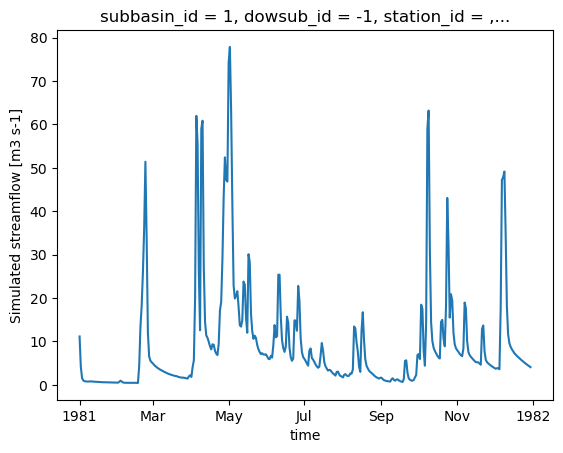
Once the model is executed, xHydro will automatically reformat the NetCDF file to bring it closer to CF conventions, ensuring compatibility with other xHydro modules. Note that, at this time, only the streamflow variable is reformatted. However, dimensions and coordinates will be standardized across all files.
[18]:
# HYDROTEL has a few specific options
help(hm.run)
Help on method run in module xhydro.modelling._hydrotel:

run(
    *,
    run_options: list[str] | None = None,
    dry_run: bool = False,
    overwrite: bool = False,
    standardize: bool = True,
    return_streamflow: bool = True
) -> str | xr.Dataset method of xhydro.modelling._hydrotel.Hydrotel instance
    Run the simulation.

    Parameters
    ----------
    run_options : list[str] | None
        Additional options to pass to the HYDROTEL executable.
        Common arguments include:
        - `-t NUM`: Run the simulation using a given number of threads (default is 1).
        - `-c`: Skip the validation of the input files.
        - `-s`: Skip the interpolation of missing values in the input files. Only use this if you are sure that the input files are complete.
        Call the executable without arguments to see the full list of available options.
    dry_run : bool
        If True, returns the command to run the simulation without actually running it.
    overwrite : bool
        If True, overwrite the output files if they already exist. Default is False.
    standardize : bool
        If True, standardize the output files to ensure they are in a consistent format. Default is True.
    return_streamflow : bool
        If True, return the simulated streamflow. Default is True.

    Returns
    -------
    str
        The command to run the simulation, if 'dry_run' is True.
    xr.Dataset
        The streamflow file, if 'dry_run' is False.
[19]:
ds_out = hm.run()
clear_output(wait=False)
[20]:
ds_out
[20]:
<xarray.Dataset> Size: 303kB
Dimensions:        (time: 364, subbasin_id: 196)
Coordinates:
  * time           (time) datetime64[ns] 3kB 1981-01-01 ... 1981-12-30
  * subbasin_id    (subbasin_id) <U3 2kB '1' '2' '3' '4' ... '194' '195' '196'
    dowsub_id      (subbasin_id) <U3 2kB ...
    station_id     (subbasin_id) <U7 5kB ...
    lon            (subbasin_id) float64 2kB ...
    lat            (subbasin_id) float64 2kB ...
    drainage_area  (subbasin_id) float64 2kB ...
Data variables:
    q              (time, subbasin_id) float32 285kB ...
Attributes:
    description:              Variable de sortie simulation Hydrotel
    creation_time:            17-06-2026 14:02:20
    HYDROTEL_version:         4.3.6.0000
HYDROTEL_config_version: 4.3.1.0000[21]:
ds_out["q"].isel(subbasin_id=0).plot()
[21]:
[<matplotlib.lines.Line2D at 0x7f70e6dd5d30>]
4.3. Retrieving additional outputs
The output_config allows users to specify which variables to output. It is thus easy to retrieve additional variables by simply updating the configuration and re-running the model.
[22]:
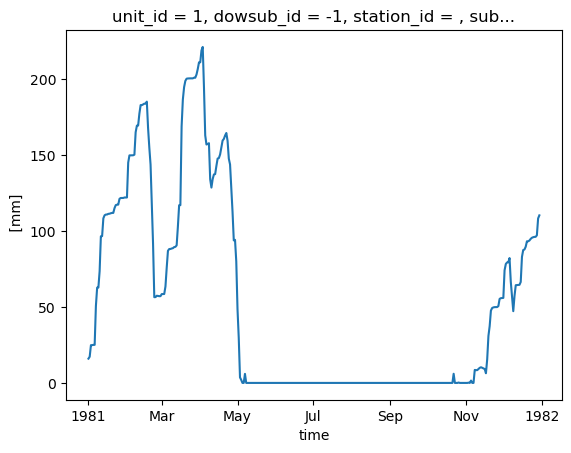
# "Couvert nival" is the snow water equivalent
hm.update_config(output_config={"COUVERT_NIVAL": "1"})
hm.run(overwrite=True, return_streamflow=False)
clear_output(wait=False)
The .get_outputs() function can be used to retrieve any of these variables as a xarray.Dataset.
[23]:
help(hm.get_outputs)
Help on method get_outputs in module xhydro.modelling._hydrotel:

get_outputs(output: str, return_paths: bool = False, **kwargs) -> xr.Dataset | Path | list[Path] method of xhydro.modelling._hydrotel.Hydrotel instance
    Get the outputs of the simulation.

    Parameters
    ----------
    output : str
        "path" to return the output directory.
        Otherwise, the name of the output to retrieve, or "q" for the streamflow.
        This should match the name of the output file without the extension (e.g. "neige" for "neige.nc").
        Wildcards can be used.
    return_paths : bool
        If True, return the path to the output file(s) instead of the dataset. Default is False.
    \*\*kwargs : dict
        Keyword arguments to pass to :py:func:`xarray.open_dataset`.

    Returns
    -------
    xr.Dataset
        The requested output variable.
    Path
        The path to the output directory if output is set to "path".
    list[Path]
        The path to the output file(s) if return_path is True.
[24]:
files = hm.get_outputs("*", return_paths=True)
files
[24]:
[PosixPath('/tmp/tmpww7qb255/hydrotel_demo/simulation/simulation/resultat/couvert_nival.nc'),
 PosixPath('/tmp/tmpww7qb255/hydrotel_demo/simulation/simulation/resultat/debit_aval.nc')]
[25]:
snow = hm.get_outputs("couvert_nival")
snow
[25]:
<xarray.Dataset> Size: 791kB
Dimensions:                  (time: 364, unit_id: 495)
Coordinates: (12/14)
  * time                     (time) datetime64[ns] 3kB 1981-01-01 ... 1981-12-30
  * unit_id                  (unit_id) <U3 6kB '1' '2' '3' ... '493' '494' '495'
    dowsub_id                (unit_id) <U3 6kB dask.array<chunksize=(495,), meta=np.ndarray>
    station_id               (unit_id) <U7 14kB dask.array<chunksize=(495,), meta=np.ndarray>
    subbasin_id              (unit_id) <U3 6kB dask.array<chunksize=(495,), meta=np.ndarray>
    lon                      (unit_id) float64 4kB dask.array<chunksize=(495,), meta=np.ndarray>
    ...                       ...
    unit_centroid_latitude   (unit_id) float64 4kB dask.array<chunksize=(495,), meta=np.ndarray>
    drainage_area            (unit_id) float64 4kB dask.array<chunksize=(495,), meta=np.ndarray>
    subbasin_drainage_area   (unit_id) float64 4kB dask.array<chunksize=(495,), meta=np.ndarray>
    unit_drainage_area       (unit_id) float64 4kB dask.array<chunksize=(495,), meta=np.ndarray>
    subbasin_elevation       (unit_id) float64 4kB dask.array<chunksize=(495,), meta=np.ndarray>
    unit_elevation           (unit_id) float64 4kB dask.array<chunksize=(495,), meta=np.ndarray>
Data variables:
    couvert_nival            (time, unit_id) float32 721kB dask.array<chunksize=(364, 495), meta=np.ndarray>
Attributes:
    description:              Variable de sortie simulation Hydrotel
    creation_time:            17-06-2026 14:02:26
    HYDROTEL_version:         4.3.6.0000
HYDROTEL_config_version: 4.3.1.0000[26]:
snow["couvert_nival"].isel(unit_id=0).plot()
[26]:
[<matplotlib.lines.Line2D at 0x7f70e6e792b0>]
A few important notes regarding these additional outputs:
There is currently no standardization of the variable names or their units.
In an effort to standardize the outputs across different models, the following aggregation levels have been defined. These are noted in a
aggregation_levelattribute in the variable’s metadata, and can be used to identify the spatial resolution of the output:ComputationalUnit: In HYDROTEL, this corresponds to the Relatively Homogeneous Hydrological Units (RHHUs).Subbasin: Following the Raven convention, this corresponds to the immediate drainage area of a river segment, excluding the upstream drainage area.DrainageArea: This corresponds to the cumulative drainage area of a river segment.
With one exception which is at the subbasin level (APPORT LATERAL), all additional outputs in HYDROTEL are provided at the computational unit level. The aggregate_outputs function has thus been implemented in xHydro to allow the aggregation of outputs in post-processing, if needed. Note that this function relies on multiple watershed properties which are deduced from the model’s files.
[27]:
help(hm.aggregate_outputs)
Help on method aggregate_outputs in module xhydro.modelling._hydrotel:

aggregate_outputs(
    to: Literal['subbasin', 'drainage_area'],
    subset: list[str] | None = None,
    **kwargs
) -> None method of xhydro.modelling._hydrotel.Hydrotel instance
    Aggregate the model outputs to a different spatial unit. See the Notes section for more details.

    Parameters
    ----------
    to : {"subbasin", "drainage_area"}
        The spatial unit to aggregate to.
    subset : list[str] | None
        The list of variables to aggregate. If None, all variables will be processed.
        The strings should match the names produced by the HYDROTEL model.
    \*\*kwargs : dict
        Keyword arguments to pass to :py:func:`xarray.open_dataset`.

    Returns
    -------
    None
        The aggregated outputs will be saved as new NetCDF files in the output directory, with a name pattern
        roughly following what is produced by HYDROTEL (e.g. "variable}_By{aggregation}.nc").
        Aggregation will be 'BySubbasin' or 'ByDrainageArea', depending on the 'to' parameter.

    Notes
    -----
    Unlike Raven, HYDROTEL always produces output files at the RHHU level, which is the finest spatial unit in the model.
    Therefore, unlike its Raven variant, this method does not need a 'by' parameter to specify the spatial unit of the input files.
    Furthermore, this method expects that the 'standardize_outputs' method has been called beforehand to ensure that the output
    files are in a consistent format and contain the necessary spatial information for the aggregation.
[28]:
hm.aggregate_outputs(to="drainage_area")
[29]:
snow_agg = hm.get_outputs("couvert_nival_ByDrainageArea")
snow_agg
[29]:
<xarray.Dataset> Size: 589kB
Dimensions:        (time: 364, subbasin_id: 196)
Coordinates:
  * time           (time) datetime64[ns] 3kB 1981-01-01 ... 1981-12-30
  * subbasin_id    (subbasin_id) <U3 2kB '1' '2' '3' '4' ... '194' '195' '196'
    dowsub_id      (subbasin_id) <U3 2kB dask.array<chunksize=(196,), meta=np.ndarray>
    station_id     (subbasin_id) <U7 5kB dask.array<chunksize=(196,), meta=np.ndarray>
    lon            (subbasin_id) float64 2kB dask.array<chunksize=(196,), meta=np.ndarray>
    lat            (subbasin_id) float64 2kB dask.array<chunksize=(196,), meta=np.ndarray>
    drainage_area  (subbasin_id) float64 2kB dask.array<chunksize=(196,), meta=np.ndarray>
Data variables:
    couvert_nival  (time, subbasin_id) float64 571kB dask.array<chunksize=(364, 196), meta=np.ndarray>
Attributes:
    description:              Variable de sortie simulation Hydrotel
    creation_time:            17-06-2026 14:02:26
    HYDROTEL_version:         4.3.6.0000
HYDROTEL_config_version: 4.3.1.00004.4. Model calibration
WARNING
Only Raven-based models are currently implemented.