2. Hydrological modelling - Raven (lumped)
xHydro provides a collection of functions designed to facilitate hydrological modelling, focusing on two key models: HYDROTEL and a suite of models emulated by the Raven Hydrological Framework. It is important to note that Raven already possesses an extensive Python library, RavenPy, which enables users to build, calibrate, and execute models.
xHydro wraps some of these functions to support multi-model assessments with HYDROTEL, though users seeking advanced functionalities may prefer to use RavenPy directly.
The primary contribution of xHydro to hydrological modelling is thus its support for HYDROTEL, a model that previously lacked a dedicated Python library. This Notebook covers RavenPy models, but a similar notebook for HYDROTEL is available here.
2.1. Basic information
[1]:
from IPython.display import clear_output

import xhydro as xh
import xhydro.modelling as xhm

clear_output(wait=False)
The xHydro modelling framework is based on a model_config dictionary, which is meant to contain all necessary information to execute a given hydrological model. For example, depending on the model, it can store meteorological datasets directly, paths to datasets (netCDF files or other), csv configuration files, parameters, and basically anything that is required to configure and execute an hydrological model.
The list of required inputs for the dictionary can be obtained one of two ways. The first is to look at the hydrological model’s class, such as xhydro.modelling.RavenpyModel. The second is to use the xh.modelling.get_hydrological_model_inputs function to get a list of the required keys for a given model, as well as the documentation.
[3]:
Help on function get_hydrological_model_inputs in module xhydro.modelling.hydrological_modelling:

get_hydrological_model_inputs(model_name: str, required_only: bool = False) -> tuple[dict, str]
    Get the required inputs for a given hydrological model.

    Parameters
    ----------
    model_name : str
        The name of the hydrological model to use.
        Currently supported models are ["HYDROTEL", "Blended", "GR4JCN", "HBVEC", "HMETS", "HYPR", "Mohyse", "SACSMA"].
    required_only : bool
        If True, only the required inputs will be returned.

    Returns
    -------
    dict
        A dictionary containing the required configuration for the hydrological model.
    str
        The documentation for the hydrological model.
[4]:
# This function can be called to get a list of the keys for a given model, as well as its documentation.
inputs, docs = xhm.get_hydrological_model_inputs("GR4JCN", required_only=False)
inputs
[4]:
{'model_name': typing.Literal['Blended', 'GR4JCN', 'HBVEC', 'HMETS', 'HYPR', 'Mohyse', 'SACSMA'] | None,
 'overwrite': bool,
 'workdir': str | os.PathLike | None,
 'executable': str | os.PathLike | None,
 'run_name': str | None,
 'start_date': datetime.datetime | str | None,
 'end_date': datetime.datetime | str | None,
 'parameters': numpy.ndarray | list[float] | None,
 'qobs_file': os.PathLike | str | None,
 'alt_name_flow': str | None,
 'hru': geopandas.geodataframe.GeoDataFrame | dict | os.PathLike | str | None,
 'output_subbasins': typing.Literal['all', 'qobs'] | list[int] | None,
 'minimum_reservoir_area': str | None,
 'meteo_file': os.PathLike | str | None,
 'data_type': list[str] | None,
 'alt_names_meteo': dict | None,
 'meteo_station_properties': dict | None,
 'gridweights': str | os.PathLike | None}
[5]:
print(docs)
Initialize the RavenPy model class.

Parameters
----------
overwrite : bool
    If True, overwrite the existing project files. Default is False.
workdir : str | Path | None
    Path to save the .rv files and model outputs. Default is None, which creates a temporary directory.
executable : str | os.PathLike | None, optional
    Path to the Raven executable, bypassing RavenPy.
    If None (default), the Raven executable from your current Python environment ('raven-hydro') will be used.
run_name : str, optional
    Name of the run, which will be used to name the project files. Defaults to "raven" if not provided.
model_name : {"Blended", "GR4JCN", "HBVEC", "HMETS", "HYPR", "Mohyse", "SACSMA"}, optional
    The name of the RavenPy model to run. Only optional if the project files already exist.
start_date : dt.datetime | str, optional
    The first date of the simulation. Only optional if the project files already exist.
end_date : dt.datetime | str, optional
    The last date of the simulation. Only optional if the project files already exist.
parameters : np.ndarray | list[float], optional
    The model parameters for simulation or calibration. Only optional if the project files already exist.
qobs_file : str | Path, optional
    Path to the file containing the observed streamflow data.
    If there are multiple stations, the file should contain a 'basin_id' variable that identifies the subbasin for each time series.
    If a 'station_id' variable is present, it will be used to identify the station.
alt_name_flow : str, optional
    Name of the streamflow variable in the observed data file. If not provided, it will be assumed to be "q".
hru : gpd.GeoDataFrame | dict | os.PathLike, optional
    A GeoDataFrame, or dictionary containing the HRU properties. Only optional if the project files already exist.
    For distributed models, it should be readable by ravenpy.extractors.BasinMakerExtractor.
    For lumped models, should contain the following variables:
    - area: The watershed drainage area, in km².
    - elevation: The elevation of the watershed, in meters.
    - latitude: The latitude of the watershed centroid.
    - longitude: The longitude of the watershed centroid.
    - HRU_ID: The ID of the HRU (required for gridded data, optional for station data).
    If the meteorological data is gridded, the HRU dataset must also contain a SubId, DowSubId, valid geometry and crs.
    If the input is modified, a new shapefile will be created in the workdir/weights subdirectory.
output_subbasins : {"all", "qobs"} | list[int] | None, optional
    If "all", all subbasins will be outputted. If "qobs", only the subbasins with observed flow will be outputted.
    Leave as None to use the value as defined in the HRU file ('Has_Gauge' column). Only applicable for distributed HBVEC models.
minimum_reservoir_area : str, optional
    Quantified string (e.g. "20 km2") representing the minimum lake area to consider the lake explicitly as a reservoir.
    If not provided, all lakes with the 'HRU_IsLake' column set to 1 in the HRU file will be considered as reservoirs.
    Note that 'reservoirs' in Raven can also refer to natural lakes with weir-like outflows.
    Only applicable for distributed HBVEC models.
meteo_file : str | Path, optional
    Path to the file containing the observed meteorological data. Only optional if the project files already exist.
    The meteorological data can be either station or gridded data. Use the 'xhydro.modelling.format_input' function to ensure the data
    is in the correct format. Unless the input is a single station accompanied by 'meteo_station_properties', the file should contain
    the following coordinates:
    - elevation: The elevation of the station / grid cell, in meters.
    - latitude: The latitude of the station / grid cell centroid.
    - longitude: The longitude of the station / grid cell centroid.
data_type : list[str], optional
    The list of types of data provided to Raven in the meteorological file. Only optional if the project files already exist.
    See https://github.com/CSHS-CWRA/RavenPy/blob/master/src/ravenpy/config/conventions.py for the list of available types.
alt_names_meteo : dict, optional
    A dictionary that allows users to link the names of meteorological variables in their dataset to Raven-compliant names.
    The keys should be the Raven names as listed in the data_type parameter.
meteo_station_properties : dict, optional
    Additional properties of the weather stations providing the meteorological data. Only required if absent from the 'meteo_file'.
    For single stations, the format is {"ALL": {"elevation": elevation, "latitude": latitude, "longitude": longitude}}.
    This has not been tested for multiple stations or gridded data.
gridweights : str | Path | None
    If using gridded meteorological data, path to a text file containing the weights linking the grid cells to the HRUs.
    If None, the weights will be computed using ravenpy.extractors.GridWeightExtractor and saved in a 'weights' subdirectory
    of the project folder, using a "{meteo_file}_vs_{hru_file}_weights.txt" pattern.
\*\*kwargs : dict, optional
    Additional parameters to pass to the RavenPy emulator, to modify the default modules used by a given hydrological model.
    Typical entries include RainSnowFraction, Evaporation, GlobalParameters, etc.
    See https://raven.uwaterloo.ca/Downloads.html for the latest Raven documentation. Currently, model templates are listed in Appendix F.
HYDROTEL and Raven vary in terms of required inputs and available functions, but an effort will be made to standardize the outputs as much as possible. Currently, all models include the following three functions:
.run(): Executes the model, reformats the outputs to be compatible with analysis tools inxHydro, and returns the simulated streamflow as axarray.Dataset.The streamflow variable will be named
qand will have units ofm3 s-1.For 1D data (such as hydrometric stations), the corresponding dimension in the dataset will be identified by the
cf_role: timeseries_idattribute.
.get_inputs(): Retrieves the meteorological inputs used by the model..get_outputs(): Retrieves the simulated outputs from the model.Use
.get_outputs("q")to obtain the simulated streamflow as axarray.Dataset.
.standardize_outputs(): Standardizes the outputs to ensure consistency across different models, facilitating comparison and analysis. This function is used by default in the.run()method, but can also be called separately if needed.
2.2. Initializing and running a calibrated model
Raven requires several .rv* files to control various aspects such as meteorological inputs, watershed characteristics, and more. If the project directory already exists and contains data, xHydro will prepare the model for execution without overwriting existing .rv* files—unless the overwrite argument is explicitly set to True. To force overwriting of these files, you can thus either:
Set
overwrite=Truein themodel_configwhen instantiating the modelUse the
.create_rv(overwrite=True)method on the instantiated model.
This Notebook will focus on lumped RavenPy models. For distributed models, refer to the Raven distributed modelling notebook.
2.2.1. Acquiring HRU Data
Raven relies on Hydrological Response Units (HRUs) for its hydrological simulations. For lumped models, only one HRU can be used at a time.
If using station-based meteorological data, the required HRU attributes are minimal:
area: Watershed drainage area (km²)elevation: Watershed elevation (m)latitude: Latitude of the watershed centroidlongitude: Longitude of the watershed centroid
If using gridded meteorological data, additional attributes are required, but xHydro will use default values for those that are not provided (except for the geometry):
HRU_ID: Unique identifier for the HRU (set to1for lumped models)SubId: Subbasin ID (set to1for lumped models)DowSubId: Downstream Subbasin ID (set to-1for lumped models)A valid geometry and coordinate reference system (
crs)
HRUs can be represented as either a geopandas.GeoDataFrame or a Python dict. To assist with HRU creation, you can use the xhydro.gis.watershed_to_raven_hru function, which will extract the necessary information from functions described in the GIS notebook.
[6]:
Help on function watershed_to_raven_hru in module xhydro.gis:

watershed_to_raven_hru(
    watershed: gpd.GeoDataFrame | tuple | str | os.PathLike,
    *,
    unique_id: str | None = None,
    projected_crs: int | str | None = 'NAD83',
    **kwargs
) -> gpd.GeoDataFrame
    Extract the necessary properties for Raven hydrological models.

    Parameters
    ----------
    watershed : gpd.GeoDataFrame | tuple | str | Path
        The input, which is either:
        - A gpd.GeoDataFrame containing watershed polygons with a defined .crs attribute.
        - The path to such a gpd.GeoDataFrame.
        - Coordinates (longitude, latitude) for the location from where watershed delineation will be conducted.
    unique_id : str, optional
        The column name in the GeoDataFrame that serves as a unique identifier.
        Ignored if the input is a coordinate tuple.
    projected_crs : int | str
        The projected coordinate reference system (crs) to utilize for calculations, such as determining watershed area.
        If a string is provided, it should be a valid Geodetic CRS for the `gpd.estimate_utm_crs()` method.
        If None, the function will use the `gpd.estimate_utm_crs()` default (WGS 84).
        Default is an estimated CRS based on NAD83.
    \*\*kwargs : dict
        Additional keyword arguments passed to the `surface_properties` function.

    Returns
    -------
    gpd.GeoDataFrame
        Output GeoDataFrame containing the watershed properties required for Raven hydrological models.

    Notes
    -----
    Gridded meteorological data in RavenPy requires the `SubId` and `DowSubId` columns to be set, but this cannot currently be
    automatically calculated. Therefore, the function sets `SubId` to 1 and `DowSubId` to -1 by default, which is
    correct for lumped hydrological models, but will not be appropriate for distributed models. Until this is fixed, only a
    single watershed can be delineated.

    Furthermore, still for gridded meteorological data, RavenPy requires a shapefile with a valid geometry. Until a method
    is implemented to convert the geometry to something valid in xarray, the function will only return GeoDataFrames.
[7]:
hru = xh.gis.watershed_to_raven_hru((-72.0873547526953, 46.000456612402))
hru
/home/rondeau/projets/xhydro/src/xhydro/gis.py:201: UserWarning: Geometry is in a geographic CRS. Results from 'centroid' are likely incorrect. Use 'GeoSeries.to_crs()' to re-project geometries to a projected CRS before this operation.

/home/rondeau/projets/xhydro/src/xhydro/gis.py:202: UserWarning: Geometry is in a geographic CRS. Results from 'centroid' are likely incorrect. Use 'GeoSeries.to_crs()' to re-project geometries to a projected CRS before this operation.
[7]:
| HRU_ID | area | latitude | longitude | elevation | SubId | DowSubId | geometry | |
|---|---|---|---|---|---|---|---|---|
| 0 | 7120384690 | 755.976896 | 45.948568 | -71.801471 | 275.822235 | 1 | -1 | POLYGON ((-71.60638 45.77973, -71.61029 45.782... |
2.2.2. Formatting Meteorological Data
INFO
If using multiple meteorological stations, it is recommended to add the Interpolation argument to model_config or the RavenpyModel call to control the interpolation algorithm. Raven uses the nearest neighbour method by default, but other options are available:
INTERP_NEAREST_NEIGHBOR(default) — Nearest neighbor (Voronoi) methodINTERP_INVERSE_DISTANCE— Inverse distance weightingINTERP_INVERSE_DISTANCE_ELEVATION— Inverse distance weighting with consideration of elevationINTERP_AVERAGE_ALL— Averages all specified gauge readingsINTERP_FROM_FILE [filename]— Weights for each gauge at each HRU are specified in an external file. This method should work viaxHydro, but it has not been fully tested.
INFO
xHydro uses functions from RavenPy to compute weights for each grid cell based on the HRU’s geometry.The acquisition of raw meteorological data is covered in the GIS notebook and Use Case Example notebooks. Therefore, this notebook will use a test dataset.
[8]:
import xarray as xr

from xhydro.testing.helpers import (  # In-house function to get data from the xhydro-testdata repo
    deveraux,
)

D = deveraux()

meteo_file = D.fetch("ravenpy/ERA5_Riviere_Rouge_global.nc")
ds = xr.open_dataset(meteo_file)

# Add spatial information
ds = ds.assign_coords({"altitude": 450, "lat": 46, "lon": -72})
ds["altitude"].attrs["units"] = "m"
ds["lat"].attrs["units"] = "degrees_north"
ds["lon"].attrs["units"] = "degrees_east"
ds
[8]:
<xarray.Dataset> Size: 132kB
Dimensions:   (time: 6576)
Coordinates:
  * time      (time) datetime64[ns] 53kB 1981-12-31 1982-01-01 ... 2000-01-01
    altitude  int64 8B 450
    lat       int64 8B 46
    lon       int64 8B -72
Data variables:
    tmin      (time) float32 26kB ...
    tmax      (time) float32 26kB ...
    pr        (time) float32 26kB ...
Attributes: (12/31)
    GRIB_NV:                                  0
    GRIB_Nx:                                  1440
    GRIB_Ny:                                  721
    GRIB_cfName:                              unknown
    GRIB_cfVarName:                           t2m
    GRIB_dataType:                            an
    ...                                       ...
    GRIB_typeOfLevel:                         surface
    GRIB_units:                               degC
    long_name:                                2 metre temperature
    standard_name:                            unknown
    units:                                    degC
grid_mapping: crsEvery hydrological model has different requirements when it comes to their input data. In this example, the data variables have units (temperatures in degC and precipitation in mm) that would be compatible with the requirements for Raven, but this might not always be the case. For reference on default units expected by Raven, consult this link. Furthermore, the spatial information that we added lacks
attributes or names that would allow RavenPy to recognize them.
The function xh.modelling.format_input can be used to reformat CF-compliant datasets for use in hydrological models.
[9]:
Help on function format_input in module xhydro.modelling.hydrological_modelling:

format_input(
    ds: xr.Dataset,
    model: str,
    convert_calendar_missing: float | str | dict | bool = nan,
    save_as: str | PathLike | None = None,
    **kwargs
) -> tuple[xr.Dataset, dict]
    Reformat CF-compliant meteorological data for use in hydrological models. See the "Notes" section for important details.

    Parameters
    ----------
    ds : xr.Dataset
        A dataset containing the meteorological data. See the "Notes" section for more information on the expected format.
    model : str
        The name of the hydrological model to use.
        Currently supported models are:
        - "HYDROTEL", "Raven" (which is an alias for all RavenPy models), "Blended", "GR4JCN", "HBVEC", "HMETS", "HYPR", "Mohyse", "SACSMA".
    convert_calendar_missing : float | str | dict | bool, optional
        The value to use for missing values when converting the calendar to "standard".
        If the value is a float, it will be used as the fill value for all variables.
        If the value is a string "interpolate", the new dates will be linearly interpolated over time.
        A dictionary can be used to specify a different fill value for each variable.
        Keys should be the names of the variables as they appear in the first entry in the "variable_name" lists of the "Notes" section.
        If True, temperatures will be interpolated and precipitation will be filled with 0.
        If False, the calendar will not be converted. Only possible for "Raven" models.
    save_as : str, optional
        Where to save the reformatted data. If None, the data will not be saved.
        This can be useful when multiple files are needed for a single model run (e.g. HYDROTEL needs a configuration file).
    \*\*kwargs : dict
        Additional keyword arguments to pass to the save function.

    Returns
    -------
    xr.Dataset
        The reformatted dataset.
    dict
        For HYDROTEL, a dictionary containing the configuration for the meteorological data.
        If `save_as` is provided, the configuration will have been saved to a file with the same name as `save_as`, but with a ".nc.config" extension.
        For Raven, a dictionary containing the 'data_type' and 'alt_names_meteo' keys required for the 'model_config' argument.

    Notes
    -----
    The input dataset should ideally be CF-compliant and follow CMIP6's Controlled Vocabulary, but this function will attempt to detect the
    variables based on the standard_name attribute, the cell_methods attribute, or the variable name.
    More information on those attributes can be found here: https://wcrp-cmip.org/cmip-model-and-experiment-documentation/, and specifically
    the 'CMIP6 MIP table' link provided in the 'Search for variables' section.

    Specifically:

    - If using 1D time series, the station dimension should have an attribute `cf_role` set to "timeseries_id".
    - Units don't need to be canonical, but they should be convertible to the expected units and be understood by `xclim`.
    - Elevation represents the altitude of the meteorological data / model grid cell, not the altitude of the ground.
    - Snowfall units should be in water equivalent of precipitation (e.g. mm/day or kg/m²/s), NOT height (e.g. cm of fresh snow on the ground).
    - The function will try to detect the variables based on the attributes and the variable name. The following attempts will be made:
        - Longitude:
            - standard_name: "longitude"
            - variable name: "longitude", "lon"
        - Latitude:
            - standard_name: "latitude"
            - variable name: "latitude", "lat"
        - Elevation:
            - standard_name: "surface_altitude"
            - variable name: "elevation", "orog", "z", "altitude", "height"
        - Precipitation:
            - standard_name: "*precipitation*" (e.g. "lwe_thickness_of_precipitation_amount")
            - variable name: "pr", "precip", "precipitation"
        - Rainfall:
            - standard_name: "*rainfall*" (e.g. "rainfall_flux", "rainfall_amount")
            - variable name: "prra", "prlp", "rainfall", "rain", "precipitation_rain"
        - Snowfall:
            - standard_name: "*snowfall*" (e.g. "snowfall_flux", "snowfall_amount")
            - variable name: "prsn", "snowfall", "precipitation_snow"
        - Maximum temperature:
            - standard_name: "air_temperature"
            - cell_methods: "time: maximum"
            - variable name: "tasmax", "tmax", "t2m_max", "temperature_max"
        - Minimum temperature:
            - standard_name: "air_temperature"
            - cell_methods: "time: minimum"
            - variable name: "tasmin", "tmin", "t2m_min", "temperature_min"
        - Mean temperature:
            - standard_name: "air_temperature"
            - cell_methods: "time: mean"
            - variable name: "tas", "tmean", "t2m", "temperature_mean"

    HYDROTEL requires the following variables: ["longitude", "latitude", "elevation", "time", "tasmax", "tasmin", "pr"].
    Raven requires the following variables: ["longitude", "latitude", "elevation", "time", "tasmax/tasmin" or "tas", "pr" or "prlp/prsn"].
[10]:
from pathlib import Path
import tempfile
notebook_folder = Path(tempfile.TemporaryDirectory().name)

# You can also use the 'save_as' argument to save the new file(s) in your project folder.
ds_reformatted, config = xh.modelling.format_input(
    ds,
    "GR4JCN",
    save_as=notebook_folder / "_data" / "meteo_hmr.nc",
)
ds_reformatted
/exec/rondeau/.conda/envs/xhydro-20260609/lib/python3.14/site-packages/clisops/utils/dataset_utils.py:1772: UserWarning: For coordinate variable 'longitude' no bounds can be identified.
[10]:
<xarray.Dataset> Size: 132kB
Dimensions:     (station_id: 1, time: 6576)
Coordinates:
  * station_id  (station_id) <U1 4B '0'
    elevation   (station_id) int64 8B 450
    latitude    (station_id) int64 8B 46
    longitude   (station_id) int64 8B -72
  * time        (time) datetime64[ns] 53kB 1981-12-31 1982-01-01 ... 2000-01-01
Data variables:
    tasmin      (station_id, time) float32 26kB -14.84 -6.52 ... -26.85 -15.48
    tasmax      (station_id, time) float32 26kB -5.316 -0.0699 ... -14.92 -15.48
    pr          (station_id, time) float32 26kB 0.3767 9.103 ... 0.07919 0.01176
Attributes: (12/31)
    GRIB_NV:                                  0
    GRIB_Nx:                                  1440
    GRIB_Ny:                                  721
    GRIB_cfName:                              unknown
    GRIB_cfVarName:                           t2m
    GRIB_dataType:                            an
    ...                                       ...
    GRIB_typeOfLevel:                         surface
    GRIB_units:                               degC
    long_name:                                2 metre temperature
    standard_name:                            unknown
    units:                                    degC
grid_mapping: crsWhile RavenPy does not require a configuration file to accompany the meteorological file, many information must be given to model_config to properly instantiate the model. The second output of format_input will return the “meteo_file”, “data_type”, “alt_names_meteo”, and “meteo_station_properties” entries based on the provided file.
[11]:
config
[11]:
{'data_type': ['TEMP_MAX', 'TEMP_MIN', 'PRECIP'],
 'alt_names_meteo': {'TEMP_MAX': 'tasmax',
  'TEMP_MIN': 'tasmin',
  'PRECIP': 'pr'},
 'meteo_file': '/tmp/tmpb89hve51/_data/meteo_hmr.nc'}
2.2.3. Initializing the Model
model_config dictionary, as long as they are supported by the emulated Raven model.In the example below, the RainSnowFraction and Evaporation algorithms are customized, overriding the default values used by the GR4JCN model.
[12]:
model_config = {
    "model_name": "GR4JCN",
    "workdir": notebook_folder / "gr4jcn_simulation",
    "parameters": [
        0.529,
        -3.396,
        407.29,
        1.072,
        16.9,
        0.947,
    ],  # GR4JCN has 6 parameters, others might have more
    "global_parameter": {"AVG_ANNUAL_SNOW": 100.00},
    "hru": hru,
    "start_date": "1990-01-01",
    "end_date": "1991-12-31",
    "RainSnowFraction": "RAINSNOW_DINGMAN",
    "Evaporation": "PET_HARGREAVES_1985",
    **config,
}
With model_config on hand, an instance of the hydrological model can be initialized using xhydro.modelling.hydrological_model or the xhydro.modelling.RavenpyModel class directly.
[13]:
hm = xhm.hydrological_model(model_config)
hm
[13]:
<xhydro.modelling._ravenpy_models.RavenpyModel at 0x7fa3c4604ec0>
2.2.4. Validating the Meteorological Data
Before executing hydrological models, a few basic checks will be performed automatically. However, users may want to conduct more advanced health checks on the meteorological inputs (e.g., identifying unrealistic values). This can be done using xhydro.utils.health_checks. For the full list of available checks, refer to the ‘xscen’ documentation.
We can use .get_inputs() to automatically retrieve the meteorological data. In this example, we’ll ensure there are no abnormal meteorological values or sequences of values.
[14]:
health_checks = {
    "raise_on": [],  # If an entry is not here, it will warn the user instead of raising an exception.
    "flags": {
        "pr": {  # You can have specific flags per variable.
            "negative_accumulation_values": {},
            "very_large_precipitation_events": {},
            "outside_n_standard_deviations_of_climatology": {"n": 5},
            "values_repeating_for_n_or_more_days": {"n": 5},
        },
        "tasmax": {
            "tasmax_below_tasmin": {},
            "temperature_extremely_low": {},
            "temperature_extremely_high": {},
            "outside_n_standard_deviations_of_climatology": {"n": 5},
            "values_repeating_for_n_or_more_days": {"n": 5},
        },
        "tasmin": {
            "temperature_extremely_low": {},
            "temperature_extremely_high": {},
            "outside_n_standard_deviations_of_climatology": {"n": 5},
            "values_repeating_for_n_or_more_days": {"n": 5},
        },
    },
}
[15]:
from xclim.core.units import amount2rate

with hm.get_inputs() as ds_in:
    ds_in["pr"] = amount2rate(ds_in["pr"])  # Precipitation in xclim needs to be a flux.

    xh.utils.health_checks(ds_in, **health_checks)
/exec/rondeau/.conda/envs/xhydro-20260609/lib/python3.14/site-packages/xscen/diagnostics.py:294: UserWarning: The following health checks failed:
  - 'pr' has suspicious values according to the following flags: ['outside_5_standard_deviations_of_climatology', 'values_repeating_for_5_or_more_days'].
2.2.5. Executing the Model
A few basic checks are performed when the .run() function is called, before executing the model itself. However, since both RavenPy and Raven will perform a series of checkups themselves, they are kept at a minimum in xHydro. If required, a RavenpyModel.executable class attribute can be used to point to your own Raven executable instead of the one provided by the raven-hydro library in the active Python environment.
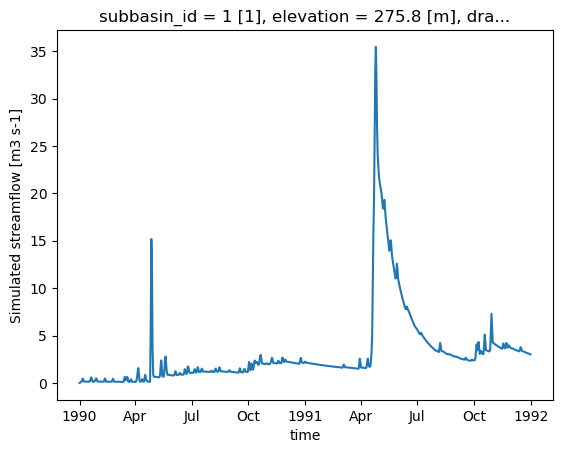
Once the model is executed, xHydro will automatically reformat the NetCDF file to bring it closer to CF conventions, ensuring compatibility with other xHydro modules. Note that, at this time, only the streamflow variable is reformatted, as the modularity of Raven allows for a wide variety of outputs, and it is not yet clear how to standardize all of them. However, dimensions and coordinates will be standardized across all files.
[16]:
ds_out = hm.run()
ds_out
[16]:
<xarray.Dataset> Size: 9kB
Dimensions:             (time: 730)
Coordinates:
  * time                (time) datetime64[ns] 6kB 1990-01-01 ... 1991-12-31
    subbasin_id         <U1 4B ...
    elevation           float32 4B ...
    drainage_area       float64 8B ...
    centroid_longitude  float64 8B ...
    centroid_latitude   float64 8B ...
Data variables:
    q                   (time) float32 3kB ...
Attributes:
    Conventions:      CF-1.6
    featureType:      timeSeries
    history:          Created on 2026-06-17T14:00:52 by Raven 4.12
    description:      Standard Output
    references:       Craig J.R. and the Raven Development Team Raven user's ...
    model_id:         GR4JCN
    Raven_version:    4.12
RavenPy_version: 0.21.0[17]:
ds_out["q"].plot()
[17]:
[<matplotlib.lines.Line2D at 0x7fa35cfda120>]
2.2.6. Retrieving additional outputs
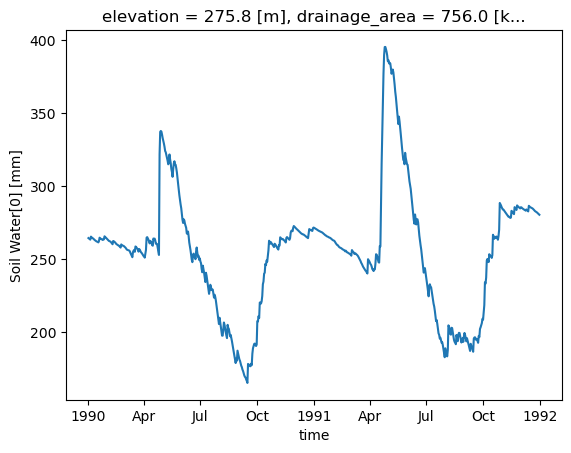
By default, Raven produces multiple output files in addition to the streamflow file, which contain various state variables. The .get_outputs() function can be used to retrieve any of these variables as a xarray.Dataset.
[18]:
help(hm.get_outputs)
Help on method get_outputs in module xhydro.modelling._ravenpy_models:

get_outputs(output: str, return_paths: bool = False, **kwargs) -> xr.Dataset | Path | list[Path] method of xhydro.modelling._ravenpy_models.RavenpyModel instance
    Return the outputs of the Raven model.

    Parameters
    ----------
    output : str
        "path" to return the output directory.
        "q" to only return the streamflow variable.
        Alternatively, a string matching the name of the output file to return (e.g. "Hydrographs", "Storage", "ByHRU", etc.).
        Wildcards can be used.
    return_paths : bool
        If True, return the path to the output file(s) instead of the dataset. Default is False.
    \*\*kwargs : dict
        Keyword arguments to pass to :py:func:`xarray.open_dataset`.

    Returns
    -------
    xr.Dataset
        The requested output variable.
    Path
        The path to the output directory if output is set to "path".
    list[Path]
        The path to the output file(s) if return_path is True.
[19]:
files = hm.get_outputs("*", return_paths=True)
files
[19]:
[PosixPath('/tmp/tmpb89hve51/gr4jcn_simulation/output/raven_Hydrographs.nc'),
 PosixPath('/tmp/tmpb89hve51/gr4jcn_simulation/output/raven_WatershedStorage.nc')]
[20]:
storage = hm.get_outputs("WatershedStorage")
storage
[20]:
<xarray.Dataset> Size: 61kB
Dimensions:                    (time: 730)
Coordinates:
  * time                       (time) datetime64[ns] 6kB 1990-01-01 ... 1991-...
    elevation                  float32 4B ...
    drainage_area              float64 8B ...
    centroid_longitude         float64 8B ...
    centroid_latitude          float64 8B ...
Data variables: (12/19)
    rainfall                   (time) float32 3kB dask.array<chunksize=(730,), meta=np.ndarray>
    snowfall                   (time) float32 3kB dask.array<chunksize=(730,), meta=np.ndarray>
    channel_storage            (time) float32 3kB dask.array<chunksize=(730,), meta=np.ndarray>
    reservoir_storage          (time) float32 3kB dask.array<chunksize=(730,), meta=np.ndarray>
    rivulet_storage            (time) float32 3kB dask.array<chunksize=(730,), meta=np.ndarray>
    Surface Water              (time) float32 3kB dask.array<chunksize=(730,), meta=np.ndarray>
    ...                         ...
    Convolution Storage[0]     (time) float32 3kB dask.array<chunksize=(730,), meta=np.ndarray>
    Convolution Storage[1]     (time) float32 3kB dask.array<chunksize=(730,), meta=np.ndarray>
    total                      (time) float32 3kB dask.array<chunksize=(730,), meta=np.ndarray>
    cum_input                  (time) float32 3kB dask.array<chunksize=(730,), meta=np.ndarray>
    cum_outflow                (time) float32 3kB dask.array<chunksize=(730,), meta=np.ndarray>
    MB_error                   (time) float32 3kB dask.array<chunksize=(730,), meta=np.ndarray>
Attributes:
    Conventions:      CF-1.6
    featureType:      timeSeries
    history:          Created on 2026-06-17T14:00:52 by Raven 4.12
    description:      Standard Output
    references:       Craig J.R. and the Raven Development Team Raven user's ...
    model_id:         GR4JCN
    Raven_version:    4.12
RavenPy_version: 0.21.0[21]:
storage["Soil Water[0]"].plot()
[21]:
[<matplotlib.lines.Line2D at 0x7fa35cfd7e00>]
2.3. Updating the rv* files
Currently, RavenPy provides no straightforward way to open and modify the Raven .rv* files. For instance, changing simulation dates or meteorological data directly through the files is not yet supported. Until this feature is added, some basic functions have been integrated into xHydro, but should be used with care.
The basic information, such as start_date, end_date, and parameters, are stored directly in the RavenpyModel class and can be manually updated. Similarly, if additional arguments had been given to the model during initialization, they are stored within a dictionary under RavenpyModel.kwargs, which can be accessed and modified as needed.
The observed streamflow, HRU characteristics and meteorological data are stored under the .qobs, .hru and .meteo attributes respectively, but can be much trickier to update, since the associated RavenPy commands must be reconstructed again. Therefore, it is strongly recommended to use the .update_data method to update these. This function calls upon a subset of the same arguments used when initializing a Raven model:
[22]:
help(hm.update_data)
Help on method update_data in module xhydro.modelling._ravenpy_models:

update_data(
    *,
    qobs_file: os.PathLike | str | None = None,
    alt_name_flow: str | None = 'q',
    hru: gpd.GeoDataFrame | dict | os.PathLike | str | None = None,
    output_subbasins: Literal['all', 'qobs'] | list[int] | None = None,
    minimum_reservoir_area: str | None = None,
    meteo_file: os.PathLike | str | None = None,
    data_type: list[str] | None = None,
    alt_names_meteo: dict | None = None,
    meteo_station_properties: dict | None = None,
    gridweights: str | os.PathLike | None = None
) method of xhydro.modelling._ravenpy_models.RavenpyModel instance
    Update the model configuration with new observed data (self.qobs), HRU properties (self.hru), or meteorological data (self.meteo).

    Parameters
    ----------
    qobs_file : os.PathLike | str
        Path to the NetCDF file containing the observed streamflow data.
        If there are multiple stations, the file should contain a 'basin_id' variable that identifies the subbasin for each time series.
        If a 'station_id' variable is present, it will be used to identify the station.
    alt_name_flow : str, optional
        Alternative name for the streamflow variable in the observed data.
    hru : gpd.GeoDataFrame | dict | os.PathLike | str
        A GeoDataFrame, or dictionary containing the HRU properties. Alternatively, a path to a shapefile containing the HRU properties.
        For distributed models, it should be readable by ravenpy.extractors.BasinMakerExtractor.
        For lumped models, should contain the following variables:
        - area: The watershed drainage area, in km².
        - elevation: The elevation of the watershed, in meters.
        - latitude: The latitude of the watershed centroid.
        - longitude: The longitude of the watershed centroid.
        - HRU_ID: The ID of the HRU (required for gridded data, optional for station data).
        If the meteorological data is gridded, the HRU dataset must also contain a SubId, DowSubId, valid geometry and crs.
        If the input is modified, a new shapefile will be created in the workdir/weights subdirectory.
    output_subbasins : {"all", "qobs"} | list[int] | None, optional
        If "all", all subbasins will be outputted.
        If "qobs", subbasins with observed flow will be outputted, as defined by the basin IDs in the observed streamflow data.
        If a list of integers is provided, it should contain the basin IDs to output.
        Leave as None to use the value as defined in the HRU file ('Has_Gauge' column).
    minimum_reservoir_area : str, optional
        Quantified string (e.g. "20 km2") representing the minimum lake area to consider the lake explicitly as a reservoir.
        If not provided, all lakes with the 'HRU_IsLake' column set to 1 in the HRU file will be considered as reservoirs.
        Note that 'reservoirs' in Raven can also refer to natural lakes with weir-like outflows.
        Only applicable for distributed HBVEC models.
    meteo_file : str | Path, optional
        Path to the file containing the observed meteorological data. Only optional if the project files already exist.
        The meteorological data can be either station or gridded data. Use the 'xhydro.modelling.format_input' function to ensure the data
        is in the correct format. Unless the input is a single station accompanied by 'meteo_station_properties', the file should contain
        the following coordinates:
        - elevation: The elevation of the station / grid cell, in meters.
        - latitude: The latitude of the station / grid cell centroid.
        - longitude: The longitude of the station / grid cell centroid.
    data_type : list[str], optional
        The list of types of data provided to Raven in the meteorological file. Only optional if the project files already exist.
        See https://github.com/CSHS-CWRA/RavenPy/blob/master/src/ravenpy/config/conventions.py for the list of available types.
    alt_names_meteo : dict, optional
        A dictionary that allows users to link the names of meteorological variables in their dataset to Raven-compliant names.
        The keys should be the Raven names as listed in the data_type parameter.
    meteo_station_properties : dict, optional
        Additional properties of the weather stations providing the meteorological data. Only required if absent from the 'meteo_file'.
        For single stations, the format is {"ALL": {"elevation": elevation, "latitude": latitude, "longitude": longitude}}.
        This has not been tested for multiple stations or gridded data.
    gridweights : str | Path | None
        If using gridded meteorological data, path to a text file containing the weights linking the grid cells to the HRUs.
        If None, the weights will be computed using ravenpy.extractors.GridWeightExtractor and saved in a 'weights' subdirectory
        of the project folder, using a "{meteo_file}_vs_{hru_file}_weights.txt" pattern.

    Notes
    -----
    If the meteorological data is gridded, new weights will be computed using the HRU file in the RavenpyModel instance and saved
    in a 'weights' subdirectory of the project folder, under the name 'meteo-name_vs_hru-name.txt'.
That function will only update the RavenpyModel class itself, not the files. If possible, it is strongly recommended to use the create_rv function to overwrite the existing .rv* files with the updated information.
If this is not possible, some aspects of the model can still be updated using the .update_config method:
[23]:
help(hm.update_config)
Help on method update_config in module xhydro.modelling._ravenpy_models:

update_config(
    *,
    rvi_dates: bool = False,
    rvi_commands: list[str] | None = None,
    rvt: bool = False,
    rvh: bool = False
) -> None method of xhydro.modelling._ravenpy_models.RavenpyModel instance
    Manually update some aspects of the configuration of the RavenPy model.

    Parameters
    ----------
    rvi_dates : bool
        If True, update the .rvi file with the 'start_date' and 'end_date' defined in the model.
    rvi_commands : list[str] | None
        A list of commands to include in the .rvi file. If None, no additional commands will be added.
        Warning: These commands will be added at the end of the .rvi file, with no checks. Use with caution.
    rvt : bool
        If True, update the .rvt file with the meteorological data and observed streamflow data defined in the model.
    rvh : bool
        If True, update the .rvh file with the list of subbasins to output. Nothing else will be changed in that file.

    Notes
    -----
    Ideally, users should favor using the `update_data` method to update the model configuration, then call the `create_rv`
    method to recreate the project files from scratch. This method assumes that the changes brought to the model configuration
    are minimal, such as wanting to change the meteorological data or the simulation start and end dates.

    Be aware that:
      - The .rvh will be rewritten entirely. If multiple sources of data were mentioned, such as both meteorological and observed streamflow data,
        all of them must be included in the RavenpyModel instance.
      - If the meteorological data is gridded, new weights will be computed using the HRU file in the RavenpyModel instance. If that HRU
        file is different from the one used to create the original .rvh file, it may lead to inconsistencies or errors.
      - Similarly, only the list of subbasins to output will be modified in the new .rvh file. Any additional changes to the HRU or
        other components might also lead to inconsistencies or errors.

    A backup of the original files will be created before any modifications are made.
Be very aware that not all updates will be reflected in the .rv* files. The last two options especially should be used with caution, as HRU characteristics, such as the subbasin IDs, will not be updated. If the HRU within the model has changed, there is currently no way to modify existing files. They should be deleted and recreated using the .create_rv() method.
2.4. Model Calibration
When building a model from scratch, a calibration step is necessary to find the optimal set of parameters. Model calibration involves a loop of several iterations, where: model parameters are selected, the model is run, and the results are compared to observed data. In xHydro, the calibration function utilizes SPOTPY to carry out the optimization process.
The calibration function still uses the model_config dictionary created earlier, but now within the xh.modelling.perform_calibration function.
[24]:
Help on function perform_calibration in module xhydro.modelling.calibration:

perform_calibration(
    model_config: dict,
    obj_func: str,
    bounds_high: np.ndarray | list[float | int],
    bounds_low: np.ndarray | list[float | int],
    evaluations: int,
    qobs: os.PathLike | np.ndarray | xr.Dataset | xr.DataArray,
    algorithm: str = 'DDS',
    mask: np.ndarray | list[float | int] | None = None,
    transform: str | None = None,
    epsilon: float = 0.01,
    sampler_kwargs: dict | None = None
)
    Perform calibration using SPOTPY.

    This is the entrypoint for the model calibration. After setting-up the
    model_config object and other arguments, calling "perform_calibration" will
    return the optimal parameter set, objective function value and simulated
    flows on the calibration period.

    Parameters
    ----------
    model_config : dict
        The model configuration object that contains all info to run the model.
        The model function called to run this model should always use this object and read-in data it requires.
        It will be up to the user to provide the data that the model requires.
    obj_func : str
        The objective function used for calibrating. Can be any one of these:

            - "abs_bias": Absolute value of the "bias" metric
            - "abs_pbias": Absolute value of the "pbias" metric
            - "abs_volume_error": Absolute value of the volume_error metric
            - "agreement_index": Index of agreement
            - "correlation_coeff": Correlation coefficient
            - "high_flow_rel_error": High flow relative error
            - "kge": Kling Gupta Efficiency metric (2009 version)
            - "kge_mod": Kling Gupta Efficiency metric (2012 version)
            - "kge_2021": Kling Gupta Efficiency metric (2021 version)
            - "lce": Least-squares combined efficiency
            - "low_flow_rel_error": Low flow relative error
            - "mae": Mean Absolute Error metric
            - "mare": Mean Absolute Relative Error metric
            - "mse": Mean Square Error metric
            - "nse": Nash-Sutcliffe Efficiency metric
            - "persistence_index": Persistence index
            - "r2": r-squared, i.e. square of correlation_coeff.
            - "rmse": Root Mean Square Error
            - "rrmse": Relative Root Mean Square Error (RMSE-to-mean ratio)
            - "rsr": Ratio of RMSE to standard deviation.
            - "volumetric_efficiency": Volumetric efficiency

    bounds_high : np.array
        High bounds for the model parameters to be calibrated. SPOTPY will sample parameter sets from
        within these bounds. The size must be equal to the number of parameters to calibrate.
    bounds_low : np.array
        Low bounds for the model parameters to be calibrated. SPOTPY will sample parameter sets from
        within these bounds. The size must be equal to the number of parameters to calibrate.
    evaluations : int
        Maximum number of model evaluations (calibration budget) to perform before stopping the calibration process.
    qobs : os.PathLike or np.ndarray or xr.Dataset or xr.DataArray
        Observed streamflow dataset (or path to it), used to compute the objective function.
        If using a dataset, it must contain a "streamflow" variable.
    algorithm : str
        The optimization algorithm to use. Currently, "DDS" and "SCEUA" are available, but more can be easily added.
    mask : np.array, optional
        A vector indicating which values to preserve/remove from the objective function computation. 0=remove, 1=preserve.
    transform : str, optional
        The method to transform streamflow prior to computing the objective function. Can be one of:
        Square root ('sqrt'), inverse ('inv'), or logarithmic ('log') transformation.
    epsilon : scalar float
        Used to add a small delta to observations for log and inverse transforms, to eliminate errors
        caused by zero flow days (1/0 and log(0)). The added perturbation is equal to the mean observed streamflow
        times this value of epsilon.
    sampler_kwargs : dict
        Contains the keywords and hyperparameter values for the optimization algorithm.
        Keywords depend on the algorithm choice. Currently, SCEUA and DDS are supported with
        the following default values:
        - SCEUA: dict(ngs=7, kstop=3, peps=0.1, pcento=0.1)
        - DDS: dict(trials=1)

    Returns
    -------
    best_parameters : array_like
        The optimized parameter set.
    qsim : xr.Dataset
        Simulated streamflow using the optimized parameter set.
    bestobjf : float
        The best objective function value.
We can prepare the additional arguments required by the calibration function. A good calibration process should always exclude some data from the computation of the objective function to ensure a validation period. This can be achieved using the mask argument, which uses an array of 0 and 1.
This example will only use 10 evaluations to cut on computing time, but a real calibration should rely on at least 500 iterations with simple models such as GR4JCN.
[25]:
qobs_file = D.fetch("ravenpy/Debit_Riviere_Rouge.nc")
ds_obs = xr.open_dataset(qobs_file)

# Reformat the data
ds_obs = ds_obs.rename({"qobs": "q"}).sel(time=slice("1990", "1991"))

# Create the mask
mask = xr.where(ds_obs.time.dt.year.isin([1990]), 0, 1)
[26]:
# Parameter bounds for GR4JCN
bounds_low = [0.01, -15.0, 10.0, 0.0, 1.0, 0.0]
bounds_high = [2.5, 10.0, 700.0, 7.0, 30.0, 1.0]
[27]:
model_config["overwrite"] = True

# Run the calibration
best_parameters, best_simulation, best_objfun = xhm.perform_calibration(
    model_config,
    obj_func="kge",
    bounds_low=bounds_low,
    bounds_high=bounds_high,
    qobs=ds_obs,
    evaluations=10,
    algorithm="DDS",
    mask=mask,
    sampler_kwargs={"trials": 1},
)
Initializing the  Dynamically Dimensioned Search (DDS) algorithm  with  10  repetitions
The objective function will be maximized
Starting the DDS algorithm with 10 repetitions...
Finding best starting point for trial 1 using 5 random samples.
Initialize database...
['csv', 'hdf5', 'ram', 'sql', 'custom', 'noData']
5 of 10, maximal objective function=-0.296356, time remaining: 00:00:02
10 of 10, maximal objective function=-0.169388, time remaining: 00:00:00
Best solution found has obj function value of -0.1693876335191944 at 5


*** Final SPOTPY summary ***
Total Duration: 4.82 seconds
Total Repetitions: 10
Maximal objective value: -0.169388
Corresponding parameter setting:
param0: 0.01
param1: 7.93733
param2: 445.208
param3: 5.5979
param4: 19.8371
param5: 0.51721
******************************

Best parameter set:
param0=0.01, param1=7.937330262196863, param2=445.207562129456, param3=5.597901919406624, param4=19.837146090020553, param5=0.5172101669888751
Run number 9 has the highest objectivefunction with: -0.1694
[28]:
# The first output corresponds to the best set of parameters
best_parameters
[28]:
[np.float64(0.01),
 np.float64(7.937330262196863),
 np.float64(445.207562129456),
 np.float64(5.597901919406624),
 np.float64(19.837146090020553),
 np.float64(0.5172101669888751)]
[29]:
# The second output corresponds to the timeseries for the best set of parameters
best_simulation
[29]:
<xarray.Dataset> Size: 9kB
Dimensions:             (time: 730)
Coordinates:
  * time                (time) datetime64[ns] 6kB 1990-01-01 ... 1991-12-31
    subbasin_id         <U1 4B ...
    elevation           float32 4B ...
    drainage_area       float64 8B ...
    centroid_longitude  float64 8B ...
    centroid_latitude   float64 8B ...
Data variables:
    q                   (time) float32 3kB ...
Attributes:
    Conventions:      CF-1.6
    featureType:      timeSeries
    history:          Created on 2026-06-17T14:01:00 by Raven 4.12
    description:      Standard Output
    references:       Craig J.R. and the Raven Development Team Raven user's ...
    model_id:         GR4JCN
    Raven_version:    4.12
RavenPy_version: 0.21.0[30]:
# The second output is the value of the objective function for the best set of parameters
best_objfun
[30]:
np.float64(-0.1693876335191944)