4. Modélisation hydrologique - HYDROTEL
AVERTISSEMENT
xHydro fournit des outils pour exécuter HYDROTEL, mais ne préparera pas le modèle lui-même. Cela doit être fait au préalable.
INFO
L’exécutable HYDROTEL peut être acquis à partir de ce dépôt GitHub.
xHydro propose une collection de fonctions conçues pour faciliter la modélisation hydrologique, en se concentrant sur deux modèles clés : HYDROTEL et une suite de modèles émulés par le Raven Hydrological Framework. Il est important de noter que Raven dispose déjà d’une vaste librairie Python, RavenPy, qui permet aux utilisateurs de construire, calibrer et exécuter des modèles. xHydro encapsule certaines de ces fonctions pour soutenir les évaluations multi-modèles avec HYDROTEL, mais les utilisateurs recherchant des fonctionnalités avancées préféreront utiliser RavenPy directement.
La principale contribution de xHydro à la modélisation hydrologique est donc son soutien à HYDROTEL, un modèle qui manquait auparavant d’une librairie Python dédiée. Cependant, la construction d’un projet HYDROTEL est mieux réalisée en utilisant PHYSITEL et l’interface graphique d’HYDROTEL, qui sont des logiciels propriétaires. Par conséquent, pour l’instant, xHydro est conçu pour faciliter l’exécution et la modification d’un projet HYDROTEL déjà établi, plutôt que d’aider à en construire un depuis zéro.
Un Notebook similaire à celui-ci, mais qui couvre les modèles RavenPy, est disponible ici.
4.1. Informations de base
[1]:
from IPython.display import clear_output
import xhydro as xh
import xhydro.modelling as xhm
clear_output(wait=False)
Le cadre de modélisation xHydro est basé sur un dictionnaire model_config, qui est censé contenir toutes les informations nécessaires pour exécuter un modèle hydrologique donné. Par exemple, en fonction du modèle, il peut stocker directement les jeux de données météorologiques, les chemins vers ces jeux de données (fichiers netCDF ou autres), les fichiers de configuration csv, les paramètres, et fondamentalement tout ce qui est nécessaire pour configurer et exécuter un modèle hydrologique.
La liste des entrées requises pour le dictionnaire peut être obtenue de deux façons. La première consiste à regarder la classe du modèle hydrologique, comme xhydro.modelling.Hydrotel. La seconde consiste à utiliser la fonction xh.modelling.get_hydrological_model_inputs pour obtenir la liste des clés requises pour un modèle donné, ainsi que sa documentation.
[3]:
Help on function get_hydrological_model_inputs in module xhydro.modelling.hydrological_modelling:

get_hydrological_model_inputs(model_name: str, required_only: bool = False) -> tuple[dict, str]
    Get the required inputs for a given hydrological model.

    Parameters
    ----------
    model_name : str
        The name of the hydrological model to use.
        Currently supported models are ["HYDROTEL", "Blended", "GR4JCN", "HBVEC", "HMETS", "HYPR", "Mohyse", "SACSMA"].
    required_only : bool
        If True, only the required inputs will be returned.

    Returns
    -------
    dict
        A dictionary containing the required configuration for the hydrological model.
    str
        The documentation for the hydrological model.
[4]:
# This function can be called to get a list of the keys for a given model, as well as its documentation.
inputs, docs = xhm.get_hydrological_model_inputs("Hydrotel", required_only=False)
inputs
[4]:
{'model_name': 'HYDROTEL',
 'project_dir': str | os.PathLike,
 'project_file': str,
 'executable': str | os.PathLike,
 'project_config': dict | None,
 'simulation_config': dict | None,
 'output_config': dict | None}
[5]:
print(docs)
Class to handle HYDROTEL simulations.

Parameters
----------
project_dir : str or Path
    Path to the project folder.
project_file : str
    Name of the project file (e.g. 'projet.csv').
executable : str or Path
    Command to execute HYDROTEL.
    On Windows, this should be the path to hydrotel.exe.
project_config : dict, optional
    Dictionary of configuration options to overwrite in the project file.
simulation_config : dict, optional
    Dictionary of configuration options to overwrite in the simulation file. See the Notes section for more details.
output_config : dict, optional
    Dictionary of configuration options to overwrite in the output file (output.csv).

Notes
-----
The name of the simulation file must match the name of the 'SIMULATION COURANTE' option in the project file.

This class is designed to handle the execution of HYDROTEL simulations, with the ability to overwrite configuration options,
but it does not handle the creation of the project folder itself. The project folder must be created beforehand.

For more information on how to configure the project, refer to the documentation of HYDROTEL:
https://github.com/INRS-Modelisation-hydrologique/hydrotel
HYDROTEL et Raven varient en termes d’entrées requises et de fonctions disponibles, mais un effort sera fait pour standardiser les sorties autant que possible. Actuellement, tous les modèles incluent les trois fonctions suivantes :
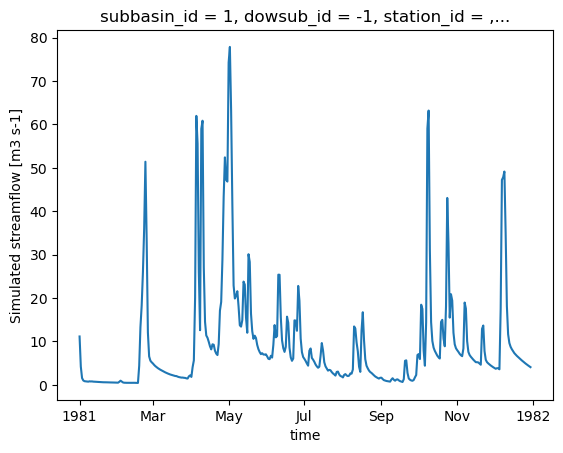
.run(): Exécute le modèle, reformate les sorties pour être compatibles avec les outils d’analyse dansxHydro, et retourne le débit simulé en tant quexarray.Dataset.La variable de débit sera nommée
qet aura pour unitésm3 s-1.Pour les données 1D (comme les stations hydrométriques), la dimension correspondante dans le jeux de données sera identifiée par l’attribut
cf_role: timeseries_id.
.get_inputs(): Récupère les entrées météorologiques utilisées par le modèle..get_outputs(): Récupère les sorties simulées du modèle.Utilisez
.get_outputs("q")pour obtenir le débit simulé dans unxarray.Dataset.
.standardize_outputs(): Standardise les sorties pour garantir la cohérence entre différents modèles, facilitant ainsi la comparaison et l’analyse. Cette fonction est utilisée par défaut dans la méthode.run(), mais peut également être appelée séparément si nécessaire.
4.2. Initialisation et exécution d’un modèle calé
Un projet HYDROTEL typique se compose de plusieurs sous-dossiers et fichiers qui décrivent les entrées météorologiques, les caractéristiques du bassin versant, et plus encore. Un exemple est donné dans la cellule ci-dessous. Le modèle repose principalement sur trois fichiers clés :
Un fichier de projet situé dans le répertoire principal, qui peut avoir n’importe quel nom (par exemple,
SLNO.csv). Il contient les informations de base sur le projet, y compris le nom de la simulation en cours (SIMULATION COURANTE).Un fichier
simulation/[simulation_name]/[simulation_name].csvqui gère tous les paramètres de l’exécution, y compris les dates de simulation, le chemin vers les données météorologiques et les processus physiques à utiliser.Un fichier
simulation/[simulation_name]/output.csvqui spécifie quels résultats produire, tels que les variables et les tronçons de rivière.
Les fichiers par défaut ne sont pas fournis avec xHydro, mais vous pouvez trouver un exemple de projet HYDROTEL dans le dossier DemoProject du (dépôt HYDROTEL)[https://github.com/INRS-Modelisation-hydrologique/hydrotel]. Les options de configuration pour project_config, simulation_config, ou output_config peuvent néanmoins être spécifiées lors de l’initialisation du modèle HYDROTEL, ou via la fonction .update_config() plus tard. Cela mettra à jour les fichiers CSV correspondants en conséquence.
[6]:
# For this example, we will use the DemoProject prepared for the HYDROTEL model.
import os
from dotenv import load_dotenv
from pathlib import Path
import tempfile
notebook_folder = Path(tempfile.TemporaryDirectory().name)

load_dotenv(dotenv_path=Path.cwd().parents[1] / "tests" / ".env")
hydrotel_demo = os.getenv("HYDROTEL_DEMO", None)
hydrotel_executable = os.getenv("HYDROTEL_EXECUTABLE", None)

# Copy the demo project to a temporary folder, so that we can run the model without modifying the original files.
import shutil
shutil.copytree(hydrotel_demo, notebook_folder / "hydrotel_demo")
# Remove the input and output files
for f in (notebook_folder / "hydrotel_demo" / "meteo").glob("*"):
    f.unlink()
for f in (notebook_folder / "hydrotel_demo" / "simulation" / "simulation" / "resultat").glob("*"):
    f.unlink()
[7]:
from pathlib import Path

def print_file_structure(directory, indent=0):
    path = Path(directory)
    for item in path.iterdir():
        print(" " * indent + item.name)
        # If the item is a directory, recurse into it
        if item.is_dir():
            print_file_structure(item, indent + 2)


# Example usage
print_file_structure(notebook_folder / "hydrotel_demo")
DELISLE.csv
meteo
physitel
  proprietehydrolique.sol
  uhrh.prj
  rivieres.dbf
  noeuds.nds
  point.rdx
  uhrh.csv
  lacs.shx
  rivieres.shp
  pente.tif
  type_sol.cla
  troncon.trl
  occupation_sol.tif
  uhrh.shx
  lacs.prj
  uhrh.dbf
  occupation_sol.cla
  rivieres.prj
  uhrh.shp
  uhrh.tif
  rivieres.shx
  orientation.tif
  lacs.shp
  occupation_sol.csv
  lacs.dbf
  altitude.tif
  type_sol.tif
simulation
  simulation
    thorsen.csv
    bv3c.csv
    degre_jour_modifie.csv
    thornthwaite.csv
    degre-jour-glacier.csv
    milieux_humides_isoles.csv
    rankinen.csv
    cequeau.csv
    etp-mc-guiness.csv
    stats.txt
    hydro_quebec.csv
    degre-jour-bande.csv
    penman.csv
    rayonnement_net.csv
    corrections.csv
    grillemeteo.csv
    penman_monteith.csv
    linacre.csv
    simulation.gsb
    simulation.csv
    moyenne_3_stations.csv
    output.csv
    troncons_stations.csv
    submodels-versions.txt
    milieux_humides_riverains.csv
    thiessen.csv
    grilleprevision.csv
    onde_cinematique.csv
    onde_cinematique_modifiee.csv
    priestlay_taylor.csv
    resultat
  simulation-global
    corrections.csv
    simulation-global.gsb
    troncons_stations.csv
    parametres_sous_modeles.csv
    milieux_humides_riverains.csv
    stats.txt
    submodels-versions.txt
    output.csv
    simulation-global.csv
    milieux_humides_isoles.csv
neige
  station.stn
  NEIGE01.nei
  NEIGE02.nei
  NEIGE03.nei
  station.p3s
etats
  ruisselement_surface_surf_2020010100.csv
  bilan_vertical_2020070100.csv
  acheminement_riviere_MH_2020010100.csv
  ruisselement_surface_2020010100.csv
  fonte_neige_2020070100.csv
  ruisselement_surface_hypo_2020070100.csv
  ruisselement_surface_base_2020010100.csv
  acheminement_riviere_2020010100.csv
  ruisselement_surface_2020070100.csv
  fonte_neige_2020010100.csv
  ruisselement_surface_hypo_2020010100.csv
  acheminement_riviere_2020070100.csv
  ruisselement_surface_base_2020070100.csv
  bilan_vertical_2020010100.csv
  ruisselement_surface_surf_2020070100.csv
  acheminement_riviere_MH_2020070100.csv
hydro
  02MC036.hyd
  station.sth
hgm
  hydrogramme.hgm
physio
  shreve.csv
  troncon_width_depth.csv
  wet_pixel_info.csv
  pro_rac.def
  ind_fol.def
  strahler.csv
[8]:
model_config = {
    "model_name": "Hydrotel",
    "project_dir": notebook_folder / "hydrotel_demo",
    "project_file": "DELISLE.csv",
    "simulation_config": {
        "DATE DEBUT": "1981-01-01",
        "DATE FIN": "1981-12-31",
        "FICHIER STATIONS METEO": "meteo/ERA5.nc",
        "PAS DE TEMPS": 24,
    },
    "output_config": {"TRONCONS": "tous", "DEBITS_AVAL": 1, "OUTPUT_NETCDF": 1},
    "executable": hydrotel_executable,
}
Une fois model_config en main, une instance du modèle hydrologique peut être initialisée en utilisant xhydro.modelling.hydrological_model ou la classe xhydro.modelling.Hydrotel directement.
[9]:
hm = xhm.hydrological_model(model_config)

print(f"Simulation directory, taken from the project file: '{hm.simulation_dir}'\n")
print(f"Project configuration: '{hm.project_config}'\n")
print(f"Simulation configuration: '{hm.simulation_config}'\n")
print(f"Output configuration: '{hm.output_config}'")
Simulation directory, taken from the project file: '/tmp/tmpww7qb255/hydrotel_demo/simulation/simulation'

Project configuration: '{'PROJET HYDROTEL VERSION': '4.3.1.0000', 'FICHIER ALTITUDE': 'physitel/altitude.tif', 'FICHIER PENTE': 'physitel/pente.tif', 'FICHIER ORIENTATION': 'physitel/orientation.tif', 'FICHIER ZONE': 'physitel/uhrh.tif', 'FICHIER NOEUD': 'physitel/noeuds.nds', 'FICHIER TRONCON': 'physitel/troncon.trl', 'FICHIER PIXELS': 'physitel/point.rdx', 'FICHIER MILIEUX HUMIDES PROFONDEUR TRONCONS': 'physio/troncon_width_depth.csv', 'SIMULATION COURANTE': 'simulation'}'

Simulation configuration: '{'SIMULATION HYDROTEL VERSION': '4.3.1.0000', 'FICHIER OCCUPATION SOL': 'physitel/occupation_sol.cla', 'FICHIER PROPRIETE HYDROLIQUE': 'physitel/proprietehydrolique.sol', 'FICHIER TYPE SOL COUCHE1': 'physitel/type_sol.cla', 'FICHIER TYPE SOL COUCHE2': 'physitel/type_sol.cla', 'FICHIER TYPE SOL COUCHE3': 'physitel/type_sol.cla', 'COEFFICIENT ADDITIF PROPRIETE HYDROLIQUE': '0', 'FICHIER INDICE FOLIERE': 'physio/ind_fol.def', 'FICHIER PROFONDEUR RACINAIRE': 'physio/pro_rac.def', 'FICHIER GRILLE METEO': '', 'FICHIER STATIONS METEO': 'meteo/ERA5.nc', 'FICHIER STATIONS HYDRO': 'hydro/station.sth', 'PREVISION METEO': '0', 'FICHIER GRILLE PREVISION': '', 'DATE DEBUT PREVISION': '1973-06-01 00:00', 'DATE DEBUT': '1981-01-01 00:00', 'DATE FIN': '1981-12-31 00:00', 'PAS DE TEMPS': 24, 'TRONCON EXUTOIRE': '1', 'TRONCONS DECONNECTER': 'off', 'NOM FICHIER CORRECTIONS': '1', 'LECTURE ETAT FONTE NEIGE': 'etats/fonte_neige_2020010100.csv', 'LECTURE ETAT TEMPERATURE DU SOL': '', 'LECTURE ETAT BILAN VERTICAL': 'etats/bilan_vertical_2020010100.csv', 'LECTURE ETAT RUISSELEMENT SURFACE': 'etats/ruisselement_surface_2020010100.csv', 'LECTURE ETAT ACHEMINEMENT RIVIERE': 'etats/acheminement_riviere_2020010100.csv', 'ECRITURE ETAT FONTE NEIGE': '2020-07-01 00:00', 'ECRITURE ETAT TEMPERATURE DU SOL': '', 'ECRITURE ETAT BILAN VERTICAL': '2020-07-01 00:00', 'ECRITURE ETAT RUISSELEMENT SURFACE': '2020-07-01 00:00', 'ECRITURE ETAT ACHEMINEMENT RIVIERE': '2020-07-01 00:00', 'REPERTOIRE ECRITURE ETAT FONTE NEIGE': 'etats', 'REPERTOIRE ECRITURE ETAT TEMPERATURE DU SOL': '', 'REPERTOIRE ECRITURE ETAT BILAN VERTICAL': 'etats', 'REPERTOIRE ECRITURE ETAT RUISSELEMENT SURFACE': 'etats', 'REPERTOIRE ECRITURE ETAT ACHEMINEMENT RIVIERE': 'etats', 'INTERPOLATION DONNEES': 'THIESSEN', 'FONTE DE NEIGE': 'DEGRE JOUR MODIFIE', 'FONTE GLACIER': '', 'TEMPERATURE DU SOL': '', 'EVAPOTRANSPIRATION': 'HYDRO-QUEBEC', 'BILAN VERTICAL': 'BV3C', 'RUISSELEMENT': 'ONDE CINEMATIQUE', 'ACHEMINEMENT RIVIERE': 'ONDE CINEMATIQUE MODIFIEE', 'MILIEUX HUMIDES ISOLES': '1', 'MILIEUX HUMIDES RIVERAINS': '1', 'FICHIER DE PARAMETRE GLOBAL': '0', 'LECTURE INTERPOLATION DONNEES': 'lecture_interpolation.csv', 'THIESSEN': 'thiessen.csv', 'MOYENNE 3 STATIONS': 'moyenne_3_stations.csv', 'LECTURE FONTE NEIGE': 'lecture_fonte_neige.csv', 'DEGRE JOUR MODIFIE': 'degre_jour_modifie.csv', 'LECTURE TEMPERATURE DU SOL': 'lecture_tempsol.csv', 'RANKINEN': 'rankinen.csv', 'THORSEN': 'thorsen.csv', 'LECTURE EVAPOTRANSPIRATION': 'lecture_etp.csv', 'HYDRO-QUEBEC': 'hydro_quebec.csv', 'THORNTHWAITE': 'thornthwaite.csv', 'LINACRE': 'linacre.csv', 'PENMAN': 'penman.csv', 'PRIESTLAY-TAYLOR': 'priestlay_taylor.csv', 'PENMAN-MONTEITH': 'penman_monteith.csv', 'LECTURE BILAN VERTICAL': 'lecture_bilan_vertical.csv', 'BV3C': 'bv3c.csv', 'CEQUEAU': 'cequeau.csv', 'LECTURE RUISSELEMENT SURFACE': 'lecture_ruisselement.csv', 'ONDE CINEMATIQUE': 'onde_cinematique.csv', 'LECTURE ACHEMINEMENT RIVIERE': 'lecture_acheminement.csv', 'ONDE CINEMATIQUE MODIFIEE': 'onde_cinematique_modifiee.csv', 'FICHIER MILIEUX HUMIDES ISOLES': 'milieux_humides_isoles.csv', 'FICHIER MILIEUX HUMIDES RIVERAINS': 'milieux_humides_riverains.csv'}'

Output configuration: '{'TRONCONS': 'tous', 'TRONCONS_MOYENNES_PONDEREES': '1', 'TMIN': '1', 'TMAX': '1', 'TMIN_JOUR': '1', 'TMAX_JOUR': '1', 'PLUIE': '1', 'NEIGE': '1', 'APPORT': '1', 'COUVERT_NIVAL': '1', 'HAUTEUR_NEIGE': '1', 'ALBEDO_NEIGE': '1', 'APPORT_GLACIER': '1', 'EAU_GLACIER': '1', 'PROFONDEUR_GEL': '1', 'ETP': '1', 'ETR1': '1', 'ETR2': '1', 'ETR3': '1', 'ETR_TOTAL': '1', 'PRODUCTION_BASE': '1', 'PRODUCTION_HYPO': '1', 'PRODUCTION_SURF': '1', 'Q12': '1', 'Q23': '1', 'Q23_SOMME_ANNUELLE': '1', 'QRECHARGE': '1', 'THETA1': '1', 'THETA2': '1', 'THETA3': '1', 'APPORT_LATERAL': '1', 'APPORT_LATERAL_UHRH': '1', 'ECOULEMENT_SURF': '1', 'ECOULEMENT_HYPO': '1', 'ECOULEMENT_BASE': '1', 'DEBITS_AMONT': '1', 'DEBITS_AVAL': 1, 'DEBITS_AVAL_MOY7J_MIN': '1', 'HAUTEUR_AVAL': '1', 'OUTPUT_NETCDF': 1}'
Comme nous pouvons le voir, le projet de démonstration produit toutes les variables disponibles pour tous les tronçons de rivière. Cela est dû au fait que la clé output_config ne remplace que les clés spécifiées, mais laisse le reste de la configuration inchangé. Par conséquent, si nous voulons ne garder que les quelques variables pertinentes pour notre analyse, nous pouvons utiliser la méthode update_config une fois que le modèle a été initialisé.
[10]:
output = hm.output_config.copy()
output = {k: "0" if str(output[k]) == "1" else output[k] for k in output.keys()}
output["DEBITS_AVAL"] = "1"
output["OUTPUT_NETCDF"] = "1"
hm.update_config(output_config=output)
print(f"Updated output configuration: '{hm.output_config}'")
Updated output configuration: '{'TRONCONS': 'tous', 'TRONCONS_MOYENNES_PONDEREES': '0', 'TMIN': '0', 'TMAX': '0', 'TMIN_JOUR': '0', 'TMAX_JOUR': '0', 'PLUIE': '0', 'NEIGE': '0', 'APPORT': '0', 'COUVERT_NIVAL': '0', 'HAUTEUR_NEIGE': '0', 'ALBEDO_NEIGE': '0', 'APPORT_GLACIER': '0', 'EAU_GLACIER': '0', 'PROFONDEUR_GEL': '0', 'ETP': '0', 'ETR1': '0', 'ETR2': '0', 'ETR3': '0', 'ETR_TOTAL': '0', 'PRODUCTION_BASE': '0', 'PRODUCTION_HYPO': '0', 'PRODUCTION_SURF': '0', 'Q12': '0', 'Q23': '0', 'Q23_SOMME_ANNUELLE': '0', 'QRECHARGE': '0', 'THETA1': '0', 'THETA2': '0', 'THETA3': '0', 'APPORT_LATERAL': '0', 'APPORT_LATERAL_UHRH': '0', 'ECOULEMENT_SURF': '0', 'ECOULEMENT_HYPO': '0', 'ECOULEMENT_BASE': '0', 'DEBITS_AMONT': '0', 'DEBITS_AVAL': '1', 'DEBITS_AVAL_MOY7J_MIN': '0', 'HAUTEUR_AVAL': '0', 'OUTPUT_NETCDF': '1'}'
4.2.1. Mise en forme des données météorologiques
L’acquisition des données météorologiques brutes est couverte dans le Notebook GIS et le Notebook Exemple de cas d’utilisation. Par conséquent, ce Notebook utilisera un jeu de données de test.
[11]:
import xarray as xr

from xhydro.testing.helpers import (  # In-house function to get data from the xhydro-testdata repo
    deveraux,
)

D = deveraux()

meteo_file = D.fetch("hydro_modelling/ERA5_testdata.nc")
ds = xr.open_dataset(meteo_file)
ds
[11]:
<xarray.Dataset> Size: 69kB
Dimensions:      (time: 366, lat: 3, lon: 5)
Coordinates:
  * time         (time) datetime64[ns] 3kB 1981-01-01 1981-01-02 ... 1982-01-01
  * lat          (lat) float64 24B 48.5 48.75 49.0
  * lon          (lon) float64 40B -65.5 -65.25 -65.0 -64.75 -64.5
    z            (lat, lon) float32 60B ...
    spatial_agg  <U7 28B ...
    timestep     <U1 4B ...
    HYBAS_ID     int64 8B ...
    source       <U29 116B ...
Data variables:
    tasmax       (time, lat, lon) float32 22kB ...
    tasmin       (time, lat, lon) float32 22kB ...
    pr           (time, lat, lon) float32 22kB ...
Attributes: (12/30)
    GRIB_NV:                                  0
    GRIB_Nx:                                  1440
    GRIB_Ny:                                  721
    GRIB_cfName:                              unknown
    GRIB_cfVarName:                           t2m
    GRIB_dataType:                            an
    ...                                       ...
    GRIB_totalNumber:                         0
    GRIB_typeOfLevel:                         surface
    GRIB_units:                               K
    long_name:                                2 metre temperature
    standard_name:                            unknown
units: KChaque modèle hydrologique a des exigences différentes en ce qui concerne leurs données d’entrée. Dans cet exemple, les intrants ont des unités (températures en °K et précipitations en m) et des unités de temps qui ne seraient pas compatibles avec les exigences du modèle HYDROTEL. De plus, bien que HYDROTEL puisse gérer des grilles 2D, il est presque toujours préférable de fournir une dimension spatiale 1D afin de réduire certaines manipulations effectuées par le modèle lors de l’initialisation.
La fonction xh.modelling.format_input peut être utilisée pour reformater les jeux de données conformes au format CF pour une utilisation dans les modèles hydrologiques.
[12]:
Help on function format_input in module xhydro.modelling.hydrological_modelling:

format_input(
    ds: xr.Dataset,
    model: str,
    convert_calendar_missing: float | str | dict | bool = nan,
    save_as: str | PathLike | None = None,
    **kwargs
) -> tuple[xr.Dataset, dict]
    Reformat CF-compliant meteorological data for use in hydrological models. See the "Notes" section for important details.

    Parameters
    ----------
    ds : xr.Dataset
        A dataset containing the meteorological data. See the "Notes" section for more information on the expected format.
    model : str
        The name of the hydrological model to use.
        Currently supported models are:
        - "HYDROTEL", "Raven" (which is an alias for all RavenPy models), "Blended", "GR4JCN", "HBVEC", "HMETS", "HYPR", "Mohyse", "SACSMA".
    convert_calendar_missing : float | str | dict | bool, optional
        The value to use for missing values when converting the calendar to "standard".
        If the value is a float, it will be used as the fill value for all variables.
        If the value is a string "interpolate", the new dates will be linearly interpolated over time.
        A dictionary can be used to specify a different fill value for each variable.
        Keys should be the names of the variables as they appear in the first entry in the "variable_name" lists of the "Notes" section.
        If True, temperatures will be interpolated and precipitation will be filled with 0.
        If False, the calendar will not be converted. Only possible for "Raven" models.
    save_as : str, optional
        Where to save the reformatted data. If None, the data will not be saved.
        This can be useful when multiple files are needed for a single model run (e.g. HYDROTEL needs a configuration file).
    \*\*kwargs : dict
        Additional keyword arguments to pass to the save function.

    Returns
    -------
    xr.Dataset
        The reformatted dataset.
    dict
        For HYDROTEL, a dictionary containing the configuration for the meteorological data.
        If `save_as` is provided, the configuration will have been saved to a file with the same name as `save_as`, but with a ".nc.config" extension.
        For Raven, a dictionary containing the 'data_type' and 'alt_names_meteo' keys required for the 'model_config' argument.

    Notes
    -----
    The input dataset should ideally be CF-compliant and follow CMIP6's Controlled Vocabulary, but this function will attempt to detect the
    variables based on the standard_name attribute, the cell_methods attribute, or the variable name.
    More information on those attributes can be found here: https://wcrp-cmip.org/cmip-model-and-experiment-documentation/, and specifically
    the 'CMIP6 MIP table' link provided in the 'Search for variables' section.

    Specifically:

    - If using 1D time series, the station dimension should have an attribute `cf_role` set to "timeseries_id".
    - Units don't need to be canonical, but they should be convertible to the expected units and be understood by `xclim`.
    - Elevation represents the altitude of the meteorological data / model grid cell, not the altitude of the ground.
    - Snowfall units should be in water equivalent of precipitation (e.g. mm/day or kg/m²/s), NOT height (e.g. cm of fresh snow on the ground).
    - The function will try to detect the variables based on the attributes and the variable name. The following attempts will be made:
        - Longitude:
            - standard_name: "longitude"
            - variable name: "longitude", "lon"
        - Latitude:
            - standard_name: "latitude"
            - variable name: "latitude", "lat"
        - Elevation:
            - standard_name: "surface_altitude"
            - variable name: "elevation", "orog", "z", "altitude", "height"
        - Precipitation:
            - standard_name: "*precipitation*" (e.g. "lwe_thickness_of_precipitation_amount")
            - variable name: "pr", "precip", "precipitation"
        - Rainfall:
            - standard_name: "*rainfall*" (e.g. "rainfall_flux", "rainfall_amount")
            - variable name: "prra", "prlp", "rainfall", "rain", "precipitation_rain"
        - Snowfall:
            - standard_name: "*snowfall*" (e.g. "snowfall_flux", "snowfall_amount")
            - variable name: "prsn", "snowfall", "precipitation_snow"
        - Maximum temperature:
            - standard_name: "air_temperature"
            - cell_methods: "time: maximum"
            - variable name: "tasmax", "tmax", "t2m_max", "temperature_max"
        - Minimum temperature:
            - standard_name: "air_temperature"
            - cell_methods: "time: minimum"
            - variable name: "tasmin", "tmin", "t2m_min", "temperature_min"
        - Mean temperature:
            - standard_name: "air_temperature"
            - cell_methods: "time: mean"
            - variable name: "tas", "tmean", "t2m", "temperature_mean"

    HYDROTEL requires the following variables: ["longitude", "latitude", "elevation", "time", "tasmax", "tasmin", "pr"].
    Raven requires the following variables: ["longitude", "latitude", "elevation", "time", "tasmax/tasmin" or "tas", "pr" or "prlp/prsn"].
[13]:
# You can also use the 'save_as' argument to save the new file(s) in your project folder.
ds_reformatted, config = xh.modelling.format_input(
    ds,
    "Hydrotel",
    save_as=notebook_folder / "hydrotel_demo" / "meteo" / "ERA5.nc",
)
/exec/rondeau/.conda/envs/xhydro-20260609/lib/python3.14/site-packages/clisops/utils/dataset_utils.py:1772: UserWarning: For coordinate variable 'longitude' no bounds can be identified.
HYDROTEL nécessite un fichier de configuration pour accompagner le fichier météorologique. Ce fichier de configuration doit avoir le même nom que le fichier NetCDF correspondant, mais avec une extension .nc.config. Si l’option save_as est utilisée, ce fichier de configuration sera également enregistré avec les données météorologiques.
Notez qu’un troisième fichier, avec une extension .pth, peut également être fourni. Ce fichier est utilisé pour spécifier le poids à appliquer à chaque station dans les données météorologiques par rapport à chaque unité de calcul (RHHU, ou « Unité Hydrologique Relativement Homogène »). Ce fichier est optionnel, et s’il n’est pas fourni, le modèle le calculera automatiquement lors de l’initialisation. xHydro ne fournit actuellement pas de fonction pour créer ce fichier, mais cela pourrait être ajouté à l’avenir.
[14]:
ds_reformatted
[14]:
<xarray.Dataset> Size: 38kB
Dimensions:      (time: 366, station_id: 8)
Coordinates:
  * time         (time) int64 3kB 5785920 5787360 5788800 ... 6310080 6311520
  * station_id   (station_id) int64 64B 0 1 2 3 4 5 6 7
    elevation    (station_id) float32 32B 100.0 100.0 100.0 ... 100.0 100.0
    latitude     (station_id) float64 64B 48.5 48.5 48.75 ... 48.75 48.75 49.0
    longitude    (station_id) float64 64B -65.25 -65.0 -65.5 ... -64.5 -65.5
    spatial_agg  <U7 28B 'polygon'
    timestep     <U1 4B 'D'
    HYBAS_ID     int64 8B 7120035110
    source       <U29 116B 'era5_reanalysis_single_levels'
Data variables:
    tasmax       (time, station_id) float32 12kB -9.085 -8.085 ... -2.062 -4.993
    tasmin       (time, station_id) float32 12kB -15.94 -14.57 ... -13.86 -18.4
    pr           (time, station_id) float32 12kB 0.1025 0.1063 ... 0.5474 0.9813
Attributes: (12/30)
    GRIB_NV:                                  0
    GRIB_Nx:                                  1440
    GRIB_Ny:                                  721
    GRIB_cfName:                              unknown
    GRIB_cfVarName:                           t2m
    GRIB_dataType:                            an
    ...                                       ...
    GRIB_totalNumber:                         0
    GRIB_typeOfLevel:                         surface
    GRIB_units:                               K
    long_name:                                2 metre temperature
    standard_name:                            unknown
units: K[15]:
config
[15]:
{'TYPE (STATION/GRID/GRID_EXTENT)': 'STATION',
 'STATION_DIM_NAME': 'station_id',
 'LATITUDE_NAME': 'latitude',
 'LONGITUDE_NAME': 'longitude',
 'ELEVATION_NAME': 'elevation',
 'TIME_NAME': 'time',
 'TMIN_NAME': 'tasmin',
 'TMAX_NAME': 'tasmax',
 'PRECIP_NAME': 'pr'}
4.2.2. Validation des données météorologiques
Les utilisateurs peuvent souhaiter effectuer des vérifications plus avancées sur les entrées météorologiques avant d’exécuter des modèles hydrologiques (par exemple, pour identifier des valeurs irréalistes). Cela peut être fait en utilisant xhydro.utils.health_checks. Pour la liste complète des vérifications disponibles, reportez-vous à la documentation “xscen”.
Nous pouvons utiliser .get_inputs() pour récupérer automatiquement les données météorologiques. Dans cet exemple, nous nous assurerons qu’il n’y a pas de valeurs ou de séquences de valeurs météorologiques anormales.
[16]:
health_checks = {
    "raise_on": [],  # If an entry is not here, it will warn the user instead of raising an exception.
    "flags": {
        "pr": {  # You can have specific flags per variable.
            "negative_accumulation_values": {},
            "very_large_precipitation_events": {},
            "outside_n_standard_deviations_of_climatology": {"n": 5},
            "values_repeating_for_n_or_more_days": {"n": 5},
        },
        "tasmax": {
            "tasmax_below_tasmin": {},
            "temperature_extremely_low": {},
            "temperature_extremely_high": {},
            "outside_n_standard_deviations_of_climatology": {"n": 5},
            "values_repeating_for_n_or_more_days": {"n": 5},
        },
        "tasmin": {
            "temperature_extremely_low": {},
            "temperature_extremely_high": {},
            "outside_n_standard_deviations_of_climatology": {"n": 5},
            "values_repeating_for_n_or_more_days": {"n": 5},
        },
    },
}
[17]:
from xclim.core.units import amount2rate

ds_in = hm.get_inputs()
ds_in["pr"] = amount2rate(ds_in["pr"])  # Precipitation in xclim needs to be a flux.

xh.utils.health_checks(ds_in, **health_checks)
/exec/rondeau/.conda/envs/xhydro-20260609/lib/python3.14/site-packages/xscen/diagnostics.py:294: UserWarning: The following health checks failed:
  - 'pr' has suspicious values according to the following flags: ['outside_5_standard_deviations_of_climatology', 'values_repeating_for_5_or_more_days'].
4.2.3. Exécution du modèle
Les fichiers de configuration seront mis à jour avant d’exécuter le modèle lui-même, mais comme HYDROTEL effectuera lui-même une série de vérifications, ils sont maintenus à un minimum dans xHydro.
Une fois le modèle exécuté, xHydro reformatera automatiquement le fichier NetCDF pour le rapprocher des conventions CF, assurant ainsi la compatibilité avec les autres modules de xHydro. Notez qu’à ce stade, seule la variable de débit est reformattée. Cependant, les dimensions et les coordonnées seront standardisées dans tous les fichiers.
[18]:
# HYDROTEL has a few specific options
help(hm.run)
Help on method run in module xhydro.modelling._hydrotel:

run(
    *,
    run_options: list[str] | None = None,
    dry_run: bool = False,
    overwrite: bool = False,
    standardize: bool = True,
    return_streamflow: bool = True
) -> str | xr.Dataset method of xhydro.modelling._hydrotel.Hydrotel instance
    Run the simulation.

    Parameters
    ----------
    run_options : list[str] | None
        Additional options to pass to the HYDROTEL executable.
        Common arguments include:
        - `-t NUM`: Run the simulation using a given number of threads (default is 1).
        - `-c`: Skip the validation of the input files.
        - `-s`: Skip the interpolation of missing values in the input files. Only use this if you are sure that the input files are complete.
        Call the executable without arguments to see the full list of available options.
    dry_run : bool
        If True, returns the command to run the simulation without actually running it.
    overwrite : bool
        If True, overwrite the output files if they already exist. Default is False.
    standardize : bool
        If True, standardize the output files to ensure they are in a consistent format. Default is True.
    return_streamflow : bool
        If True, return the simulated streamflow. Default is True.

    Returns
    -------
    str
        The command to run the simulation, if 'dry_run' is True.
    xr.Dataset
        The streamflow file, if 'dry_run' is False.
[19]:
ds_out = hm.run()
clear_output(wait=False)
[20]:
ds_out
[20]:
<xarray.Dataset> Size: 303kB
Dimensions:        (time: 364, subbasin_id: 196)
Coordinates:
  * time           (time) datetime64[ns] 3kB 1981-01-01 ... 1981-12-30
  * subbasin_id    (subbasin_id) <U3 2kB '1' '2' '3' '4' ... '194' '195' '196'
    dowsub_id      (subbasin_id) <U3 2kB ...
    station_id     (subbasin_id) <U7 5kB ...
    lon            (subbasin_id) float64 2kB ...
    lat            (subbasin_id) float64 2kB ...
    drainage_area  (subbasin_id) float64 2kB ...
Data variables:
    q              (time, subbasin_id) float32 285kB ...
Attributes:
    description:              Variable de sortie simulation Hydrotel
    creation_time:            17-06-2026 14:02:20
    HYDROTEL_version:         4.3.6.0000
HYDROTEL_config_version: 4.3.1.0000[21]:
ds_out["q"].isel(subbasin_id=0).plot()
[21]:
[<matplotlib.lines.Line2D at 0x7f70e6dd5d30>]
4.3. Récupération de sorties supplémentaires
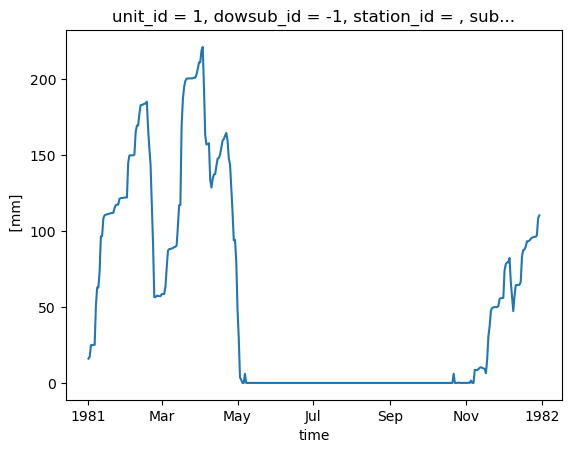
output_config permet aux utilisateurs de spécifier quelles variables sortir. Il est donc facile de récupérer des variables supplémentaires simplement en mettant à jour la configuration et en relançant le modèle.
[22]:
# "Couvert nival" is the snow water equivalent
hm.update_config(output_config={"COUVERT_NIVAL": "1"})
hm.run(overwrite=True, return_streamflow=False)
clear_output(wait=False)
La fonction .get_outputs() peut être utilisée pour récupérer n’importe laquelle de ces variables sous la forme d’un xarray.Dataset.
[23]:
help(hm.get_outputs)
Help on method get_outputs in module xhydro.modelling._hydrotel:

get_outputs(output: str, return_paths: bool = False, **kwargs) -> xr.Dataset | Path | list[Path] method of xhydro.modelling._hydrotel.Hydrotel instance
    Get the outputs of the simulation.

    Parameters
    ----------
    output : str
        "path" to return the output directory.
        Otherwise, the name of the output to retrieve, or "q" for the streamflow.
        This should match the name of the output file without the extension (e.g. "neige" for "neige.nc").
        Wildcards can be used.
    return_paths : bool
        If True, return the path to the output file(s) instead of the dataset. Default is False.
    \*\*kwargs : dict
        Keyword arguments to pass to :py:func:`xarray.open_dataset`.

    Returns
    -------
    xr.Dataset
        The requested output variable.
    Path
        The path to the output directory if output is set to "path".
    list[Path]
        The path to the output file(s) if return_path is True.
[24]:
files = hm.get_outputs("*", return_paths=True)
files
[24]:
[PosixPath('/tmp/tmpww7qb255/hydrotel_demo/simulation/simulation/resultat/couvert_nival.nc'),
 PosixPath('/tmp/tmpww7qb255/hydrotel_demo/simulation/simulation/resultat/debit_aval.nc')]
[25]:
snow = hm.get_outputs("couvert_nival")
snow
[25]:
<xarray.Dataset> Size: 791kB
Dimensions:                  (time: 364, unit_id: 495)
Coordinates: (12/14)
  * time                     (time) datetime64[ns] 3kB 1981-01-01 ... 1981-12-30
  * unit_id                  (unit_id) <U3 6kB '1' '2' '3' ... '493' '494' '495'
    dowsub_id                (unit_id) <U3 6kB dask.array<chunksize=(495,), meta=np.ndarray>
    station_id               (unit_id) <U7 14kB dask.array<chunksize=(495,), meta=np.ndarray>
    subbasin_id              (unit_id) <U3 6kB dask.array<chunksize=(495,), meta=np.ndarray>
    lon                      (unit_id) float64 4kB dask.array<chunksize=(495,), meta=np.ndarray>
    ...                       ...
    unit_centroid_latitude   (unit_id) float64 4kB dask.array<chunksize=(495,), meta=np.ndarray>
    drainage_area            (unit_id) float64 4kB dask.array<chunksize=(495,), meta=np.ndarray>
    subbasin_drainage_area   (unit_id) float64 4kB dask.array<chunksize=(495,), meta=np.ndarray>
    unit_drainage_area       (unit_id) float64 4kB dask.array<chunksize=(495,), meta=np.ndarray>
    subbasin_elevation       (unit_id) float64 4kB dask.array<chunksize=(495,), meta=np.ndarray>
    unit_elevation           (unit_id) float64 4kB dask.array<chunksize=(495,), meta=np.ndarray>
Data variables:
    couvert_nival            (time, unit_id) float32 721kB dask.array<chunksize=(364, 495), meta=np.ndarray>
Attributes:
    description:              Variable de sortie simulation Hydrotel
    creation_time:            17-06-2026 14:02:26
    HYDROTEL_version:         4.3.6.0000
HYDROTEL_config_version: 4.3.1.0000[26]:
snow["couvert_nival"].isel(unit_id=0).plot()
[26]:
[<matplotlib.lines.Line2D at 0x7f70e6e792b0>]
Quelques notes importantes concernant ces sorties supplémentaires :
Il n’y a actuellement aucune standardisation des noms de variables ou de leurs unités.
Dans le but de standardiser les sorties entre différents modèles, les niveaux d’agrégation suivants ont été définis. Ceux-ci sont notés dans un attribut
aggregation_leveldans les métadonnées de la variable, et peuvent être utilisés pour identifier la résolution spatiale de la sortie :ComputationalUnit: Dans HYDROTEL, cela correspond aux Unités Hydrologiques Relativement Homogènes (UHRH).Subbasin: Selon la convention Raven, cela correspond à la zone de drainage immédiatement autour d’un tronçon de rivière, excluant la zone de drainage en amont.DrainageArea: Cela correspond à la zone de drainage totale d’un tronçon de rivière.
À une exception près qui est calculée à l’échelle du sous-bassin (APPORT LATERAL), toutes les sorties supplémentaires dans HYDROTEL sont fournies à l’échelle de l’unité de calcul. La fonction aggregate_outputs a donc été implémentée dans xHydro pour permettre l’agrégation des sorties a posteriori, si nécessaire. Notez que cette fonction repose sur plusieurs propriétés du bassin versant qui sont déduites des fichiers du modèle.
[27]:
help(hm.aggregate_outputs)
Help on method aggregate_outputs in module xhydro.modelling._hydrotel:

aggregate_outputs(
    to: Literal['subbasin', 'drainage_area'],
    subset: list[str] | None = None,
    **kwargs
) -> None method of xhydro.modelling._hydrotel.Hydrotel instance
    Aggregate the model outputs to a different spatial unit. See the Notes section for more details.

    Parameters
    ----------
    to : {"subbasin", "drainage_area"}
        The spatial unit to aggregate to.
    subset : list[str] | None
        The list of variables to aggregate. If None, all variables will be processed.
        The strings should match the names produced by the HYDROTEL model.
    \*\*kwargs : dict
        Keyword arguments to pass to :py:func:`xarray.open_dataset`.

    Returns
    -------
    None
        The aggregated outputs will be saved as new NetCDF files in the output directory, with a name pattern
        roughly following what is produced by HYDROTEL (e.g. "variable}_By{aggregation}.nc").
        Aggregation will be 'BySubbasin' or 'ByDrainageArea', depending on the 'to' parameter.

    Notes
    -----
    Unlike Raven, HYDROTEL always produces output files at the RHHU level, which is the finest spatial unit in the model.
    Therefore, unlike its Raven variant, this method does not need a 'by' parameter to specify the spatial unit of the input files.
    Furthermore, this method expects that the 'standardize_outputs' method has been called beforehand to ensure that the output
    files are in a consistent format and contain the necessary spatial information for the aggregation.
[28]:
hm.aggregate_outputs(to="drainage_area")
[29]:
snow_agg = hm.get_outputs("couvert_nival_ByDrainageArea")
snow_agg
[29]:
<xarray.Dataset> Size: 589kB
Dimensions:        (time: 364, subbasin_id: 196)
Coordinates:
  * time           (time) datetime64[ns] 3kB 1981-01-01 ... 1981-12-30
  * subbasin_id    (subbasin_id) <U3 2kB '1' '2' '3' '4' ... '194' '195' '196'
    dowsub_id      (subbasin_id) <U3 2kB dask.array<chunksize=(196,), meta=np.ndarray>
    station_id     (subbasin_id) <U7 5kB dask.array<chunksize=(196,), meta=np.ndarray>
    lon            (subbasin_id) float64 2kB dask.array<chunksize=(196,), meta=np.ndarray>
    lat            (subbasin_id) float64 2kB dask.array<chunksize=(196,), meta=np.ndarray>
    drainage_area  (subbasin_id) float64 2kB dask.array<chunksize=(196,), meta=np.ndarray>
Data variables:
    couvert_nival  (time, subbasin_id) float64 571kB dask.array<chunksize=(364, 196), meta=np.ndarray>
Attributes:
    description:              Variable de sortie simulation Hydrotel
    creation_time:            17-06-2026 14:02:26
    HYDROTEL_version:         4.3.6.0000
HYDROTEL_config_version: 4.3.1.00004.4. Calage du modèle
AVERTISSEMENT
Seuls les modèles basés sur Raven sont actuellement implémentés