3. Modélisation hydrologique - Raven (modèles distribués)
xHydro propose une collection de fonctions conçues pour faciliter la modélisation hydrologique, en se concentrant sur deux modèles clés : HYDROTEL et une suite de modèles émulés par le Raven Hydrological Framework. Il est important de noter que Raven dispose déjà d’une vaste librairie Python, RavenPy, qui permet aux utilisateurs de construire, calibrer et exécuter des modèles. xHydro encapsule certaines de ces fonctions pour soutenir les évaluations multi-modèles avec HYDROTEL, mais les utilisateurs recherchant des fonctionnalités avancées préféreront utiliser RavenPy directement.
La principale contribution de xHydro à la modélisation hydrologique est donc son support pour HYDROTEL, un modèle qui manquait auparavant d’une librairie Python dédiée. Ce Notebook couvre les modèles RavenPy, mais un Notebook similaire pour HYDROTEL est disponible ici.
3.1. Informations de base
[1]:
from IPython.display import clear_output

import xhydro as xh
import xhydro.modelling as xhm

clear_output(wait=False)
Le cadre de modélisation xHydro est basé sur un dictionnaire model_config, qui est censé contenir toutes les informations nécessaires pour exécuter un modèle hydrologique donné. Par exemple, en fonction du modèle, il peut stocker directement les jeux de données météorologiques, les chemins vers ces jeux de données (fichiers netCDF ou autres), les fichiers de configuration csv, les paramètres, et fondamentalement tout ce qui est nécessaire pour configurer et exécuter un modèle hydrologique.
La liste des entrées requises pour le dictionnaire peut être obtenue de deux façons. La première consiste à regarder la classe du modèle hydrologique, comme xhydro.modelling.RavenpyModel. La seconde consiste à utiliser la fonction xh.modelling.get_hydrological_model_inputs pour obtenir la liste des clés requises pour un modèle donné, ainsi que sa documentation.
[3]:
Help on function get_hydrological_model_inputs in module xhydro.modelling.hydrological_modelling:

get_hydrological_model_inputs(model_name: str, required_only: bool = False) -> tuple[dict, str]
    Get the required inputs for a given hydrological model.

    Parameters
    ----------
    model_name : str
        The name of the hydrological model to use.
        Currently supported models are ["HYDROTEL", "Blended", "GR4JCN", "HBVEC", "HMETS", "HYPR", "Mohyse", "SACSMA"].
    required_only : bool
        If True, only the required inputs will be returned.

    Returns
    -------
    dict
        A dictionary containing the required configuration for the hydrological model.
    str
        The documentation for the hydrological model.
[4]:
# This function can be called to get a list of the keys for a given model, as well as its documentation.
inputs, docs = xhm.get_hydrological_model_inputs("HBVEC", required_only=False)
inputs
[4]:
{'model_name': typing.Literal['Blended', 'GR4JCN', 'HBVEC', 'HMETS', 'HYPR', 'Mohyse', 'SACSMA'] | None,
 'overwrite': bool,
 'workdir': str | os.PathLike | None,
 'executable': str | os.PathLike | None,
 'run_name': str | None,
 'start_date': datetime.datetime | str | None,
 'end_date': datetime.datetime | str | None,
 'parameters': numpy.ndarray | list[float] | None,
 'qobs_file': os.PathLike | str | None,
 'alt_name_flow': str | None,
 'hru': geopandas.geodataframe.GeoDataFrame | dict | os.PathLike | str | None,
 'output_subbasins': typing.Literal['all', 'qobs'] | list[int] | None,
 'minimum_reservoir_area': str | None,
 'meteo_file': os.PathLike | str | None,
 'data_type': list[str] | None,
 'alt_names_meteo': dict | None,
 'meteo_station_properties': dict | None,
 'gridweights': str | os.PathLike | None}
[5]:
print(docs)
Initialize the RavenPy model class.

Parameters
----------
overwrite : bool
    If True, overwrite the existing project files. Default is False.
workdir : str | Path | None
    Path to save the .rv files and model outputs. Default is None, which creates a temporary directory.
executable : str | os.PathLike | None, optional
    Path to the Raven executable, bypassing RavenPy.
    If None (default), the Raven executable from your current Python environment ('raven-hydro') will be used.
run_name : str, optional
    Name of the run, which will be used to name the project files. Defaults to "raven" if not provided.
model_name : {"Blended", "GR4JCN", "HBVEC", "HMETS", "HYPR", "Mohyse", "SACSMA"}, optional
    The name of the RavenPy model to run. Only optional if the project files already exist.
start_date : dt.datetime | str, optional
    The first date of the simulation. Only optional if the project files already exist.
end_date : dt.datetime | str, optional
    The last date of the simulation. Only optional if the project files already exist.
parameters : np.ndarray | list[float], optional
    The model parameters for simulation or calibration. Only optional if the project files already exist.
qobs_file : str | Path, optional
    Path to the file containing the observed streamflow data.
    If there are multiple stations, the file should contain a 'basin_id' variable that identifies the subbasin for each time series.
    If a 'station_id' variable is present, it will be used to identify the station.
alt_name_flow : str, optional
    Name of the streamflow variable in the observed data file. If not provided, it will be assumed to be "q".
hru : gpd.GeoDataFrame | dict | os.PathLike, optional
    A GeoDataFrame, or dictionary containing the HRU properties. Only optional if the project files already exist.
    For distributed models, it should be readable by ravenpy.extractors.BasinMakerExtractor.
    For lumped models, should contain the following variables:
    - area: The watershed drainage area, in km².
    - elevation: The elevation of the watershed, in meters.
    - latitude: The latitude of the watershed centroid.
    - longitude: The longitude of the watershed centroid.
    - HRU_ID: The ID of the HRU (required for gridded data, optional for station data).
    If the meteorological data is gridded, the HRU dataset must also contain a SubId, DowSubId, valid geometry and crs.
    If the input is modified, a new shapefile will be created in the workdir/weights subdirectory.
output_subbasins : {"all", "qobs"} | list[int] | None, optional
    If "all", all subbasins will be outputted. If "qobs", only the subbasins with observed flow will be outputted.
    Leave as None to use the value as defined in the HRU file ('Has_Gauge' column). Only applicable for distributed HBVEC models.
minimum_reservoir_area : str, optional
    Quantified string (e.g. "20 km2") representing the minimum lake area to consider the lake explicitly as a reservoir.
    If not provided, all lakes with the 'HRU_IsLake' column set to 1 in the HRU file will be considered as reservoirs.
    Note that 'reservoirs' in Raven can also refer to natural lakes with weir-like outflows.
    Only applicable for distributed HBVEC models.
meteo_file : str | Path, optional
    Path to the file containing the observed meteorological data. Only optional if the project files already exist.
    The meteorological data can be either station or gridded data. Use the 'xhydro.modelling.format_input' function to ensure the data
    is in the correct format. Unless the input is a single station accompanied by 'meteo_station_properties', the file should contain
    the following coordinates:
    - elevation: The elevation of the station / grid cell, in meters.
    - latitude: The latitude of the station / grid cell centroid.
    - longitude: The longitude of the station / grid cell centroid.
data_type : list[str], optional
    The list of types of data provided to Raven in the meteorological file. Only optional if the project files already exist.
    See https://github.com/CSHS-CWRA/RavenPy/blob/master/src/ravenpy/config/conventions.py for the list of available types.
alt_names_meteo : dict, optional
    A dictionary that allows users to link the names of meteorological variables in their dataset to Raven-compliant names.
    The keys should be the Raven names as listed in the data_type parameter.
meteo_station_properties : dict, optional
    Additional properties of the weather stations providing the meteorological data. Only required if absent from the 'meteo_file'.
    For single stations, the format is {"ALL": {"elevation": elevation, "latitude": latitude, "longitude": longitude}}.
    This has not been tested for multiple stations or gridded data.
gridweights : str | Path | None
    If using gridded meteorological data, path to a text file containing the weights linking the grid cells to the HRUs.
    If None, the weights will be computed using ravenpy.extractors.GridWeightExtractor and saved in a 'weights' subdirectory
    of the project folder, using a "{meteo_file}_vs_{hru_file}_weights.txt" pattern.
\*\*kwargs : dict, optional
    Additional parameters to pass to the RavenPy emulator, to modify the default modules used by a given hydrological model.
    Typical entries include RainSnowFraction, Evaporation, GlobalParameters, etc.
    See https://raven.uwaterloo.ca/Downloads.html for the latest Raven documentation. Currently, model templates are listed in Appendix F.
HYDROTEL et Raven varient en termes d’entrées requises et de fonctions disponibles, mais un effort sera fait pour standardiser les sorties autant que possible. Actuellement, tous les modèles incluent les trois fonctions suivantes :
.run(): Exécute le modèle, reformate les sorties pour être compatibles avec les outils d’analyse dansxHydro, et retourne le débit simulé en tant quexarray.Dataset.La variable de débit sera nommée
qet aura pour unitésm3 s-1.Pour les données 1D (comme les stations hydrométriques), la dimension correspondante dans le jeux de données sera identifiée par l’attribut
cf_role: timeseries_id.
.get_inputs(): Récupère les entrées météorologiques utilisées par le modèle..get_outputs(): Récupère les sorties simulées du modèle.Utilisez
.get_outputs("q")pour obtenir le débit simulé dans unxarray.Dataset.
.standardize_outputs(): Standardise les sorties pour assurer la cohérence entre les différents modèles, facilitant ainsi la comparaison et l’analyse. Cette fonction est utilisée par défaut dans la méthode.run(), mais peut également être appelée séparément si nécessaire.
3.2. Initialisation et exécution d’un modèle calé
Raven nécessite plusieurs fichiers .rv* pour contrôler divers aspects tels que les intrants météorologiques, les caractéristiques du bassin versant, et plus encore. Si le répertoire du projet existe déjà et contient des données, xHydro préparera le modèle pour l’exécution sans écraser les fichiers .rv* existants, à moins que l’argument overwrite ne soit explicitement défini sur True. Pour forcer l’écrasement de ces fichiers, vous pouvez donc soit :
Définir
overwrite=Truedansmodel_configlors de l’instanciation du modèleUtiliser la méthode
.create_rv(overwrite=True)sur le modèle instancié.
Ce Notebook se concentrera sur les modèles RavenPy distribués. Pour les modèles globaux, consultez le Notebook Raven de modélisation globale.
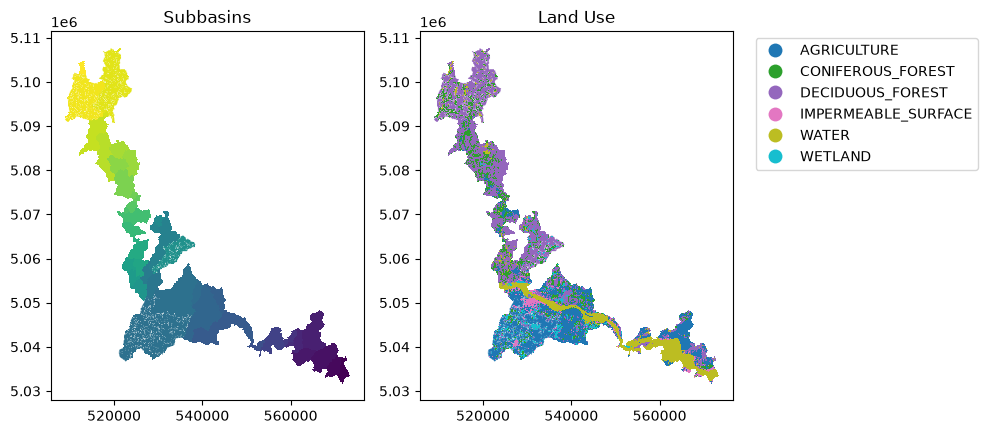
3.2.1. Formatage des données HRU pour les modèles distribués
Raven s’appuie sur les unités de réponse hydrologique (HRU) pour ses calculs. Ceux-ci sont généralement générés à l’aide de l’outil BasinMaker, et plus précisément de sa fonction .Generate_HRUs. Ainsi, les modèles distribués dans xHydro sont actuellement basés sur la structure et la nomenclature des HRU de BasinMaker, et utilisent la classe BasinMakerExtractor de RavenPy pour extraire les attributs nécessaires des HRU à partir d’un shapefile.
De plus, bien que BasinMaker produise des attributs tels que Landuse_ID, ceux-ci ne seront pas transmis au modèle RavenPy. Au lieu de cela, le HRU doit contenir des attributs d’utilisation du sol pertinents qui peuvent être directement mappés aux arguments du modèle hydrologique. Par exemple, pour le modèle HBV-EC, qui est actuellement le seul modèle distribué disponible dans Raven, les attributs suivants sont utilisés à la place : LAND_USE_C, VEG_C, et SOIL_PROF, qui représentent respectivement l’utilisation du sol, la végétation et le profil du sol.
INFO
Par défaut, HBV-EC tel que défini dans RavenPy ne comprend qu’un unique LAND_USE_C (LU_ALL), VEG_C (VEG_ALL), et SOIL_PROF (DEFAULT_P). Si vous souhaitez utiliser différentes classes, vous devrez modifier le dictionnaire model_config pour y inclure les clés pertinentes. Il n’y a actuellement pas de bonne documentation sur la façon de procéder, mais vous pouvez vous référer à la définition de la classe du modèle HBVEC dans ravenpy.config.emulators.hbvec.py.
Par exemple, de nouvelles classes de végétation peuvent être ajoutées en modifiant les clés VegetationClasses et VegetationParameterList avec de nouvelles entrées détaillant toutes les classes de végétation et leurs paramètres. Il en va de même pour les classes d’utilisation du sol et de profil de sol.
[6]:
from pathlib import Path

import geopandas as gpd
import matplotlib.pyplot as plt
import pooch

from xhydro.testing.helpers import (  # In-house function to get data from the xhydro-testdata repo
    deveraux,
)

df = gpd.read_file(
    Path(
        deveraux().fetch(
            "ravenpy/hru_subset.zip",
            pooch.Unzip(),
        )[0]
    ).parents[0]
)

# Plot the subbasins and land use
f, ax = plt.subplots(1, 2, figsize=(10, 10))
df.plot(column="SubId", ax=ax[0])
ax[0].set_title("Subbasins")
df.plot(
    column="LAND_USE_C",
    ax=ax[1],
    legend=True,
    legend_kwds={"bbox_to_anchor": (1.05, 1), "loc": "upper left"},
)
ax[1].set_title("Land Use")
plt.tight_layout()
[7]:
# To keep this example simple, and until cleaner methods are incorporated in xHydro, we will revert to the default HBVEC model configuration.
# This is not recommended for real applications, as you will likely want to modify the model configuration to suit your needs.
df.loc[:, "LAND_USE_C"] = "LU_ALL"
df.loc[:, "VEG_C"] = "VEG_ALL"
df.loc[:, "SOIL_PROF"] = "DEFAULT_P"
3.2.2. Formatage des données météorologiques
INFO
Si vous utilisez plusieurs stations météorologiques, il est recommandé d’ajouter l’argument Interpolation dans model_config ou lors de l’appel à RavenpyModel afin de contrôler l’algorithme d’interpolation. Raven utilise par défaut la méthode du plus proche voisin, mais d’autres options sont disponibles :
INTERP_NEAREST_NEIGHBOR(par défaut) — Méthode du plus proche voisin (Voronoï)INTERP_INVERSE_DISTANCE— Pondération par distance inverseINTERP_INVERSE_DISTANCE_ELEVATION— Pondération par distance inverse avec prise en compte de l’altitudeINTERP_AVERAGE_ALL— Moyenne de toutes les stations spécifiéesINTERP_FROM_FILE [nom_fichier]— Les poids pour chaque station à chaque HRU sont spécifiés dans un fichier externe. Cette méthode devrait fonctionner viaxHydro, mais elle n’a pas encore été entièrement testée.
INFO
xHydro utilise des fonctions de RavenPy pour calculer les poids de chaque cellule de la grille en fonction de la géométrie du HRU.L’acquisition de données météorologiques brutes est couverte dans le Notebook GIS et l”Exemple de cas d’utilisation. Par conséquent, ce Notebook utilisera un jeu de données de test.
[8]:
import xarray as xr

ds = xr.open_zarr(
    Path(
        deveraux().fetch(
            "pmp/CMIP.CCCma.CanESM5.historical.r1i1p1f1.day.gn.zarr.zip",
            pooch.Unzip(),
        )[0]
    ).parents[0]
)
ds_fx = xr.open_zarr(
    Path(
        deveraux().fetch(
            "pmp/CMIP.CCCma.CanESM5.historical.r1i1p1f1.fx.gn.zarr.zip",
            pooch.Unzip(),
        )[0]
    ).parents[0]
)

ds["orog"] = ds_fx["orog"]
ds = ds.drop_vars(["height"])
ds["pr"].attrs = {"units": "mm", "long_name": "precipitation"}
ds = ds[["pr", "tas", "orog"]]
ds
[8]:
<xarray.Dataset> Size: 85kB
Dimensions:  (time: 730, y: 3, x: 3)
Coordinates:
  * time     (time) object 6kB 2010-01-01 12:00:00 ... 2011-12-31 12:00:00
  * y        (y) float64 24B 43.25 46.04 48.84
  * x        (x) float64 24B 281.2 284.1 286.9
Data variables:
    pr       (time, y, x) float64 53kB dask.array<chunksize=(730, 3, 3), meta=np.ndarray>
    tas      (time, y, x) float32 26kB dask.array<chunksize=(730, 3, 3), meta=np.ndarray>
    orog     (y, x) float32 36B dask.array<chunksize=(3, 3), meta=np.ndarray>
Attributes: (12/56)
    CCCma_model_hash:            3dedf95315d603326fde4f5340dc0519d80d10c0
    CCCma_parent_runid:          rc3-pictrl
    CCCma_pycmor_hash:           33c30511acc319a98240633965a04ca99c26427e
    CCCma_runid:                 rc3.1-his01
    Conventions:                 CF-1.7 CMIP-6.2
    YMDH_branch_time_in_child:   1850:01:01:00
    ...                          ...
    title:                       CanESM5 output prepared for CMIP6
    tracking_id:                 hdl:21.14100/d0a84c86-7fb1-4de4-8837-574504c...
    variable_id:                 hus
    variant_label:               r1i1p1f1
    version:                     v20190429
version_id: v20190429Chaque modèle hydrologique a des exigences différentes en ce qui concerne ses données d’entrée. Dans cet exemple, les données ci-dessus présentent plusieurs problèmes qui ne seraient pas compatibles avec les exigences de Raven. Pour référence sur les unités par défaut attendues par Raven, consultez ce lien.
La fonction xh.modelling.format_input peut être utilisée pour reformater les jeux de données conformes aux normes CF pour une utilisation dans les modèles hydrologiques.
[9]:
Help on function format_input in module xhydro.modelling.hydrological_modelling:

format_input(
    ds: xr.Dataset,
    model: str,
    convert_calendar_missing: float | str | dict | bool = nan,
    save_as: str | PathLike | None = None,
    **kwargs
) -> tuple[xr.Dataset, dict]
    Reformat CF-compliant meteorological data for use in hydrological models. See the "Notes" section for important details.

    Parameters
    ----------
    ds : xr.Dataset
        A dataset containing the meteorological data. See the "Notes" section for more information on the expected format.
    model : str
        The name of the hydrological model to use.
        Currently supported models are:
        - "HYDROTEL", "Raven" (which is an alias for all RavenPy models), "Blended", "GR4JCN", "HBVEC", "HMETS", "HYPR", "Mohyse", "SACSMA".
    convert_calendar_missing : float | str | dict | bool, optional
        The value to use for missing values when converting the calendar to "standard".
        If the value is a float, it will be used as the fill value for all variables.
        If the value is a string "interpolate", the new dates will be linearly interpolated over time.
        A dictionary can be used to specify a different fill value for each variable.
        Keys should be the names of the variables as they appear in the first entry in the "variable_name" lists of the "Notes" section.
        If True, temperatures will be interpolated and precipitation will be filled with 0.
        If False, the calendar will not be converted. Only possible for "Raven" models.
    save_as : str, optional
        Where to save the reformatted data. If None, the data will not be saved.
        This can be useful when multiple files are needed for a single model run (e.g. HYDROTEL needs a configuration file).
    \*\*kwargs : dict
        Additional keyword arguments to pass to the save function.

    Returns
    -------
    xr.Dataset
        The reformatted dataset.
    dict
        For HYDROTEL, a dictionary containing the configuration for the meteorological data.
        If `save_as` is provided, the configuration will have been saved to a file with the same name as `save_as`, but with a ".nc.config" extension.
        For Raven, a dictionary containing the 'data_type' and 'alt_names_meteo' keys required for the 'model_config' argument.

    Notes
    -----
    The input dataset should ideally be CF-compliant and follow CMIP6's Controlled Vocabulary, but this function will attempt to detect the
    variables based on the standard_name attribute, the cell_methods attribute, or the variable name.
    More information on those attributes can be found here: https://wcrp-cmip.org/cmip-model-and-experiment-documentation/, and specifically
    the 'CMIP6 MIP table' link provided in the 'Search for variables' section.

    Specifically:

    - If using 1D time series, the station dimension should have an attribute `cf_role` set to "timeseries_id".
    - Units don't need to be canonical, but they should be convertible to the expected units and be understood by `xclim`.
    - Elevation represents the altitude of the meteorological data / model grid cell, not the altitude of the ground.
    - Snowfall units should be in water equivalent of precipitation (e.g. mm/day or kg/m²/s), NOT height (e.g. cm of fresh snow on the ground).
    - The function will try to detect the variables based on the attributes and the variable name. The following attempts will be made:
        - Longitude:
            - standard_name: "longitude"
            - variable name: "longitude", "lon"
        - Latitude:
            - standard_name: "latitude"
            - variable name: "latitude", "lat"
        - Elevation:
            - standard_name: "surface_altitude"
            - variable name: "elevation", "orog", "z", "altitude", "height"
        - Precipitation:
            - standard_name: "*precipitation*" (e.g. "lwe_thickness_of_precipitation_amount")
            - variable name: "pr", "precip", "precipitation"
        - Rainfall:
            - standard_name: "*rainfall*" (e.g. "rainfall_flux", "rainfall_amount")
            - variable name: "prra", "prlp", "rainfall", "rain", "precipitation_rain"
        - Snowfall:
            - standard_name: "*snowfall*" (e.g. "snowfall_flux", "snowfall_amount")
            - variable name: "prsn", "snowfall", "precipitation_snow"
        - Maximum temperature:
            - standard_name: "air_temperature"
            - cell_methods: "time: maximum"
            - variable name: "tasmax", "tmax", "t2m_max", "temperature_max"
        - Minimum temperature:
            - standard_name: "air_temperature"
            - cell_methods: "time: minimum"
            - variable name: "tasmin", "tmin", "t2m_min", "temperature_min"
        - Mean temperature:
            - standard_name: "air_temperature"
            - cell_methods: "time: mean"
            - variable name: "tas", "tmean", "t2m", "temperature_mean"

    HYDROTEL requires the following variables: ["longitude", "latitude", "elevation", "time", "tasmax", "tasmin", "pr"].
    Raven requires the following variables: ["longitude", "latitude", "elevation", "time", "tasmax/tasmin" or "tas", "pr" or "prlp/prsn"].
[10]:
from pathlib import Path
import tempfile
notebook_folder = Path(tempfile.TemporaryDirectory().name)

# You can also use the 'save_as' argument to save the new file(s) in your project folder.
ds_reformatted, config = xh.modelling.format_input(
    ds,
    "HBVEC",
    save_as=notebook_folder / "_data" / "meteo_hmr_distributed.nc",
)
ds_reformatted
/tmp/ipykernel_5449/2541478589.py:6: UserWarning: The calendar 'noleap' needs to be converted to 'standard', but 'convert_calendar_missing' is set to np.nan. NaNs will need to be filled manually before running HYDROTEL or Raven.
/home/docs/checkouts/readthedocs.org/user_builds/xhydro-fr/conda/latest/lib/python3.14/site-packages/clisops/utils/dataset_utils.py:1853: UserWarning: For coordinate variable 'longitude' no bounds can be identified.
[10]:
<xarray.Dataset> Size: 85kB
Dimensions:    (time: 730, latitude: 3, longitude: 3)
Coordinates:
  * time       (time) datetime64[ns] 6kB 2010-01-01T12:00:00 ... 2011-12-31T1...
  * latitude   (latitude) float64 24B 43.25 46.04 48.84
  * longitude  (longitude) float64 24B -78.75 -75.94 -73.12
    elevation  (latitude, longitude) float32 36B dask.array<chunksize=(3, 3), meta=np.ndarray>
Data variables:
    pr         (time, latitude, longitude) float64 53kB dask.array<chunksize=(730, 3, 3), meta=np.ndarray>
    tas        (time, latitude, longitude) float32 26kB dask.array<chunksize=(730, 3, 3), meta=np.ndarray>
Attributes: (12/56)
    CCCma_model_hash:            3dedf95315d603326fde4f5340dc0519d80d10c0
    CCCma_parent_runid:          rc3-pictrl
    CCCma_pycmor_hash:           33c30511acc319a98240633965a04ca99c26427e
    CCCma_runid:                 rc3.1-his01
    Conventions:                 CF-1.7 CMIP-6.2
    YMDH_branch_time_in_child:   1850:01:01:00
    ...                          ...
    title:                       CanESM5 output prepared for CMIP6
    tracking_id:                 hdl:21.14100/d0a84c86-7fb1-4de4-8837-574504c...
    variable_id:                 hus
    variant_label:               r1i1p1f1
    version:                     v20190429
version_id: v20190429Bien que RavenPy ne nécessite pas de fichier de configuration pour accompagner le fichier météorologique, de nombreuses informations doivent être fournies à model_config pour instancier correctement le modèle. Le deuxième résultat de format_input renverra les entrées « meteo_file », « data_type », « alt_names_meteo », et « meteo_station_properties » basées sur le fichier fourni.
[11]:
config
[11]:
{'data_type': ['TEMP_AVE', 'PRECIP'],
 'alt_names_meteo': {'TEMP_AVE': 'tas', 'PRECIP': 'pr'},
 'meteo_file': '/tmp/tmproo2o8hb/_data/meteo_hmr_distributed.nc'}
3.2.3. Initialisation du modèle
model_config, tant qu’elles sont prises en charge par le modèle émulé par Raven. En particulier :La clé
output_subbasinspeut être utilisée pour spécifier quels sous-bassins doivent être inclus dans la sortie.La clé
global_parameterdoit avoir une valeur pourAVG_ANNUAL_RUNOFF, qui est le ruissellement annuel moyen en mm/an (avec une plage de 0-1000 selon la documentation de Raven). Cette valeur est requise pour les modèles distribués.
[12]:
# The HBVEC model has 21 parameters
parameters = [
    -0.15,
    3.5,
    3.0,
    0.07,
    0.4,
    0.8,
    1,
    4.0,
    0.5,
    0.1,
    1,
    5.0,
    4.8,
    0.1,
    1.0,
    22.0,
    0.5,
    0.1,
    0.0,
    1.0,
    1.0,
]

model_config = {
    "model_name": "HBVEC",
    "workdir": notebook_folder / "hbvec_distributed_simulation",
    "parameters": parameters,
    "global_parameter": {
        "AVG_ANNUAL_RUNOFF": 597
    },  # Distributed models require an average annual runoff value at each HRU
    "hru": df,
    "output_subbasins": "all",  # Use "all" to output all subbasins
    "start_date": "2010-01-02",
    "end_date": "2010-12-31",
    "Evaporation": "PET_HARGREAVES",
    **config,
}
Une fois model_config en main, une instance du modèle hydrologique peut être initialisée en utilisant xhydro.modelling.hydrological_model ou directement la classe xhydro.modelling.RavenpyModel.
[13]:
hm = xhm.hydrological_model(model_config)
hm
[13]:
<xhydro.modelling._ravenpy_models.RavenpyModel at 0x742edca941a0>
3.2.4. Validation des données météorologiques
Avant d’exécuter les modèles hydrologiques, quelques vérifications de base seront effectuées automatiquement. Cependant, les utilisateurs peuvent souhaiter effectuer des contrôles de santé plus avancés sur les données météorologiques (par exemple, identifier des valeurs irréalistes). Cela peut être fait en utilisant xhydro.utils.health_checks. Pour la liste complète des contrôles disponibles, consultez la documentation de xscen.
Nous pouvons utiliser .get_inputs() pour récupérer automatiquement les données météorologiques. Dans cet exemple, nous nous assurerons qu’il n’y a pas de valeurs ou de séquences de valeurs météorologiques anormales.
[14]:
health_checks = {
    "raise_on": [],  # If an entry is not here, it will warn the user instead of raising an exception.
    "flags": {
        "pr": {  # You can have specific flags per variable.
            "negative_accumulation_values": {},
            "very_large_precipitation_events": {},
            "outside_n_standard_deviations_of_climatology": {"n": 5},
            "values_repeating_for_n_or_more_days": {"n": 5},
        },
        "tas": {
            "temperature_extremely_low": {},
            "temperature_extremely_high": {},
            "outside_n_standard_deviations_of_climatology": {"n": 5},
            "values_repeating_for_n_or_more_days": {"n": 5},
        },
    },
}
[15]:
from xclim.core.units import amount2rate

with hm.get_inputs() as ds_in:
    ds_in["pr"] = amount2rate(ds_in["pr"])  # Precipitation in xclim needs to be a flux.

    xh.utils.health_checks(ds_in, **health_checks)
3.2.5. Exécution du modèle
Quelques vérifications de base sont effectuées lorsque la fonction .run() est appelée, avant d’exécuter le modèle lui-même. Cependant, comme RavenPy et Raven effectueront eux-mêmes une série de contrôles, ils sont maintenus à un minimum dans xHydro. Si nécessaire, un attribut de la classe, RavenpyModel.executable, peut être utilisé pour pointer vers votre propre exécutable Raven au lieu de celui fourni par la librairie raven-hydro dans l’environnement Python actif.
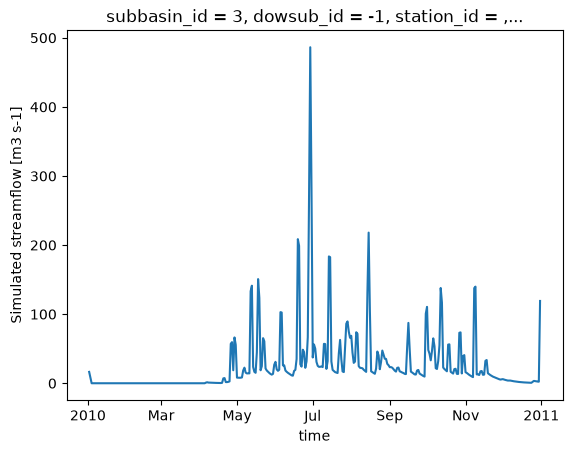
Une fois le modèle exécuté, xHydro reformatera automatiquement le fichier NetCDF pour le rapprocher des conventions CF, assurant ainsi la compatibilité avec les autres modules de xHydro. Notez qu’à ce stade, seule la variable de débit est reformattée, car la modularité de Raven permet une grande variété de sorties, et il n’est pas encore clair comment les standardiser. Cependant, les dimensions et les coordonnées seront standardisées dans tous les fichiers.
[16]:
ds_out = hm.run()
ds_out
[16]:
<xarray.Dataset> Size: 74kB
Dimensions:        (time: 364, subbasin_id: 47)
Coordinates:
  * time           (time) datetime64[ns] 3kB 2010-01-02 ... 2010-12-31
  * subbasin_id    (subbasin_id) <U2 376B '3' '4' '5' '6' ... '47' '48' '49'
    dowsub_id      (subbasin_id) <U2 376B ...
    station_id     (subbasin_id) <U6 1kB ...
    drainage_area  (subbasin_id) float64 376B ...
Data variables:
    q              (time, subbasin_id) float32 68kB ...
Attributes:
    Conventions:      CF-1.6
    featureType:      timeSeries
    history:          Created on 2026-06-19T14:15:02 by Raven 4.12
    description:      Standard Output
    references:       Craig J.R. and the Raven Development Team Raven user's ...
    model_id:         HBVEC
    Raven_version:    4.12
RavenPy_version: 0.21.0[17]:
ds_out.isel(subbasin_id=0)["q"].plot()
[17]:
[<matplotlib.lines.Line2D at 0x742ed5fe82f0>]
3.3. Mise à jour des fichiers rv*
Actuellement, RavenPy ne fournit pas de moyen simple d’ouvrir et de modifier les fichiers Raven .rv*. Par exemple, changer les dates de simulation ou les données météorologiques directement à travers les fichiers n’est pas encore pris en charge. Jusqu’à ce que cette fonctionnalité soit ajoutée, certaines fonctions de base ont été intégrées dans xHydro, mais doivent être utilisées avec précaution.
Les informations de base, telles que start_date, end_date et parameters, sont stockées directement dans la classe RavenpyModel et peuvent être mises à jour manuellement. De même, si des arguments supplémentaires ont été fournis au modèle lors de l’initialisation, ils seront stockés dans un dictionnaire sous RavenpyModel.kwargs, qui peut être consulté et modifié au besoin.
Le débit observé, les caractéristiques de HRU et les données météorologiques sont stockés sous les attributs .qobs, .hru et .meteo respectivement, mais peuvent être beaucoup plus difficiles à mettre à jour, car les commandes RavenPy associées doivent être reconstruites à nouveau. Par conséquent, il est fortement recommandé d’utiliser la méthode .update_data pour mettre à jour ces éléments. Cette fonction fait appel à un sous-ensemble des mêmes arguments utilisés lors de l’initialisation d’un modèle Raven :
[18]:
help(hm.update_data)
Help on method update_data in module xhydro.modelling._ravenpy_models:

update_data(
    *,
    qobs_file: os.PathLike | str | None = None,
    alt_name_flow: str | None = 'q',
    hru: gpd.GeoDataFrame | dict | os.PathLike | str | None = None,
    output_subbasins: Literal['all', 'qobs'] | list[int] | None = None,
    minimum_reservoir_area: str | None = None,
    meteo_file: os.PathLike | str | None = None,
    data_type: list[str] | None = None,
    alt_names_meteo: dict | None = None,
    meteo_station_properties: dict | None = None,
    gridweights: str | os.PathLike | None = None
) method of xhydro.modelling._ravenpy_models.RavenpyModel instance
    Update the model configuration with new observed data (self.qobs), HRU properties (self.hru), or meteorological data (self.meteo).

    Parameters
    ----------
    qobs_file : os.PathLike | str
        Path to the NetCDF file containing the observed streamflow data.
        If there are multiple stations, the file should contain a 'basin_id' variable that identifies the subbasin for each time series.
        If a 'station_id' variable is present, it will be used to identify the station.
    alt_name_flow : str, optional
        Alternative name for the streamflow variable in the observed data.
    hru : gpd.GeoDataFrame | dict | os.PathLike | str
        A GeoDataFrame, or dictionary containing the HRU properties. Alternatively, a path to a shapefile containing the HRU properties.
        For distributed models, it should be readable by ravenpy.extractors.BasinMakerExtractor.
        For lumped models, should contain the following variables:
        - area: The watershed drainage area, in km².
        - elevation: The elevation of the watershed, in meters.
        - latitude: The latitude of the watershed centroid.
        - longitude: The longitude of the watershed centroid.
        - HRU_ID: The ID of the HRU (required for gridded data, optional for station data).
        If the meteorological data is gridded, the HRU dataset must also contain a SubId, DowSubId, valid geometry and crs.
        If the input is modified, a new shapefile will be created in the workdir/weights subdirectory.
    output_subbasins : {"all", "qobs"} | list[int] | None, optional
        If "all", all subbasins will be outputted.
        If "qobs", subbasins with observed flow will be outputted, as defined by the basin IDs in the observed streamflow data.
        If a list of integers is provided, it should contain the basin IDs to output.
        Leave as None to use the value as defined in the HRU file ('Has_Gauge' column).
    minimum_reservoir_area : str, optional
        Quantified string (e.g. "20 km2") representing the minimum lake area to consider the lake explicitly as a reservoir.
        If not provided, all lakes with the 'HRU_IsLake' column set to 1 in the HRU file will be considered as reservoirs.
        Note that 'reservoirs' in Raven can also refer to natural lakes with weir-like outflows.
        Only applicable for distributed HBVEC models.
    meteo_file : str | Path, optional
        Path to the file containing the observed meteorological data. Only optional if the project files already exist.
        The meteorological data can be either station or gridded data. Use the 'xhydro.modelling.format_input' function to ensure the data
        is in the correct format. Unless the input is a single station accompanied by 'meteo_station_properties', the file should contain
        the following coordinates:
        - elevation: The elevation of the station / grid cell, in meters.
        - latitude: The latitude of the station / grid cell centroid.
        - longitude: The longitude of the station / grid cell centroid.
    data_type : list[str], optional
        The list of types of data provided to Raven in the meteorological file. Only optional if the project files already exist.
        See https://github.com/CSHS-CWRA/RavenPy/blob/master/src/ravenpy/config/conventions.py for the list of available types.
    alt_names_meteo : dict, optional
        A dictionary that allows users to link the names of meteorological variables in their dataset to Raven-compliant names.
        The keys should be the Raven names as listed in the data_type parameter.
    meteo_station_properties : dict, optional
        Additional properties of the weather stations providing the meteorological data. Only required if absent from the 'meteo_file'.
        For single stations, the format is {"ALL": {"elevation": elevation, "latitude": latitude, "longitude": longitude}}.
        This has not been tested for multiple stations or gridded data.
    gridweights : str | Path | None
        If using gridded meteorological data, path to a text file containing the weights linking the grid cells to the HRUs.
        If None, the weights will be computed using ravenpy.extractors.GridWeightExtractor and saved in a 'weights' subdirectory
        of the project folder, using a "{meteo_file}_vs_{hru_file}_weights.txt" pattern.

    Notes
    -----
    If the meteorological data is gridded, new weights will be computed using the HRU file in the RavenpyModel instance and saved
    in a 'weights' subdirectory of the project folder, under the name 'meteo-name_vs_hru-name.txt'.
Cette fonction ne mettra à jour que la classe RavenpyModel elle-même, pas les fichiers. Si possible, il est fortement recommandé d’utiliser la fonction create_rv pour écraser les fichiers .rv* existants avec les informations mises à jour.
Si cela n’est pas possible, certains aspects du modèle peuvent tout de même être mis à jour en utilisant la méthode .update_config :
[19]:
help(hm.update_config)
Help on method update_config in module xhydro.modelling._ravenpy_models:

update_config(
    *,
    rvi_dates: bool = False,
    rvi_commands: list[str] | None = None,
    rvt: bool = False,
    rvh: bool = False
) -> None method of xhydro.modelling._ravenpy_models.RavenpyModel instance
    Manually update some aspects of the configuration of the RavenPy model.

    Parameters
    ----------
    rvi_dates : bool
        If True, update the .rvi file with the 'start_date' and 'end_date' defined in the model.
    rvi_commands : list[str] | None
        A list of commands to include in the .rvi file. If None, no additional commands will be added.
        Warning: These commands will be added at the end of the .rvi file, with no checks. Use with caution.
    rvt : bool
        If True, update the .rvt file with the meteorological data and observed streamflow data defined in the model.
    rvh : bool
        If True, update the .rvh file with the list of subbasins to output. Nothing else will be changed in that file.

    Notes
    -----
    Ideally, users should favor using the `update_data` method to update the model configuration, then call the `create_rv`
    method to recreate the project files from scratch. This method assumes that the changes brought to the model configuration
    are minimal, such as wanting to change the meteorological data or the simulation start and end dates.

    Be aware that:
      - The .rvh will be rewritten entirely. If multiple sources of data were mentioned, such as both meteorological and observed streamflow data,
        all of them must be included in the RavenpyModel instance.
      - If the meteorological data is gridded, new weights will be computed using the HRU file in the RavenpyModel instance. If that HRU
        file is different from the one used to create the original .rvh file, it may lead to inconsistencies or errors.
      - Similarly, only the list of subbasins to output will be modified in the new .rvh file. Any additional changes to the HRU or
        other components might also lead to inconsistencies or errors.

    A backup of the original files will be created before any modifications are made.
Soyez très conscient que toutes les mises à jour ne seront pas reflétées dans les fichiers .rv*. Les deux dernières options en particulier doivent être utilisées avec prudence, car les caractéristiques de HRU, telles que les ID de sous-bassin, ne seront pas mises à jour. Si le HRU au sein du modèle a changé, il n’y a actuellement aucun moyen de modifier les fichiers existants. Ils doivent être supprimés et recréés en utilisant la méthode .create_rv().
3.4. Récupération de sorties supplémentaires
Par défaut, Raven produit plusieurs fichiers de sortie en plus du fichier de débit, qui contiennent diverses variables d’état. Cependant, une limitation majeure est que ces fichiers ne couvrent que l’exutoire du bassin versant et non les HRU individuels ou les tronçons de rivière. La commande :CustomOutput peut être utilisée pour spécifier des sorties supplémentaires et leur résolution spatiale. Le moyen le plus simple de les générer est d’utiliser la méthode update_config.
Des informations sur l’utilisation de la commande :CustomOutput peuvent être trouvées dans la documentation de Raven.
[20]:
hm.update_config(
    rvi_commands=[":CustomOutput DAILY CUMULSUM SNOW BY_HRU"]
)
hm.run(overwrite=True, return_streamflow=False)
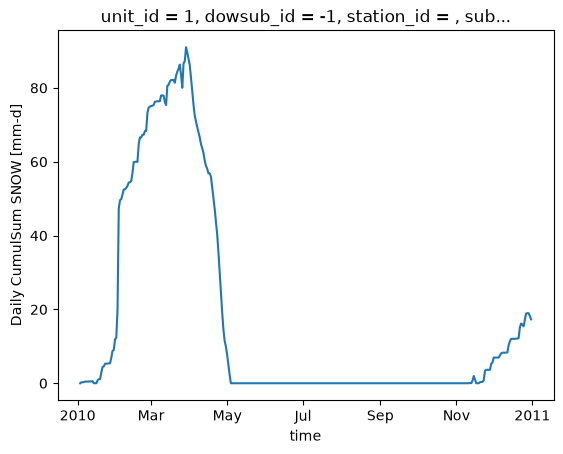
La fonction .get_outputs() peut être utilisée pour récupérer n’importe laquelle de ces variables en tant que xarray.Dataset.
[21]:
help(hm.get_outputs)
Help on method get_outputs in module xhydro.modelling._ravenpy_models:

get_outputs(output: str, return_paths: bool = False, **kwargs) -> xr.Dataset | Path | list[Path] method of xhydro.modelling._ravenpy_models.RavenpyModel instance
    Return the outputs of the Raven model.

    Parameters
    ----------
    output : str
        "path" to return the output directory.
        "q" to only return the streamflow variable.
        Alternatively, a string matching the name of the output file to return (e.g. "Hydrographs", "Storage", "ByHRU", etc.).
        Wildcards can be used.
    return_paths : bool
        If True, return the path to the output file(s) instead of the dataset. Default is False.
    \*\*kwargs : dict
        Keyword arguments to pass to :py:func:`xarray.open_dataset`.

    Returns
    -------
    xr.Dataset
        The requested output variable.
    Path
        The path to the output directory if output is set to "path".
    list[Path]
        The path to the output file(s) if return_path is True.
[22]:
files = hm.get_outputs("*", return_paths=True)
files
[22]:
[PosixPath('/tmp/tmproo2o8hb/hbvec_distributed_simulation/output/raven_WatershedStorage.nc'),
 PosixPath('/tmp/tmproo2o8hb/hbvec_distributed_simulation/output/raven_SNOW_Daily_CumulSum_ByHRU.nc'),
 PosixPath('/tmp/tmproo2o8hb/hbvec_distributed_simulation/output/raven_Hydrographs.nc')]
[23]:
snow = hm.get_outputs("SNOW*")
snow
[23]:
<xarray.Dataset> Size: 265kB
Dimensions:                      (time: 363, unit_id: 166)
Coordinates: (12/14)
  * time                         (time) datetime64[ns] 3kB 2010-01-03 ... 201...
  * unit_id                      (unit_id) <U3 2kB '1' '2' '3' ... '165' '166'
    dowsub_id                    (unit_id) <U2 1kB dask.array<chunksize=(166,), meta=np.ndarray>
    station_id                   (unit_id) <U6 4kB dask.array<chunksize=(166,), meta=np.ndarray>
    subbasin_id                  (unit_id) <U2 1kB dask.array<chunksize=(166,), meta=np.ndarray>
    subbasin_centroid_longitude  (unit_id) float64 1kB dask.array<chunksize=(166,), meta=np.ndarray>
    ...                           ...
    unit_centroid_latitude       (unit_id) float64 1kB dask.array<chunksize=(166,), meta=np.ndarray>
    drainage_area                (unit_id) float64 1kB dask.array<chunksize=(166,), meta=np.ndarray>
    subbasin_drainage_area       (unit_id) float64 1kB dask.array<chunksize=(166,), meta=np.ndarray>
    unit_drainage_area           (unit_id) float64 1kB dask.array<chunksize=(166,), meta=np.ndarray>
    subbasin_elevation           (unit_id) float64 1kB dask.array<chunksize=(166,), meta=np.ndarray>
    unit_elevation               (unit_id) float64 1kB dask.array<chunksize=(166,), meta=np.ndarray>
Data variables:
    CumulSum_SNOW                (time, unit_id) float32 241kB dask.array<chunksize=(1, 166), meta=np.ndarray>
Attributes:
    Conventions:      CF-1.6
    featureType:      timeSeries
    history:          Created on 2026-06-19T14:15:02 by Raven 4.12
    description:      Custom Output
    references:       Craig J.R. and the Raven Development Team Raven user's ...
    model_id:         HBVEC
    Raven_version:    4.12
RavenPy_version: 0.21.0[24]:
snow["CumulSum_SNOW"].isel(unit_id=0).plot()
[24]:
[<matplotlib.lines.Line2D at 0x742ed5e08440>]
Quelques notes importantes concernant l’utilisation de :CustomOutput dans « « xHydro :
En raison de la très grande modularité de ces sorties, il n’y a actuellement aucune standardisation des noms de variables ou de leurs unités.
De plus, certaines de ces variables sont cumulatives, tandis que d’autres ne le sont pas, et il n’y a actuellement aucun moyen de les distinguer automatiquement. Il est donc de la responsabilité de l’utilisateur de s’assurer que les variables sont correctement interprétées.
dans le but de standardiser les sorties entre différents modèles, les niveaux d’agrégation suivants ont été définis. Ceux-ci sont notés dans un attribut
aggregation_leveldans les métadonnées de la variable, et peuvent être utilisés pour identifier la résolution spatiale de la sortie :ComputationalUnit: Dans Raven, cela correspond aux unités de réponse hydrologique (HRU).Subbasin: Suivant la convention de Raven, cela correspond à la zone de drainage immédiate d’un tronçon de rivière, excluant la zone de drainage en amont.DrainageArea: Cela correspond à la zone de drainage totale d’un tronçon de rivière.
La commande CustomOutput permet un contrôle sur la résolution spatiale de la sortie (BY_HRU, BY_SUBBASIN, BY_DRAINAGE_AREA), mais une fonction aggregate_outputs a également été implémentée dans xHydro pour permettre l’agrégation des sorties a posteriori, si nécessaire. Notez que cette fonction repose sur plusieurs propriétés du bassin versant qui sont déduites du shapefile des HRU fourni.La fonction échouera si les caractéristiques des HRU ne suivent pas la structure et la nomenclature de BasinMaker.
[25]:
help(hm.aggregate_outputs)
Help on method aggregate_outputs in module xhydro.modelling._ravenpy_models:

aggregate_outputs(
    by: Literal['hru', 'unit', 'subbasin'],
    to: Literal['subbasin', 'drainage_area'],
    subset: list[str] | None = None,
    **kwargs
) -> None method of xhydro.modelling._ravenpy_models.RavenpyModel instance
    Aggregate the model outputs to a different spatial unit. See the Notes section for more details.

    Parameters
    ----------
    by : {"hru", "unit", "subbasin"}
        The spatial unit to aggregate from.
        "unit" is the generic term for "hru".
    to : {"subbasin", "drainage_area"}
        The spatial unit to aggregate to.
    subset : list[str] | None
        The list of variables to aggregate. If None, all variables will be processed.
        The strings should match the names produced by the Raven model, typically found under ":CustomOutput" in the .rvi file.
    \*\*kwargs : dict
        Keyword arguments to pass to :py:func:`xarray.open_dataset`.

    Returns
    -------
    None
        The aggregated outputs will be saved as new NetCDF files in the output directory, with a name pattern
        following what is produced by the Raven model (e.g. "{run_name}_variable}_By{aggregation}.nc").
        Aggregation will be 'ByHRU', 'BySubbasin', or 'ByDrainageArea', depending on the 'to' parameter.
        If a file with the same name already exists, a new file will be saved with a "_v{n}" suffix.

    Notes
    -----
    This method expects that relevant spatial information has been provided to the RavenPy model, either through the initial configuration or
    through the `update_data` method. Furthermore, that spatial information should be consistent with ravenpy.extractors.BasinMakerExtractor
    expectations, as well as the Data Specifications of Basin Maker (https://hydrology.uwaterloo.ca/basinmaker/) and the outputs of
    BasinMaker's `Generate_HRUs` function. In particular, the following variables should be present in the HRU file:

    - Always:
        - SubId: The ID of the subbasins.
        - BasArea: The area of the subbasins.
    - by == "hru":
        - HRU_ID: The ID of the HRUs.
        - HRU_Area: The area of the HRUs, in units consistent with the area of the subbasins.
    - to == "drainage_area":
        - DowSubId: The ID of the downstream subbasin for each HRU.
[26]:
hm.aggregate_outputs(by="hru", to="drainage_area")
[27]:
snow_agg = hm.get_outputs("SNOW*Drainage*")
snow_agg
[27]:
<xarray.Dataset> Size: 142kB
Dimensions:        (time: 363, subbasin_id: 47)
Coordinates:
  * time           (time) datetime64[ns] 3kB 2010-01-03 ... 2010-12-31
  * subbasin_id    (subbasin_id) <U2 376B '3' '4' '5' '6' ... '47' '48' '49'
    dowsub_id      (subbasin_id) <U2 376B dask.array<chunksize=(47,), meta=np.ndarray>
    station_id     (subbasin_id) <U6 1kB dask.array<chunksize=(47,), meta=np.ndarray>
    drainage_area  (subbasin_id) float64 376B dask.array<chunksize=(47,), meta=np.ndarray>
Data variables:
    CumulSum_SNOW  (time, subbasin_id) float64 136kB dask.array<chunksize=(363, 47), meta=np.ndarray>
Attributes:
    Conventions:      CF-1.6
    featureType:      timeSeries
    history:          Created on 2026-06-19T14:15:02 by Raven 4.12
    description:      Custom Output
    references:       Craig J.R. and the Raven Development Team Raven user's ...
    model_id:         HBVEC
    Raven_version:    4.12
RavenPy_version: 0.21.03.5. Calage du modèle
Le calage des modèles distribués n’est pas encore pris en charge par xHydro si plusieurs stations hydrométriques sont utilisées. Les utilisateurs sont encouragés à utiliser directement la librairie RavenPy à cette fin. Pour le calage à une station unique, xHydro peut être utilisé. Consultez la documentation de RavenPy pour les modèles globaux pour plus de détails.