2. Modélisation hydrologique - Raven (modèles globaux)
xHydro propose une collection de fonctions conçues pour faciliter la modélisation hydrologique, en se concentrant sur deux modèles clés : HYDROTEL et une suite de modèles émulés par le Raven Hydrological Framework. Il est important de noter que Raven dispose déjà d’une vaste librairie Python, RavenPy, qui permet aux utilisateurs de construire, calibrer et exécuter des modèles. xHydro encapsule certaines de ces fonctions pour soutenir les évaluations multi-modèles avec HYDROTEL, mais les utilisateurs recherchant des fonctionnalités avancées préféreront utiliser RavenPy directement.
La principale contribution de xHydro à la modélisation hydrologique est donc son support pour HYDROTEL, un modèle qui manquait auparavant d’une librairie Python dédiée. Ce Notebook couvre les modèles RavenPy, mais un Notebook similaire pour HYDROTEL est disponible ici.
2.1. Informations de base
[1]:
from IPython.display import clear_output

import xhydro as xh
import xhydro.modelling as xhm

clear_output(wait=False)
Le cadre de modélisation xHydro est basé sur un dictionnaire model_config, qui est censé contenir toutes les informations nécessaires pour exécuter un modèle hydrologique donné. Par exemple, en fonction du modèle, il peut stocker directement les jeux de données météorologiques, les chemins vers ces jeux de données (fichiers netCDF ou autres), les fichiers de configuration csv, les paramètres, et fondamentalement tout ce qui est nécessaire pour configurer et exécuter un modèle hydrologique.
La liste des entrées requises pour le dictionnaire peut être obtenue de deux façons. La première consiste à regarder la classe du modèle hydrologique, comme xhydro.modelling.RavenpyModel. La seconde consiste à utiliser la fonction xh.modelling.get_hydrological_model_inputs pour obtenir la liste des clés requises pour un modèle donné, ainsi que sa documentation.
[3]:
Help on function get_hydrological_model_inputs in module xhydro.modelling.hydrological_modelling:

get_hydrological_model_inputs(model_name: str, required_only: bool = False) -> tuple[dict, str]
    Get the required inputs for a given hydrological model.

    Parameters
    ----------
    model_name : str
        The name of the hydrological model to use.
        Currently supported models are ["HYDROTEL", "Blended", "GR4JCN", "HBVEC", "HMETS", "HYPR", "Mohyse", "SACSMA"].
    required_only : bool
        If True, only the required inputs will be returned.

    Returns
    -------
    dict
        A dictionary containing the required configuration for the hydrological model.
    str
        The documentation for the hydrological model.
[4]:
# This function can be called to get a list of the keys for a given model, as well as its documentation.
inputs, docs = xhm.get_hydrological_model_inputs("GR4JCN", required_only=False)
inputs
[4]:
{'model_name': typing.Literal['Blended', 'GR4JCN', 'HBVEC', 'HMETS', 'HYPR', 'Mohyse', 'SACSMA'] | None,
 'overwrite': bool,
 'workdir': str | os.PathLike | None,
 'executable': str | os.PathLike | None,
 'run_name': str | None,
 'start_date': datetime.datetime | str | None,
 'end_date': datetime.datetime | str | None,
 'parameters': numpy.ndarray | list[float] | None,
 'qobs_file': os.PathLike | str | None,
 'alt_name_flow': str | None,
 'hru': geopandas.geodataframe.GeoDataFrame | dict | os.PathLike | str | None,
 'output_subbasins': typing.Literal['all', 'qobs'] | list[int] | None,
 'minimum_reservoir_area': str | None,
 'meteo_file': os.PathLike | str | None,
 'data_type': list[str] | None,
 'alt_names_meteo': dict | None,
 'meteo_station_properties': dict | None,
 'gridweights': str | os.PathLike | None}
[5]:
print(docs)
Initialize the RavenPy model class.

Parameters
----------
overwrite : bool
    If True, overwrite the existing project files. Default is False.
workdir : str | Path | None
    Path to save the .rv files and model outputs. Default is None, which creates a temporary directory.
executable : str | os.PathLike | None, optional
    Path to the Raven executable, bypassing RavenPy.
    If None (default), the Raven executable from your current Python environment ('raven-hydro') will be used.
run_name : str, optional
    Name of the run, which will be used to name the project files. Defaults to "raven" if not provided.
model_name : {"Blended", "GR4JCN", "HBVEC", "HMETS", "HYPR", "Mohyse", "SACSMA"}, optional
    The name of the RavenPy model to run. Only optional if the project files already exist.
start_date : dt.datetime | str, optional
    The first date of the simulation. Only optional if the project files already exist.
end_date : dt.datetime | str, optional
    The last date of the simulation. Only optional if the project files already exist.
parameters : np.ndarray | list[float], optional
    The model parameters for simulation or calibration. Only optional if the project files already exist.
qobs_file : str | Path, optional
    Path to the file containing the observed streamflow data.
    If there are multiple stations, the file should contain a 'basin_id' variable that identifies the subbasin for each time series.
    If a 'station_id' variable is present, it will be used to identify the station.
alt_name_flow : str, optional
    Name of the streamflow variable in the observed data file. If not provided, it will be assumed to be "q".
hru : gpd.GeoDataFrame | dict | os.PathLike, optional
    A GeoDataFrame, or dictionary containing the HRU properties. Only optional if the project files already exist.
    For distributed models, it should be readable by ravenpy.extractors.BasinMakerExtractor.
    For lumped models, should contain the following variables:
    - area: The watershed drainage area, in km².
    - elevation: The elevation of the watershed, in meters.
    - latitude: The latitude of the watershed centroid.
    - longitude: The longitude of the watershed centroid.
    - HRU_ID: The ID of the HRU (required for gridded data, optional for station data).
    If the meteorological data is gridded, the HRU dataset must also contain a SubId, DowSubId, valid geometry and crs.
    If the input is modified, a new shapefile will be created in the workdir/weights subdirectory.
output_subbasins : {"all", "qobs"} | list[int] | None, optional
    If "all", all subbasins will be outputted. If "qobs", only the subbasins with observed flow will be outputted.
    Leave as None to use the value as defined in the HRU file ('Has_Gauge' column). Only applicable for distributed HBVEC models.
minimum_reservoir_area : str, optional
    Quantified string (e.g. "20 km2") representing the minimum lake area to consider the lake explicitly as a reservoir.
    If not provided, all lakes with the 'HRU_IsLake' column set to 1 in the HRU file will be considered as reservoirs.
    Note that 'reservoirs' in Raven can also refer to natural lakes with weir-like outflows.
    Only applicable for distributed HBVEC models.
meteo_file : str | Path, optional
    Path to the file containing the observed meteorological data. Only optional if the project files already exist.
    The meteorological data can be either station or gridded data. Use the 'xhydro.modelling.format_input' function to ensure the data
    is in the correct format. Unless the input is a single station accompanied by 'meteo_station_properties', the file should contain
    the following coordinates:
    - elevation: The elevation of the station / grid cell, in meters.
    - latitude: The latitude of the station / grid cell centroid.
    - longitude: The longitude of the station / grid cell centroid.
data_type : list[str], optional
    The list of types of data provided to Raven in the meteorological file. Only optional if the project files already exist.
    See https://github.com/CSHS-CWRA/RavenPy/blob/master/src/ravenpy/config/conventions.py for the list of available types.
alt_names_meteo : dict, optional
    A dictionary that allows users to link the names of meteorological variables in their dataset to Raven-compliant names.
    The keys should be the Raven names as listed in the data_type parameter.
meteo_station_properties : dict, optional
    Additional properties of the weather stations providing the meteorological data. Only required if absent from the 'meteo_file'.
    For single stations, the format is {"ALL": {"elevation": elevation, "latitude": latitude, "longitude": longitude}}.
    This has not been tested for multiple stations or gridded data.
gridweights : str | Path | None
    If using gridded meteorological data, path to a text file containing the weights linking the grid cells to the HRUs.
    If None, the weights will be computed using ravenpy.extractors.GridWeightExtractor and saved in a 'weights' subdirectory
    of the project folder, using a "{meteo_file}_vs_{hru_file}_weights.txt" pattern.
\*\*kwargs : dict, optional
    Additional parameters to pass to the RavenPy emulator, to modify the default modules used by a given hydrological model.
    Typical entries include RainSnowFraction, Evaporation, GlobalParameters, etc.
    See https://raven.uwaterloo.ca/Downloads.html for the latest Raven documentation. Currently, model templates are listed in Appendix F.
HYDROTEL et Raven varient en termes d’entrées requises et de fonctions disponibles, mais un effort sera fait pour standardiser les sorties autant que possible. Actuellement, tous les modèles incluent les trois fonctions suivantes :
.run(): Exécute le modèle, reformate les sorties pour être compatibles avec les outils d’analyse dansxHydro, et retourne le débit simulé en tant quexarray.Dataset.La variable de débit sera nommée
qet aura pour unitésm3 s-1.Pour les données 1D (comme les stations hydrométriques), la dimension correspondante dans le jeux de données sera identifiée par l’attribut
cf_role: timeseries_id.
.get_inputs(): Récupère les entrées météorologiques utilisées par le modèle..get_outputs(): Récupère les sorties simulées du modèle.Utilisez
.get_outputs("q")pour obtenir le débit simulé dans unxarray.Dataset.
.standardize_outputs(): Standardise les sorties pour assurer la cohérence entre les différents modèles, facilitant ainsi la comparaison et l’analyse. Cette fonction est utilisée par défaut dans la méthode.run(), mais peut également être appelée séparément si nécessaire.
2.2. Initialisation et exécution d’un modèle calé
Raven nécessite plusieurs fichiers .rv* pour contrôler divers aspects tels que les intrants météorologiques, les caractéristiques du bassin versant, et plus encore. Si le répertoire du projet existe déjà et contient des données, xHydro préparera le modèle pour l’exécution sans écraser les fichiers .rv* existants, à moins que l’argument overwrite ne soit explicitement défini sur True. Pour forcer l’écrasement de ces fichiers, vous pouvez donc soit :
Définir
overwrite=Truedansmodel_configlors de l’instanciation du modèleUtiliser la méthode
.create_rv(overwrite=True)sur le modèle instancié.
Ce Notebook se concentrera sur les modèles RavenPy globaux. Pour les modèles distribués, consultez le Notebook de modélisation Raven distribuée.
2.2.1. Acquisition des données HRU
Raven repose sur les Unités de Réponse Hydrologique (HRU) pour ses simulations hydrologiques. Pour les modèles globaux, un seul HRU peut être utilisé à la fois.
Si vous utilisez des données météorologiques basées sur des stations, les attributs requis pour la HRU sont minimaux :
area: Superficie de drainage du bassin versant (km²)elevation: Altitude du bassin versant (m)latitude: Latitude du centroïde du bassin versantlongitude: Longitude du centroïde du bassin versant
Si vous utilisez des données météorologiques sur grille, des attributs supplémentaires sont requis, mais xHydro utilisera des valeurs par défaut pour ceux qui ne sont pas fournis (sauf pour la géométrie) :
HRU_ID: Identifiant unique de la HRU (défini à1pour les modèles globaux)SubId: Identifiant du sous-bassin (défini à1pour les modèles globaux)DowSubId: Identifiant du sous-bassin en aval (défini à-1pour les modèles globaux)Une géométrie valide et un système de référence de coordonnées (
crs)
Les HRU peuvent être représentés sous forme de geopandas.GeoDataFrame ou de dict Python. Pour faciliter la création des HRU, vous pouvez utiliser la fonction xhydro.gis.watershed_to_raven_hru, qui extraira les informations nécessaires à partir des fonctions décrites dans le Notebook GIS.
[6]:
Help on function watershed_to_raven_hru in module xhydro.gis:

watershed_to_raven_hru(
    watershed: gpd.GeoDataFrame | tuple | str | os.PathLike,
    *,
    unique_id: str | None = None,
    projected_crs: int | str | None = 'NAD83',
    **kwargs
) -> gpd.GeoDataFrame
    Extract the necessary properties for Raven hydrological models.

    Parameters
    ----------
    watershed : gpd.GeoDataFrame | tuple | str | Path
        The input, which is either:
        - A gpd.GeoDataFrame containing watershed polygons with a defined .crs attribute.
        - The path to such a gpd.GeoDataFrame.
        - Coordinates (longitude, latitude) for the location from where watershed delineation will be conducted.
    unique_id : str, optional
        The column name in the GeoDataFrame that serves as a unique identifier.
        Ignored if the input is a coordinate tuple.
    projected_crs : int | str
        The projected coordinate reference system (crs) to utilize for calculations, such as determining watershed area.
        If a string is provided, it should be a valid Geodetic CRS for the `gpd.estimate_utm_crs()` method.
        If None, the function will use the `gpd.estimate_utm_crs()` default (WGS 84).
        Default is an estimated CRS based on NAD83.
    \*\*kwargs : dict
        Additional keyword arguments passed to the `surface_properties` function.

    Returns
    -------
    gpd.GeoDataFrame
        Output GeoDataFrame containing the watershed properties required for Raven hydrological models.

    Notes
    -----
    Gridded meteorological data in RavenPy requires the `SubId` and `DowSubId` columns to be set, but this cannot currently be
    automatically calculated. Therefore, the function sets `SubId` to 1 and `DowSubId` to -1 by default, which is
    correct for lumped hydrological models, but will not be appropriate for distributed models. Until this is fixed, only a
    single watershed can be delineated.

    Furthermore, still for gridded meteorological data, RavenPy requires a shapefile with a valid geometry. Until a method
    is implemented to convert the geometry to something valid in xarray, the function will only return GeoDataFrames.
[7]:
hru = xh.gis.watershed_to_raven_hru((-72.0873547526953, 46.000456612402))
hru
/home/rondeau/projets/xhydro/src/xhydro/gis.py:201: UserWarning: Geometry is in a geographic CRS. Results from 'centroid' are likely incorrect. Use 'GeoSeries.to_crs()' to re-project geometries to a projected CRS before this operation.

/home/rondeau/projets/xhydro/src/xhydro/gis.py:202: UserWarning: Geometry is in a geographic CRS. Results from 'centroid' are likely incorrect. Use 'GeoSeries.to_crs()' to re-project geometries to a projected CRS before this operation.
[7]:
| HRU_ID | area | latitude | longitude | elevation | SubId | DowSubId | geometry | |
|---|---|---|---|---|---|---|---|---|
| 0 | 7120384690 | 755.976896 | 45.948568 | -71.801471 | 275.822235 | 1 | -1 | POLYGON ((-71.60638 45.77973, -71.61029 45.782... |
2.2.2. Formatage des données météorologiques
INFO
Si vous utilisez plusieurs stations météorologiques, il est recommandé d’ajouter l’argument Interpolation dans model_config ou lors de l’appel à RavenpyModel afin de contrôler l’algorithme d’interpolation. Raven utilise par défaut la méthode du plus proche voisin, mais d’autres options sont disponibles :
INTERP_NEAREST_NEIGHBOR(par défaut) — Méthode du plus proche voisin (Voronoï)INTERP_INVERSE_DISTANCE— Pondération par distance inverseINTERP_INVERSE_DISTANCE_ELEVATION— Pondération par distance inverse avec prise en compte de l’altitudeINTERP_AVERAGE_ALL— Moyenne de toutes les stations spécifiéesINTERP_FROM_FILE [nom_fichier]— Les poids pour chaque station à chaque HRU sont spécifiés dans un fichier externe. Cette méthode devrait fonctionner viaxHydro, mais elle n’a pas encore été entièrement testée.
INFO
xHydro utilise des fonctions de RavenPy pour calculer les poids de chaque cellule de la grille en fonction de la géométrie du HRU.L’acquisition de données météorologiques brutes est couverte dans le Notebook GIS et l”Exemple de cas d’utilisation. Par conséquent, ce Notebook utilisera un jeu de données de test.
[8]:
import xarray as xr

from xhydro.testing.helpers import (  # In-house function to get data from the xhydro-testdata repo
    deveraux,
)

D = deveraux()

meteo_file = D.fetch("ravenpy/ERA5_Riviere_Rouge_global.nc")
ds = xr.open_dataset(meteo_file)

# Add spatial information
ds = ds.assign_coords({"altitude": 450, "lat": 46, "lon": -72})
ds["altitude"].attrs["units"] = "m"
ds["lat"].attrs["units"] = "degrees_north"
ds["lon"].attrs["units"] = "degrees_east"
ds
[8]:
<xarray.Dataset> Size: 132kB
Dimensions:   (time: 6576)
Coordinates:
  * time      (time) datetime64[ns] 53kB 1981-12-31 1982-01-01 ... 2000-01-01
    altitude  int64 8B 450
    lat       int64 8B 46
    lon       int64 8B -72
Data variables:
    tmin      (time) float32 26kB ...
    tmax      (time) float32 26kB ...
    pr        (time) float32 26kB ...
Attributes: (12/31)
    GRIB_NV:                                  0
    GRIB_Nx:                                  1440
    GRIB_Ny:                                  721
    GRIB_cfName:                              unknown
    GRIB_cfVarName:                           t2m
    GRIB_dataType:                            an
    ...                                       ...
    GRIB_typeOfLevel:                         surface
    GRIB_units:                               degC
    long_name:                                2 metre temperature
    standard_name:                            unknown
    units:                                    degC
grid_mapping: crsChaque modèle hydrologique a des exigences différentes en ce qui concerne leurs données d’entrée. Dans cet exemple, les variables ont des unités (températures en degC et précipitations en mm) qui seraient compatibles avec les exigences de Raven, mais ce n’est pas toujours le cas. Pour référence sur les unités par défaut attendues par Raven, consultez ce lien. De plus, les informations spatiales que nous avons ajoutées manquent d’attributs ou de noms qui permettraient à RavenPy de les reconnaître.
La fonction xh.modelling.format_input peut être utilisée pour reformater les jeux de données conformes aux normes CF pour une utilisation dans les modèles hydrologiques.
[9]:
Help on function format_input in module xhydro.modelling.hydrological_modelling:

format_input(
    ds: xr.Dataset,
    model: str,
    convert_calendar_missing: float | str | dict | bool = nan,
    save_as: str | PathLike | None = None,
    **kwargs
) -> tuple[xr.Dataset, dict]
    Reformat CF-compliant meteorological data for use in hydrological models. See the "Notes" section for important details.

    Parameters
    ----------
    ds : xr.Dataset
        A dataset containing the meteorological data. See the "Notes" section for more information on the expected format.
    model : str
        The name of the hydrological model to use.
        Currently supported models are:
        - "HYDROTEL", "Raven" (which is an alias for all RavenPy models), "Blended", "GR4JCN", "HBVEC", "HMETS", "HYPR", "Mohyse", "SACSMA".
    convert_calendar_missing : float | str | dict | bool, optional
        The value to use for missing values when converting the calendar to "standard".
        If the value is a float, it will be used as the fill value for all variables.
        If the value is a string "interpolate", the new dates will be linearly interpolated over time.
        A dictionary can be used to specify a different fill value for each variable.
        Keys should be the names of the variables as they appear in the first entry in the "variable_name" lists of the "Notes" section.
        If True, temperatures will be interpolated and precipitation will be filled with 0.
        If False, the calendar will not be converted. Only possible for "Raven" models.
    save_as : str, optional
        Where to save the reformatted data. If None, the data will not be saved.
        This can be useful when multiple files are needed for a single model run (e.g. HYDROTEL needs a configuration file).
    \*\*kwargs : dict
        Additional keyword arguments to pass to the save function.

    Returns
    -------
    xr.Dataset
        The reformatted dataset.
    dict
        For HYDROTEL, a dictionary containing the configuration for the meteorological data.
        If `save_as` is provided, the configuration will have been saved to a file with the same name as `save_as`, but with a ".nc.config" extension.
        For Raven, a dictionary containing the 'data_type' and 'alt_names_meteo' keys required for the 'model_config' argument.

    Notes
    -----
    The input dataset should ideally be CF-compliant and follow CMIP6's Controlled Vocabulary, but this function will attempt to detect the
    variables based on the standard_name attribute, the cell_methods attribute, or the variable name.
    More information on those attributes can be found here: https://wcrp-cmip.org/cmip-model-and-experiment-documentation/, and specifically
    the 'CMIP6 MIP table' link provided in the 'Search for variables' section.

    Specifically:

    - If using 1D time series, the station dimension should have an attribute `cf_role` set to "timeseries_id".
    - Units don't need to be canonical, but they should be convertible to the expected units and be understood by `xclim`.
    - Elevation represents the altitude of the meteorological data / model grid cell, not the altitude of the ground.
    - Snowfall units should be in water equivalent of precipitation (e.g. mm/day or kg/m²/s), NOT height (e.g. cm of fresh snow on the ground).
    - The function will try to detect the variables based on the attributes and the variable name. The following attempts will be made:
        - Longitude:
            - standard_name: "longitude"
            - variable name: "longitude", "lon"
        - Latitude:
            - standard_name: "latitude"
            - variable name: "latitude", "lat"
        - Elevation:
            - standard_name: "surface_altitude"
            - variable name: "elevation", "orog", "z", "altitude", "height"
        - Precipitation:
            - standard_name: "*precipitation*" (e.g. "lwe_thickness_of_precipitation_amount")
            - variable name: "pr", "precip", "precipitation"
        - Rainfall:
            - standard_name: "*rainfall*" (e.g. "rainfall_flux", "rainfall_amount")
            - variable name: "prra", "prlp", "rainfall", "rain", "precipitation_rain"
        - Snowfall:
            - standard_name: "*snowfall*" (e.g. "snowfall_flux", "snowfall_amount")
            - variable name: "prsn", "snowfall", "precipitation_snow"
        - Maximum temperature:
            - standard_name: "air_temperature"
            - cell_methods: "time: maximum"
            - variable name: "tasmax", "tmax", "t2m_max", "temperature_max"
        - Minimum temperature:
            - standard_name: "air_temperature"
            - cell_methods: "time: minimum"
            - variable name: "tasmin", "tmin", "t2m_min", "temperature_min"
        - Mean temperature:
            - standard_name: "air_temperature"
            - cell_methods: "time: mean"
            - variable name: "tas", "tmean", "t2m", "temperature_mean"

    HYDROTEL requires the following variables: ["longitude", "latitude", "elevation", "time", "tasmax", "tasmin", "pr"].
    Raven requires the following variables: ["longitude", "latitude", "elevation", "time", "tasmax/tasmin" or "tas", "pr" or "prlp/prsn"].
[10]:
from pathlib import Path
import tempfile
notebook_folder = Path(tempfile.TemporaryDirectory().name)

# You can also use the 'save_as' argument to save the new file(s) in your project folder.
ds_reformatted, config = xh.modelling.format_input(
    ds,
    "GR4JCN",
    save_as=notebook_folder / "_data" / "meteo_hmr.nc",
)
ds_reformatted
/exec/rondeau/.conda/envs/xhydro-20260609/lib/python3.14/site-packages/clisops/utils/dataset_utils.py:1772: UserWarning: For coordinate variable 'longitude' no bounds can be identified.
[10]:
<xarray.Dataset> Size: 132kB
Dimensions:     (station_id: 1, time: 6576)
Coordinates:
  * station_id  (station_id) <U1 4B '0'
    elevation   (station_id) int64 8B 450
    latitude    (station_id) int64 8B 46
    longitude   (station_id) int64 8B -72
  * time        (time) datetime64[ns] 53kB 1981-12-31 1982-01-01 ... 2000-01-01
Data variables:
    tasmin      (station_id, time) float32 26kB -14.84 -6.52 ... -26.85 -15.48
    tasmax      (station_id, time) float32 26kB -5.316 -0.0699 ... -14.92 -15.48
    pr          (station_id, time) float32 26kB 0.3767 9.103 ... 0.07919 0.01176
Attributes: (12/31)
    GRIB_NV:                                  0
    GRIB_Nx:                                  1440
    GRIB_Ny:                                  721
    GRIB_cfName:                              unknown
    GRIB_cfVarName:                           t2m
    GRIB_dataType:                            an
    ...                                       ...
    GRIB_typeOfLevel:                         surface
    GRIB_units:                               degC
    long_name:                                2 metre temperature
    standard_name:                            unknown
    units:                                    degC
grid_mapping: crsBien que RavenPy ne nécessite pas de fichier de configuration pour accompagner le fichier météorologique, de nombreuses informations doivent être fournies à model_config pour instancier correctement le modèle. Le deuxième résultat de format_input renverra les entrées « meteo_file », « data_type », « alt_names_meteo », et « meteo_station_properties » basées sur le fichier fourni.
[11]:
config
[11]:
{'data_type': ['TEMP_MAX', 'TEMP_MIN', 'PRECIP'],
 'alt_names_meteo': {'TEMP_MAX': 'tasmax',
  'TEMP_MIN': 'tasmin',
  'PRECIP': 'pr'},
 'meteo_file': '/tmp/tmpb89hve51/_data/meteo_hmr.nc'}
2.2.3. Initialisation du modèle
model_config, tant qu’elles sont prises en charge par le modèle Raven émulé.Dans l’exemple ci-dessous, les algorithmes RainSnowFraction et Evaporation sont personnalisés, remplaçant les valeurs par défaut utilisées par le modèle GR4JCN.
[12]:
model_config = {
    "model_name": "GR4JCN",
    "workdir": notebook_folder / "gr4jcn_simulation",
    "parameters": [
        0.529,
        -3.396,
        407.29,
        1.072,
        16.9,
        0.947,
    ],  # GR4JCN has 6 parameters, others might have more
    "global_parameter": {"AVG_ANNUAL_SNOW": 100.00},
    "hru": hru,
    "start_date": "1990-01-01",
    "end_date": "1991-12-31",
    "RainSnowFraction": "RAINSNOW_DINGMAN",
    "Evaporation": "PET_HARGREAVES_1985",
    **config,
}
Une fois model_config en main, une instance du modèle hydrologique peut être initialisée en utilisant xhydro.modelling.hydrological_model ou directement la classe xhydro.modelling.RavenpyModel.
[13]:
hm = xhm.hydrological_model(model_config)
hm
[13]:
<xhydro.modelling._ravenpy_models.RavenpyModel at 0x7fa3c4604ec0>
2.2.4. Validation des données météorologiques
Avant d’exécuter les modèles hydrologiques, quelques vérifications de base seront effectuées automatiquement. Cependant, les utilisateurs peuvent souhaiter effectuer des contrôles de santé plus avancés sur les données météorologiques (par exemple, identifier des valeurs irréalistes). Cela peut être fait en utilisant xhydro.utils.health_checks. Pour la liste complète des contrôles disponibles, consultez la documentation de xscen.
Nous pouvons utiliser .get_inputs() pour récupérer automatiquement les données météorologiques. Dans cet exemple, nous nous assurerons qu’il n’y a pas de valeurs ou de séquences de valeurs météorologiques anormales.
[14]:
health_checks = {
    "raise_on": [],  # If an entry is not here, it will warn the user instead of raising an exception.
    "flags": {
        "pr": {  # You can have specific flags per variable.
            "negative_accumulation_values": {},
            "very_large_precipitation_events": {},
            "outside_n_standard_deviations_of_climatology": {"n": 5},
            "values_repeating_for_n_or_more_days": {"n": 5},
        },
        "tasmax": {
            "tasmax_below_tasmin": {},
            "temperature_extremely_low": {},
            "temperature_extremely_high": {},
            "outside_n_standard_deviations_of_climatology": {"n": 5},
            "values_repeating_for_n_or_more_days": {"n": 5},
        },
        "tasmin": {
            "temperature_extremely_low": {},
            "temperature_extremely_high": {},
            "outside_n_standard_deviations_of_climatology": {"n": 5},
            "values_repeating_for_n_or_more_days": {"n": 5},
        },
    },
}
[15]:
from xclim.core.units import amount2rate

with hm.get_inputs() as ds_in:
    ds_in["pr"] = amount2rate(ds_in["pr"])  # Precipitation in xclim needs to be a flux.

    xh.utils.health_checks(ds_in, **health_checks)
/exec/rondeau/.conda/envs/xhydro-20260609/lib/python3.14/site-packages/xscen/diagnostics.py:294: UserWarning: The following health checks failed:
  - 'pr' has suspicious values according to the following flags: ['outside_5_standard_deviations_of_climatology', 'values_repeating_for_5_or_more_days'].
2.2.5. Exécution du modèle
Quelques vérifications de base sont effectuées lorsque la fonction .run() est appelée, avant d’exécuter le modèle lui-même. Cependant, comme RavenPy et Raven effectueront eux-mêmes une série de contrôles, ils sont maintenus à un minimum dans xHydro. Si nécessaire, un attribut de la classe, RavenpyModel.executable, peut être utilisé pour pointer vers votre propre exécutable Raven au lieu de celui fourni par la librairie raven-hydro dans l’environnement Python actif.
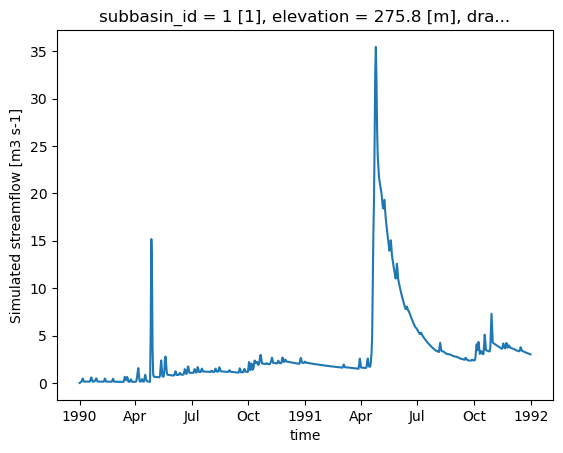
Une fois le modèle exécuté, xHydro reformatera automatiquement le fichier NetCDF pour le rapprocher des conventions CF, assurant ainsi la compatibilité avec les autres modules de xHydro. Notez qu’à ce stade, seule la variable de débit est reformattée, car la modularité de Raven permet une grande variété de sorties, et il n’est pas encore clair comment standardiser toutes ces sorties. Cependant, les dimensions et les coordonnées seront standardisées dans tous les fichiers.
[16]:
ds_out = hm.run()
ds_out
[16]:
<xarray.Dataset> Size: 9kB
Dimensions:             (time: 730)
Coordinates:
  * time                (time) datetime64[ns] 6kB 1990-01-01 ... 1991-12-31
    subbasin_id         <U1 4B ...
    elevation           float32 4B ...
    drainage_area       float64 8B ...
    centroid_longitude  float64 8B ...
    centroid_latitude   float64 8B ...
Data variables:
    q                   (time) float32 3kB ...
Attributes:
    Conventions:      CF-1.6
    featureType:      timeSeries
    history:          Created on 2026-06-17T14:00:52 by Raven 4.12
    description:      Standard Output
    references:       Craig J.R. and the Raven Development Team Raven user's ...
    model_id:         GR4JCN
    Raven_version:    4.12
RavenPy_version: 0.21.0[17]:
ds_out["q"].plot()
[17]:
[<matplotlib.lines.Line2D at 0x7fa35cfda120>]
2.2.6. Récupération de sorties supplémentaires
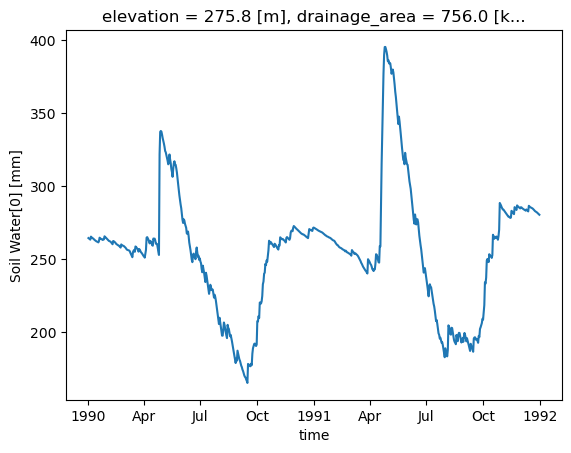
Par défaut, Raven produit plusieurs fichiers de sortie en plus du fichier de débit, qui contiennent diverses variables d’état. La fonction .get_outputs() peut être utilisée pour récupérer n’importe laquelle de ces variables dans un xarray.Dataset.
[18]:
help(hm.get_outputs)
Help on method get_outputs in module xhydro.modelling._ravenpy_models:

get_outputs(output: str, return_paths: bool = False, **kwargs) -> xr.Dataset | Path | list[Path] method of xhydro.modelling._ravenpy_models.RavenpyModel instance
    Return the outputs of the Raven model.

    Parameters
    ----------
    output : str
        "path" to return the output directory.
        "q" to only return the streamflow variable.
        Alternatively, a string matching the name of the output file to return (e.g. "Hydrographs", "Storage", "ByHRU", etc.).
        Wildcards can be used.
    return_paths : bool
        If True, return the path to the output file(s) instead of the dataset. Default is False.
    \*\*kwargs : dict
        Keyword arguments to pass to :py:func:`xarray.open_dataset`.

    Returns
    -------
    xr.Dataset
        The requested output variable.
    Path
        The path to the output directory if output is set to "path".
    list[Path]
        The path to the output file(s) if return_path is True.
[19]:
files = hm.get_outputs("*", return_paths=True)
files
[19]:
[PosixPath('/tmp/tmpb89hve51/gr4jcn_simulation/output/raven_Hydrographs.nc'),
 PosixPath('/tmp/tmpb89hve51/gr4jcn_simulation/output/raven_WatershedStorage.nc')]
[20]:
storage = hm.get_outputs("WatershedStorage")
storage
[20]:
<xarray.Dataset> Size: 61kB
Dimensions:                    (time: 730)
Coordinates:
  * time                       (time) datetime64[ns] 6kB 1990-01-01 ... 1991-...
    elevation                  float32 4B ...
    drainage_area              float64 8B ...
    centroid_longitude         float64 8B ...
    centroid_latitude          float64 8B ...
Data variables: (12/19)
    rainfall                   (time) float32 3kB dask.array<chunksize=(730,), meta=np.ndarray>
    snowfall                   (time) float32 3kB dask.array<chunksize=(730,), meta=np.ndarray>
    channel_storage            (time) float32 3kB dask.array<chunksize=(730,), meta=np.ndarray>
    reservoir_storage          (time) float32 3kB dask.array<chunksize=(730,), meta=np.ndarray>
    rivulet_storage            (time) float32 3kB dask.array<chunksize=(730,), meta=np.ndarray>
    Surface Water              (time) float32 3kB dask.array<chunksize=(730,), meta=np.ndarray>
    ...                         ...
    Convolution Storage[0]     (time) float32 3kB dask.array<chunksize=(730,), meta=np.ndarray>
    Convolution Storage[1]     (time) float32 3kB dask.array<chunksize=(730,), meta=np.ndarray>
    total                      (time) float32 3kB dask.array<chunksize=(730,), meta=np.ndarray>
    cum_input                  (time) float32 3kB dask.array<chunksize=(730,), meta=np.ndarray>
    cum_outflow                (time) float32 3kB dask.array<chunksize=(730,), meta=np.ndarray>
    MB_error                   (time) float32 3kB dask.array<chunksize=(730,), meta=np.ndarray>
Attributes:
    Conventions:      CF-1.6
    featureType:      timeSeries
    history:          Created on 2026-06-17T14:00:52 by Raven 4.12
    description:      Standard Output
    references:       Craig J.R. and the Raven Development Team Raven user's ...
    model_id:         GR4JCN
    Raven_version:    4.12
RavenPy_version: 0.21.0[21]:
storage["Soil Water[0]"].plot()
[21]:
[<matplotlib.lines.Line2D at 0x7fa35cfd7e00>]
2.3. Mise à jour des fichiers rv*
Actuellement, RavenPy ne fournit pas de moyen simple d’ouvrir et de modifier les fichiers Raven .rv*. Par exemple, changer les dates de simulation ou les données météorologiques directement à travers les fichiers n’est pas encore pris en charge. Jusqu’à ce que cette fonctionnalité soit ajoutée, certaines fonctions de base ont été intégrées dans xHydro, mais doivent être utilisées avec précaution.
Les informations de base, telles que start_date, end_date et parameters, sont stockées directement dans la classe RavenpyModel et peuvent être mises à jour manuellement. De même, si des arguments supplémentaires ont été fournis au modèle lors de l’initialisation, ils seront stockés dans un dictionnaire sous RavenpyModel.kwargs, qui peut être consulté et modifié au besoin.
Le débit observé, les caractéristiques de HRU et les données météorologiques sont stockés sous les attributs .qobs, .hru et .meteo respectivement, mais peuvent être beaucoup plus difficiles à mettre à jour, car les commandes RavenPy associées doivent être reconstruites à nouveau. Par conséquent, il est fortement recommandé d’utiliser la méthode .update_data pour mettre à jour ces éléments. Cette fonction fait appel à un sous-ensemble des mêmes arguments utilisés lors de l’initialisation d’un modèle Raven :
[22]:
help(hm.update_data)
Help on method update_data in module xhydro.modelling._ravenpy_models:

update_data(
    *,
    qobs_file: os.PathLike | str | None = None,
    alt_name_flow: str | None = 'q',
    hru: gpd.GeoDataFrame | dict | os.PathLike | str | None = None,
    output_subbasins: Literal['all', 'qobs'] | list[int] | None = None,
    minimum_reservoir_area: str | None = None,
    meteo_file: os.PathLike | str | None = None,
    data_type: list[str] | None = None,
    alt_names_meteo: dict | None = None,
    meteo_station_properties: dict | None = None,
    gridweights: str | os.PathLike | None = None
) method of xhydro.modelling._ravenpy_models.RavenpyModel instance
    Update the model configuration with new observed data (self.qobs), HRU properties (self.hru), or meteorological data (self.meteo).

    Parameters
    ----------
    qobs_file : os.PathLike | str
        Path to the NetCDF file containing the observed streamflow data.
        If there are multiple stations, the file should contain a 'basin_id' variable that identifies the subbasin for each time series.
        If a 'station_id' variable is present, it will be used to identify the station.
    alt_name_flow : str, optional
        Alternative name for the streamflow variable in the observed data.
    hru : gpd.GeoDataFrame | dict | os.PathLike | str
        A GeoDataFrame, or dictionary containing the HRU properties. Alternatively, a path to a shapefile containing the HRU properties.
        For distributed models, it should be readable by ravenpy.extractors.BasinMakerExtractor.
        For lumped models, should contain the following variables:
        - area: The watershed drainage area, in km².
        - elevation: The elevation of the watershed, in meters.
        - latitude: The latitude of the watershed centroid.
        - longitude: The longitude of the watershed centroid.
        - HRU_ID: The ID of the HRU (required for gridded data, optional for station data).
        If the meteorological data is gridded, the HRU dataset must also contain a SubId, DowSubId, valid geometry and crs.
        If the input is modified, a new shapefile will be created in the workdir/weights subdirectory.
    output_subbasins : {"all", "qobs"} | list[int] | None, optional
        If "all", all subbasins will be outputted.
        If "qobs", subbasins with observed flow will be outputted, as defined by the basin IDs in the observed streamflow data.
        If a list of integers is provided, it should contain the basin IDs to output.
        Leave as None to use the value as defined in the HRU file ('Has_Gauge' column).
    minimum_reservoir_area : str, optional
        Quantified string (e.g. "20 km2") representing the minimum lake area to consider the lake explicitly as a reservoir.
        If not provided, all lakes with the 'HRU_IsLake' column set to 1 in the HRU file will be considered as reservoirs.
        Note that 'reservoirs' in Raven can also refer to natural lakes with weir-like outflows.
        Only applicable for distributed HBVEC models.
    meteo_file : str | Path, optional
        Path to the file containing the observed meteorological data. Only optional if the project files already exist.
        The meteorological data can be either station or gridded data. Use the 'xhydro.modelling.format_input' function to ensure the data
        is in the correct format. Unless the input is a single station accompanied by 'meteo_station_properties', the file should contain
        the following coordinates:
        - elevation: The elevation of the station / grid cell, in meters.
        - latitude: The latitude of the station / grid cell centroid.
        - longitude: The longitude of the station / grid cell centroid.
    data_type : list[str], optional
        The list of types of data provided to Raven in the meteorological file. Only optional if the project files already exist.
        See https://github.com/CSHS-CWRA/RavenPy/blob/master/src/ravenpy/config/conventions.py for the list of available types.
    alt_names_meteo : dict, optional
        A dictionary that allows users to link the names of meteorological variables in their dataset to Raven-compliant names.
        The keys should be the Raven names as listed in the data_type parameter.
    meteo_station_properties : dict, optional
        Additional properties of the weather stations providing the meteorological data. Only required if absent from the 'meteo_file'.
        For single stations, the format is {"ALL": {"elevation": elevation, "latitude": latitude, "longitude": longitude}}.
        This has not been tested for multiple stations or gridded data.
    gridweights : str | Path | None
        If using gridded meteorological data, path to a text file containing the weights linking the grid cells to the HRUs.
        If None, the weights will be computed using ravenpy.extractors.GridWeightExtractor and saved in a 'weights' subdirectory
        of the project folder, using a "{meteo_file}_vs_{hru_file}_weights.txt" pattern.

    Notes
    -----
    If the meteorological data is gridded, new weights will be computed using the HRU file in the RavenpyModel instance and saved
    in a 'weights' subdirectory of the project folder, under the name 'meteo-name_vs_hru-name.txt'.
Cette fonction ne mettra à jour que la classe RavenpyModel elle-même, pas les fichiers. Si possible, il est fortement recommandé d’utiliser la fonction create_rv pour écraser les fichiers .rv* existants avec les informations mises à jour.
Si cela n’est pas possible, certains aspects du modèle peuvent tout de même être mis à jour en utilisant la méthode .update_config :
[23]:
help(hm.update_config)
Help on method update_config in module xhydro.modelling._ravenpy_models:

update_config(
    *,
    rvi_dates: bool = False,
    rvi_commands: list[str] | None = None,
    rvt: bool = False,
    rvh: bool = False
) -> None method of xhydro.modelling._ravenpy_models.RavenpyModel instance
    Manually update some aspects of the configuration of the RavenPy model.

    Parameters
    ----------
    rvi_dates : bool
        If True, update the .rvi file with the 'start_date' and 'end_date' defined in the model.
    rvi_commands : list[str] | None
        A list of commands to include in the .rvi file. If None, no additional commands will be added.
        Warning: These commands will be added at the end of the .rvi file, with no checks. Use with caution.
    rvt : bool
        If True, update the .rvt file with the meteorological data and observed streamflow data defined in the model.
    rvh : bool
        If True, update the .rvh file with the list of subbasins to output. Nothing else will be changed in that file.

    Notes
    -----
    Ideally, users should favor using the `update_data` method to update the model configuration, then call the `create_rv`
    method to recreate the project files from scratch. This method assumes that the changes brought to the model configuration
    are minimal, such as wanting to change the meteorological data or the simulation start and end dates.

    Be aware that:
      - The .rvh will be rewritten entirely. If multiple sources of data were mentioned, such as both meteorological and observed streamflow data,
        all of them must be included in the RavenpyModel instance.
      - If the meteorological data is gridded, new weights will be computed using the HRU file in the RavenpyModel instance. If that HRU
        file is different from the one used to create the original .rvh file, it may lead to inconsistencies or errors.
      - Similarly, only the list of subbasins to output will be modified in the new .rvh file. Any additional changes to the HRU or
        other components might also lead to inconsistencies or errors.

    A backup of the original files will be created before any modifications are made.
Soyez très conscient que toutes les mises à jour ne seront pas reflétées dans les fichiers .rv*. Les deux dernières options en particulier doivent être utilisées avec prudence, car les caractéristiques de HRU, telles que les ID de sous-bassin, ne seront pas mises à jour. Si le HRU au sein du modèle a changé, il n’y a actuellement aucun moyen de modifier les fichiers existants. Ils doivent être supprimés et recréés en utilisant la méthode .create_rv().
2.4. Calage du modèle
Lors de la création d’un modèle à partir de zéro, une étape de calage est nécessaire pour trouver l’ensemble optimal de paramètres. Le calage du modèle implique une boucle de plusieurs itérations, où : les paramètres du modèle sont sélectionnés, le modèle est exécuté, et les résultats sont comparés aux données observées. Dans xHydro, la fonction de calage utilise SPOTPY pour réaliser le processus d’optimisation.
La fonction de calage utilise toujours le dictionnaire model_config créé précédemment, mais maintenant au sein de la fonction xh.modelling.perform_calibration.
[24]:
Help on function perform_calibration in module xhydro.modelling.calibration:

perform_calibration(
    model_config: dict,
    obj_func: str,
    bounds_high: np.ndarray | list[float | int],
    bounds_low: np.ndarray | list[float | int],
    evaluations: int,
    qobs: os.PathLike | np.ndarray | xr.Dataset | xr.DataArray,
    algorithm: str = 'DDS',
    mask: np.ndarray | list[float | int] | None = None,
    transform: str | None = None,
    epsilon: float = 0.01,
    sampler_kwargs: dict | None = None
)
    Perform calibration using SPOTPY.

    This is the entrypoint for the model calibration. After setting-up the
    model_config object and other arguments, calling "perform_calibration" will
    return the optimal parameter set, objective function value and simulated
    flows on the calibration period.

    Parameters
    ----------
    model_config : dict
        The model configuration object that contains all info to run the model.
        The model function called to run this model should always use this object and read-in data it requires.
        It will be up to the user to provide the data that the model requires.
    obj_func : str
        The objective function used for calibrating. Can be any one of these:

            - "abs_bias": Absolute value of the "bias" metric
            - "abs_pbias": Absolute value of the "pbias" metric
            - "abs_volume_error": Absolute value of the volume_error metric
            - "agreement_index": Index of agreement
            - "correlation_coeff": Correlation coefficient
            - "high_flow_rel_error": High flow relative error
            - "kge": Kling Gupta Efficiency metric (2009 version)
            - "kge_mod": Kling Gupta Efficiency metric (2012 version)
            - "kge_2021": Kling Gupta Efficiency metric (2021 version)
            - "lce": Least-squares combined efficiency
            - "low_flow_rel_error": Low flow relative error
            - "mae": Mean Absolute Error metric
            - "mare": Mean Absolute Relative Error metric
            - "mse": Mean Square Error metric
            - "nse": Nash-Sutcliffe Efficiency metric
            - "persistence_index": Persistence index
            - "r2": r-squared, i.e. square of correlation_coeff.
            - "rmse": Root Mean Square Error
            - "rrmse": Relative Root Mean Square Error (RMSE-to-mean ratio)
            - "rsr": Ratio of RMSE to standard deviation.
            - "volumetric_efficiency": Volumetric efficiency

    bounds_high : np.array
        High bounds for the model parameters to be calibrated. SPOTPY will sample parameter sets from
        within these bounds. The size must be equal to the number of parameters to calibrate.
    bounds_low : np.array
        Low bounds for the model parameters to be calibrated. SPOTPY will sample parameter sets from
        within these bounds. The size must be equal to the number of parameters to calibrate.
    evaluations : int
        Maximum number of model evaluations (calibration budget) to perform before stopping the calibration process.
    qobs : os.PathLike or np.ndarray or xr.Dataset or xr.DataArray
        Observed streamflow dataset (or path to it), used to compute the objective function.
        If using a dataset, it must contain a "streamflow" variable.
    algorithm : str
        The optimization algorithm to use. Currently, "DDS" and "SCEUA" are available, but more can be easily added.
    mask : np.array, optional
        A vector indicating which values to preserve/remove from the objective function computation. 0=remove, 1=preserve.
    transform : str, optional
        The method to transform streamflow prior to computing the objective function. Can be one of:
        Square root ('sqrt'), inverse ('inv'), or logarithmic ('log') transformation.
    epsilon : scalar float
        Used to add a small delta to observations for log and inverse transforms, to eliminate errors
        caused by zero flow days (1/0 and log(0)). The added perturbation is equal to the mean observed streamflow
        times this value of epsilon.
    sampler_kwargs : dict
        Contains the keywords and hyperparameter values for the optimization algorithm.
        Keywords depend on the algorithm choice. Currently, SCEUA and DDS are supported with
        the following default values:
        - SCEUA: dict(ngs=7, kstop=3, peps=0.1, pcento=0.1)
        - DDS: dict(trials=1)

    Returns
    -------
    best_parameters : array_like
        The optimized parameter set.
    qsim : xr.Dataset
        Simulated streamflow using the optimized parameter set.
    bestobjf : float
        The best objective function value.
Nous pouvons préparer les arguments supplémentaires nécessaires à la fonction de calibration. Un bon processus de calibration doit toujours exclure certaines données du calcul de la fonction objectif, afin de garantir une période de validation indépendante. Cela peut être réalisé en utilisant l’argument mask, qui utilise un array de 0 et 1.
Cet exemple n’utilisera que 10 évaluations pour réduire le temps de calcul, mais un calage réel devrait reposer sur au moins 500 itérations avec des modèles simples tels que GR4JCN.
[25]:
qobs_file = D.fetch("ravenpy/Debit_Riviere_Rouge.nc")
ds_obs = xr.open_dataset(qobs_file)

# Reformat the data
ds_obs = ds_obs.rename({"qobs": "q"}).sel(time=slice("1990", "1991"))

# Create the mask
mask = xr.where(ds_obs.time.dt.year.isin([1990]), 0, 1)
[26]:
# Parameter bounds for GR4JCN
bounds_low = [0.01, -15.0, 10.0, 0.0, 1.0, 0.0]
bounds_high = [2.5, 10.0, 700.0, 7.0, 30.0, 1.0]
[27]:
model_config["overwrite"] = True

# Run the calibration
best_parameters, best_simulation, best_objfun = xhm.perform_calibration(
    model_config,
    obj_func="kge",
    bounds_low=bounds_low,
    bounds_high=bounds_high,
    qobs=ds_obs,
    evaluations=10,
    algorithm="DDS",
    mask=mask,
    sampler_kwargs={"trials": 1},
)
Initializing the  Dynamically Dimensioned Search (DDS) algorithm  with  10  repetitions
The objective function will be maximized
Starting the DDS algorithm with 10 repetitions...
Finding best starting point for trial 1 using 5 random samples.
Initialize database...
['csv', 'hdf5', 'ram', 'sql', 'custom', 'noData']
5 of 10, maximal objective function=-0.296356, time remaining: 00:00:02
10 of 10, maximal objective function=-0.169388, time remaining: 00:00:00
Best solution found has obj function value of -0.1693876335191944 at 5


*** Final SPOTPY summary ***
Total Duration: 4.82 seconds
Total Repetitions: 10
Maximal objective value: -0.169388
Corresponding parameter setting:
param0: 0.01
param1: 7.93733
param2: 445.208
param3: 5.5979
param4: 19.8371
param5: 0.51721
******************************

Best parameter set:
param0=0.01, param1=7.937330262196863, param2=445.207562129456, param3=5.597901919406624, param4=19.837146090020553, param5=0.5172101669888751
Run number 9 has the highest objectivefunction with: -0.1694
[28]:
# The first output corresponds to the best set of parameters
best_parameters
[28]:
[np.float64(0.01),
 np.float64(7.937330262196863),
 np.float64(445.207562129456),
 np.float64(5.597901919406624),
 np.float64(19.837146090020553),
 np.float64(0.5172101669888751)]
[29]:
# The second output corresponds to the timeseries for the best set of parameters
best_simulation
[29]:
<xarray.Dataset> Size: 9kB
Dimensions:             (time: 730)
Coordinates:
  * time                (time) datetime64[ns] 6kB 1990-01-01 ... 1991-12-31
    subbasin_id         <U1 4B ...
    elevation           float32 4B ...
    drainage_area       float64 8B ...
    centroid_longitude  float64 8B ...
    centroid_latitude   float64 8B ...
Data variables:
    q                   (time) float32 3kB ...
Attributes:
    Conventions:      CF-1.6
    featureType:      timeSeries
    history:          Created on 2026-06-17T14:01:00 by Raven 4.12
    description:      Standard Output
    references:       Craig J.R. and the Raven Development Team Raven user's ...
    model_id:         GR4JCN
    Raven_version:    4.12
RavenPy_version: 0.21.0[30]:
# The second output is the value of the objective function for the best set of parameters
best_objfun
[30]:
np.float64(-0.1693876335191944)